Are you a team member in a veterinary practice?
Are you a pet parent planning a trip with your furry pal?
Real Time Form Validation: A Friendly Guide for Pet Travel
You're six fields into an international pet health certificate when the form suddenly marks the microchip number in red. The family is waiting, the flight date is getting closer, and for a moment it feels like the paperwork has decided to bite back.
Then you notice the message: “Enter the microchip number using the required format.” You check the record, remove one extra space, and the warning disappears. The form wasn't scolding you. It was giving you a chance to fix a small problem before it became a larger one.
That's the useful idea behind real time form validation. Instead of waiting until someone clicks Submit, the form responds while the person is working. In pet travel, that response matters because a wrong date, missing field, or mismatched identifier can create extra work when a family and its pet are already preparing for an important journey.
The Moment a Form Fights Back
A small warning can prevent a larger scramble
A clinic manager may enter the destination, owner details, pet name, and travel date before reaching the microchip field. She types the number from the patient record, tabs away, and sees a warning appear beside the field.
Her first reaction is understandable. Did the system reject the pet? Is the registry unavailable? Has the destination rule changed? A good message answers those questions without adding drama. “Use the 15-digit microchip number shown in the patient record” is far more useful than a red outline with no explanation.
The manager compares the number, spots a missing digit, and corrects it. The field changes to a neutral or positive state. She can continue without completing the entire certificate, reaching the end, and then hunting through a long page for the problem.
The friendly version of validation: “You're close. Here's the small thing to check.”
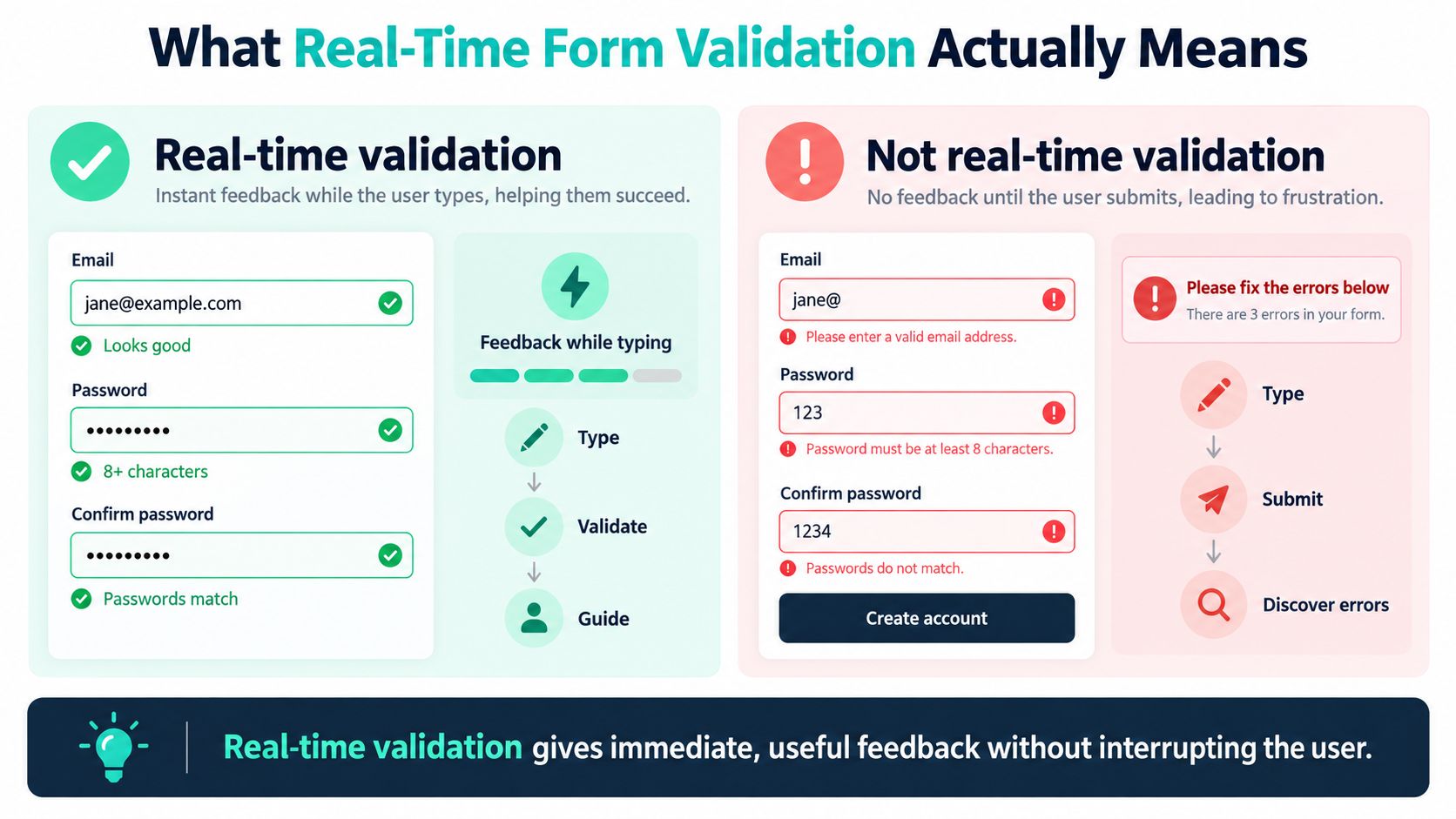
That exchange captures the difference between a form that merely stores information and one that helps people enter it correctly. Real time form validation is feedback shown during form completion, often after a field loses focus, changes, or pauses briefly during typing. On-submit validation waits until the person finishes and sends the whole form.
The timing is especially important in international pet travel. A microchip number, vaccination date, destination, or certificate type may affect what happens next. Early feedback can keep the person oriented, but it must be calm and specific. A flashing icon or unexplained red field can create more confusion than the original mistake.
There's no magic trick here, and no form can replace careful review. The point is simpler: the system should help people catch understandable errors while those errors are still easy to fix. The rest of this guide explains what that feedback is doing, when it helps, and how to make it behave well in high-stakes pet travel paperwork.
What Real Time Form Validation Actually Means
Real time form validation is inline feedback that appears as a person fills in a field. The trigger might be a field losing focus, a value changing, or a short pause after typing. The form evaluates the input and tells the user whether it looks acceptable, needs a correction, or needs more information.
On-submit validation follows a different rhythm. The user completes the form, selects Submit, and then receives a list of problems. That approach can still be useful, especially as a final safety check, but it makes the person discover mistakes later. A hybrid approach uses both methods, offering gentle field-level guidance during entry and a complete review when the form is submitted.
A simple analogy helps. On-submit validation is like a teacher grading a finished test. You learn what went wrong after answering every question. Real time validation is like a coach nearby, offering a small correction between questions. The coach shouldn't grab the pencil or interrupt every second. The value comes from choosing the right moment.
Most real time systems provide three kinds of signals:
Error states: The input doesn't match a known requirement, such as an incomplete identifier.
Success states: The value passes the available check, such as a correctly structured date.
Neutral hints: The form explains the expected format before the user makes a mistake.
The message should sit close to the field and explain the next action. “Enter the date as day, month, and year” gives the user a path forward. “Invalid value” leaves the user guessing.
For additional examples of useful wording, form validation messages can help teams compare vague alerts with messages that tell users what to change.
Real time validation doesn't replace the final submit check. A form still needs to review required fields, related values, current server rules, and anything that changed after the user began. Inline feedback is the guide during the journey. Submit-time validation is the last gate before the information moves forward.
When Real Time Feedback Helps and When It Hurts
Timing decides whether validation feels helpful or hostile. A warning that appears after a person finishes a field can guide them. A warning that appears after every keystroke may interrupt their thinking, especially when the value is incomplete by design.
The accessible pattern is usually to validate after meaningful interaction, such as when a user leaves the field, or after a short pause. Guidance also recommends using a polite live region for in-progress updates and stronger alert-style messaging for final submission failures, with a debounce of 300 to 500 milliseconds suggested by accessibility guidance to reduce interruptions while typing (Modern Framework Accessibility guidance).
Why every keystroke can be too much
Consider a microchip number. The first few digits are incomplete, but that doesn't necessarily mean the user has made a mistake. If the form announces “invalid” after every character, a screen reader user may hear a stream of repeated messages. A sighted user may see the field turn red, then redder, then apparently correct itself as the number becomes complete.
Recent accessibility guidance highlights this problem, including announcement spam, focus interruptions, and frustration caused by errors that appear before the user has finished typing (A11y Blog guidance on real time validation). Waiting for blur, or for a brief pause after input, gives the person room to finish a thought.
Color also can't carry the whole message. Red text alone may not help someone with color-vision differences, and it may not provide enough information to a screen reader. Pair the visual state with clear words, keep the message near the field, and connect the message programmatically to the input.
Avoid moving focus to an error as soon as it appears. Avoid flashing icons. Avoid making the user feel punished for entering a value that is still in progress.
The right balance for clinic workflows
Pet travel forms need feedback that's quiet, calm, and specific. A message such as “Vaccination date is outside the selected destination's entry window. Check the date or destination requirements” gives the clinic manager something practical to investigate.
A silent form that waits until submission creates unnecessary searching. An aggressive form that interrupts every field creates unnecessary stress. The useful middle ground respects the user's pace, announces meaningful changes politely, and keeps a complete error summary available when the person submits.
For practical examples of organizing supporting records alongside certificate details, see Passpaw's pet documentation picture guide. The same principle applies to validation: show people what needs attention without making them lose their place.
Three Kinds of Checks Every Form Mixes Together
A pet travel form may look like one workflow, but it often combines three different kinds of validation. Knowing which check is running helps a clinic manager understand why some feedback appears instantly while other feedback takes a moment.
Check type | Where it runs | Typical latency | Best for |
|---|---|---|---|
Format check | In the browser or app | Immediate | Microchip number structure, name length, allowed characters, passport ID pattern |
Business-rule check | In the browser, on the server, or both | Fast, but dependent on the rule set | Vaccination timing, destination requirements, certificate versions, weight units |
Async external check | Against a remote service | Slower than a local check and dependent on network response | Registry lookup, lab confirmation, clinic record matching, flight or document status |
Format checks
Format checks answer a narrow question: Does this value look structurally right? A local check can confirm that a microchip field contains the expected characters, that a name doesn't exceed the allowed length, or that a passport ID follows the accepted pattern.
These checks are good candidates for blur validation or a short debounce. They don't need to contact a remote system, so the result can appear quickly. They also shouldn't claim more than they know. A correctly shaped microchip number isn't proof that the number belongs to the pet.
Tools such as an Email Validation API illustrate the broader distinction between checking a value's structure and checking whether an external service can verify it. The same distinction matters in pet records.
Business-rule checks
Business rules ask whether the information fits the workflow. A destination may require a particular certificate type. A vaccination date may need to fit the destination's entry window. The check may run locally when the rules are already available, or on a server when the rules need central management.
These checks often depend on more than one field. A date can't be evaluated properly without knowing the destination and travel date. That's why the form may wait until a user selects a country before showing the relevant certificate options.
Async external checks
External checks contact another system. A registry lookup might confirm whether a microchip is registered to the right pet. A laboratory query might confirm a rabies titre record. A flight-related service might return current status information.
Because the response takes time, the interface should show a non-blocking state such as “Checking microchip details.” It should cancel stale requests when the user changes the value, so an older response doesn't overwrite a newer one. It should also keep a fallback submit check in place if the service is unavailable.
For a broader look at verifying uploaded records in a pet travel workflow, Passpaw's documentation verification guide provides useful context. The central lesson is straightforward: match the check to the question instead of treating every field as a simple text box.
How Pet Travel Forms Put Validation to the Test
A realistic pet travel form uses all three check types in sequence. The user shouldn't need to understand the technical categories, but the interface should behave differently depending on what it's checking.
Destination first
The clinic manager selects France as the destination. The form runs a business-rule check and loads the certificate types and fields that apply to that destination. The message might read, “Destination requirements loaded.” If the lookup is still running, the form can say, “Checking destination requirements,” without blocking unrelated information.
Once the rules are available, the form can reveal the relevant certificate choice and hide fields that don't apply. That keeps the manager focused on the current trip instead of forcing her to complete irrelevant sections.
Microchip number next
The manager enters the microchip number and leaves the field. A local format check runs first. If the structure is wrong, the form shows: “Enter the complete microchip number from the pet record.” The next step stays available because the user can correct the field immediately.
If the structure passes, an external check can run against the relevant registry. The message changes to “Checking microchip details.” A successful result might say, “Microchip details match the selected pet.” If the service can't confirm the record, the form should explain that clearly and offer a retry or review path. It shouldn't turn a temporary service problem into a permanent rejection.
Vaccination date last
The vaccination date benefits from layered validation. The format check confirms that the entry is a real date. The business-rule check compares it with the destination's entry requirements and travel timing. An external confirmation may then compare the record with the issuing clinic or document source.
A useful sequence might look like this:
“Enter the vaccination date.”
“Date format accepted.”
“Checking the date against destination requirements.”
“Date needs review. Check the vaccination record or selected destination.”
“Checking the issuing record,” when an external confirmation is available.
Each message tells the user what happened and what to do next. The form can open the next field after the local and business checks pass, while still marking external confirmation as pending when that service takes longer.
document validation software fits into the larger picture. Uploaded records and typed fields need to agree, and the interface should show a mismatch close to the information that needs attention. A well-designed workflow doesn't hide complexity. It organizes that complexity so the clinic team can act on it.
Myths Worth Putting to Bed
Myth one
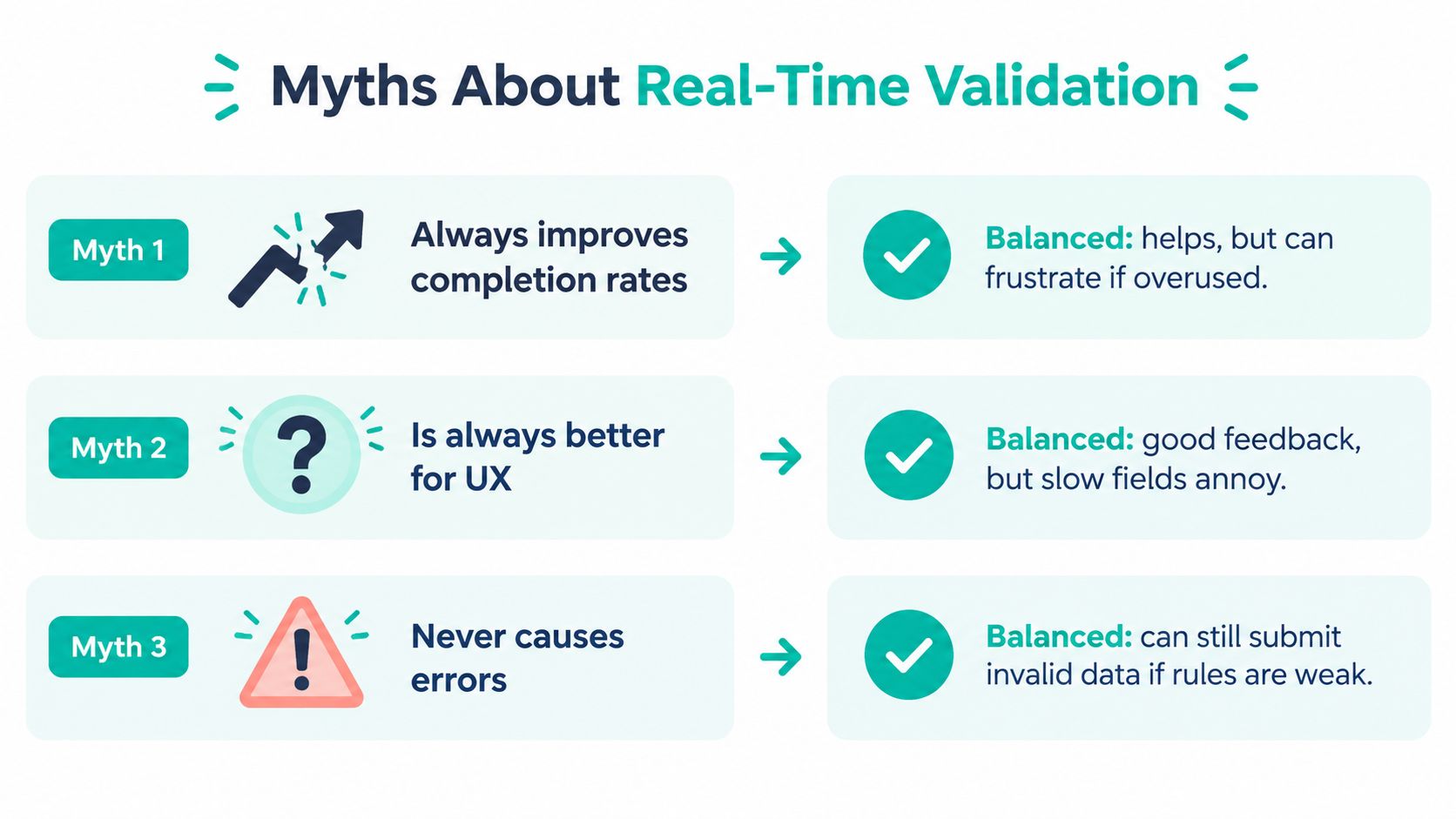
Real time validation always improves completion rates. It can help when messages are accurate, relevant, and timed well. The landmark 2009 usability study on inline validation measured several objective and subjective outcomes. It reported a 22% rise in success rates, a 22% fall in errors, a 31% increase in satisfaction, a 42% reduction in completion time, and a 47% decrease in eye fixations when inline feedback was used (LukeW's summary of the inline validation study).
Those results don't mean every warning improves every form. Noisy feedback, premature errors, and unreliable remote checks can make a workflow harder to complete. The pattern works when the form knows what it can verify and communicates that limit.
Myth two
Real time validation is always intrusive. It's intrusive when it interrupts unfinished input, moves focus, announces the same problem repeatedly, or relies on color without text. It can feel supportive when the message arrives after a meaningful interaction, stays near the field, and explains the correction in plain language.
Baymard Institute reported in 2024 that 31% of e-commerce sites provided no inline validation, so many users still discover mistakes only after submitting a form (Baymard Institute's inline validation research). The absence of feedback isn't automatically better. It shifts the discovery moment later.
Myth three
Real time checks remove the need for a final review. They reduce avoidable errors, but they can't guarantee that every cross-field conflict, service outage, or rule change has been caught. The form still needs a final submission sweep, a clear summary, and a way to return the user to each affected field.
The balanced verdict is simple: real time validation is a powerful default, not a silver bullet. It works best beside a thoughtful final check.
A Friendly Checklist for Better Validation
A clinic manager can hand this checklist to a developer, product reviewer, or implementation team. Each point connects the interface behavior to a real pet travel task.
Timing
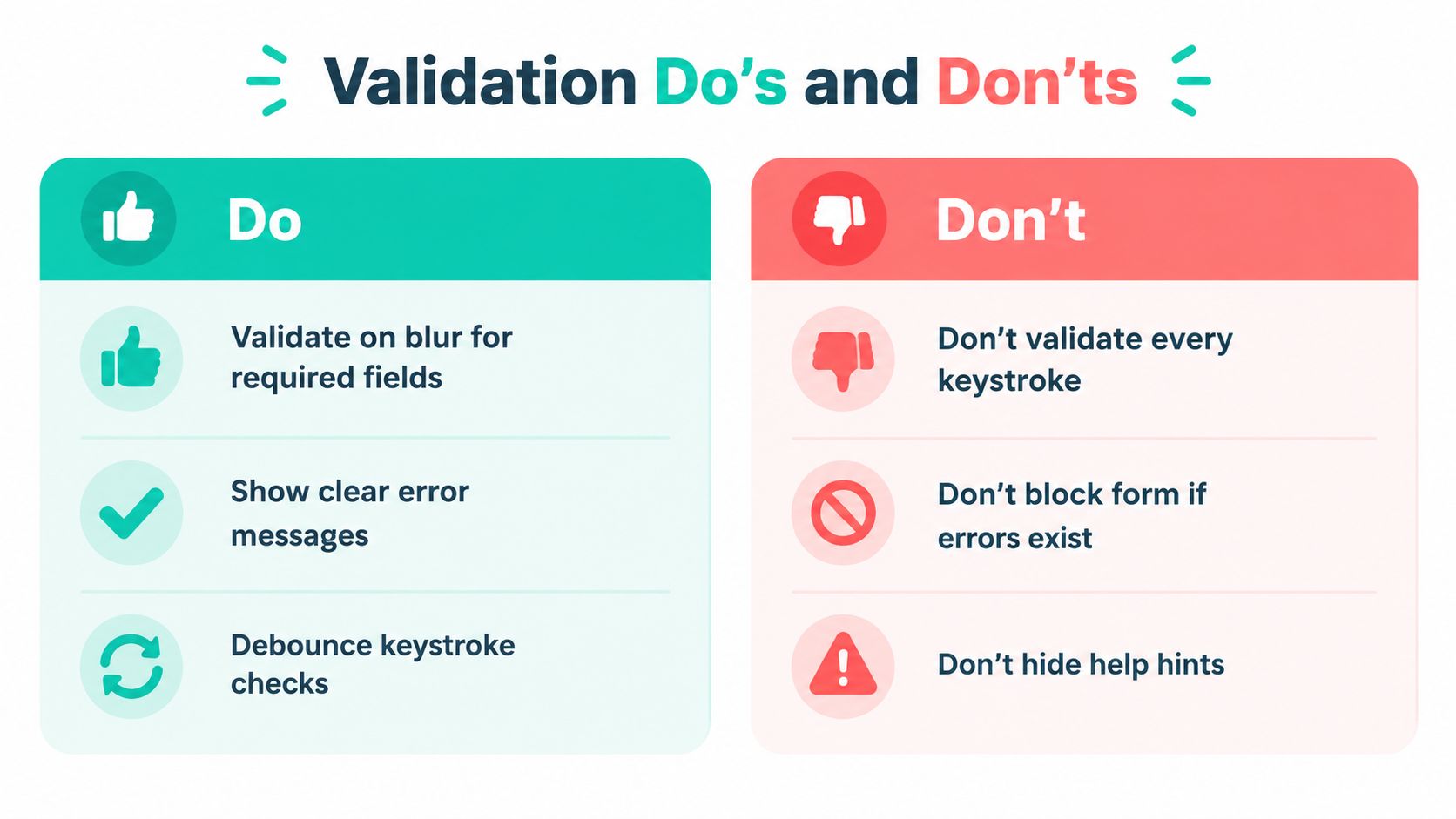
Validate on blur: Check the microchip field after the user leaves it, rather than declaring every partial number wrong.
Use a short pause: Debounce keystroke checks when a brief wait can prevent repeated messages.
Don't punish unfinished input: A half-entered date or identifier isn't necessarily an error yet.
Wording
Say what needs fixing: “Enter the complete microchip number” is better than “Invalid.”
Explain the next action: Tell the user whether to check the patient record, choose another destination, or wait for a lookup.
Keep success quiet: A small confirmation can reassure without turning every field into a celebration.
Accessibility
Use text with color: Pair a red error state with a visible message and a meaningful icon or label.
Keep messages close: Place the explanation beside the field so sighted users can find it quickly.
Use polite announcements: Connect relevant updates to an
aria-liveregion without flooding assistive technology users.Protect focus: Don't move the cursor unexpectedly when a warning appears.
A practical UI design guide can help teams review spacing, hierarchy, labels, and visual states before the form reaches clinic staff.
Match the check to the field
Format checks: Use them for microchip structure, passport ID patterns, name limits, and weight units.
Business-rule checks: Use them for destination requirements, certificate choices, and vaccination timing.
Async checks: Use them for registry records, laboratory results, document matching, and other remote information.
Show “Checking” when a remote result is pending. Cancel stale requests when the user changes the value. Don't claim that a local pattern match proves an external fact.
Keep the safety net
Run a submit-time review: Recheck every required field, relationship between values, and current rule set.
Show an error summary: Give the user a clear list of unresolved issues and links back to the fields.
Plan for service failure: Explain what happens when a registry or document service is unavailable instead of leaving the user with a frozen form.
Respect mobile entry
Choose the right keyboard: Use numeric entry for numeric identifiers and date controls for dates where appropriate.
Avoid tiny targets: Make error messages and correction controls easy to tap.
Preserve entered data: A validation response shouldn't clear the pet's name, travel date, or other completed information.
For teams gathering feedback from pet owners or clinic staff, a pet travel survey tool can help capture where people hesitate, misunderstand messages, or need extra support. Validation is a feature, not a finish line. It should make accurate pet travel paperwork easier to complete, review, and correct.
Passpaw provides real-time document validation for international pet travel paperwork, helping teams compare uploaded documents with entered pet information and spot missing or mismatched details during the workflow. Visit Passpaw to see how the platform can support veterinary practices and pet owners with clearer, more timely validation.

More articles
From regulatory changes to best practices for veterinarians and pet owners, our resources keep you ahead of the curve.