Are you a team member in a veterinary practice?
Are you a pet parent planning a trip with your furry pal?
Documentation Picture Guide for Pet Travel
Your pet's carrier is packed, the itinerary is confirmed, and then an email arrives: the travel documents couldn't be approved. The paperwork may be complete, yet the documentation picture still fails because a date is outside its allowed window, a stamp is blurred, or a page edge was cropped.
Pet travel approvals depend on two practical controls: the image must be readable, and the document must still be valid. International health certificates are often completed close to departure. Airlines typically require certificates no older than 10 days, even where the destination allows a longer period, and some destinations use shorter windows, according to the U.S. State Department's pet travel guidance. A clear photo of an expired certificate won't help you get through review.
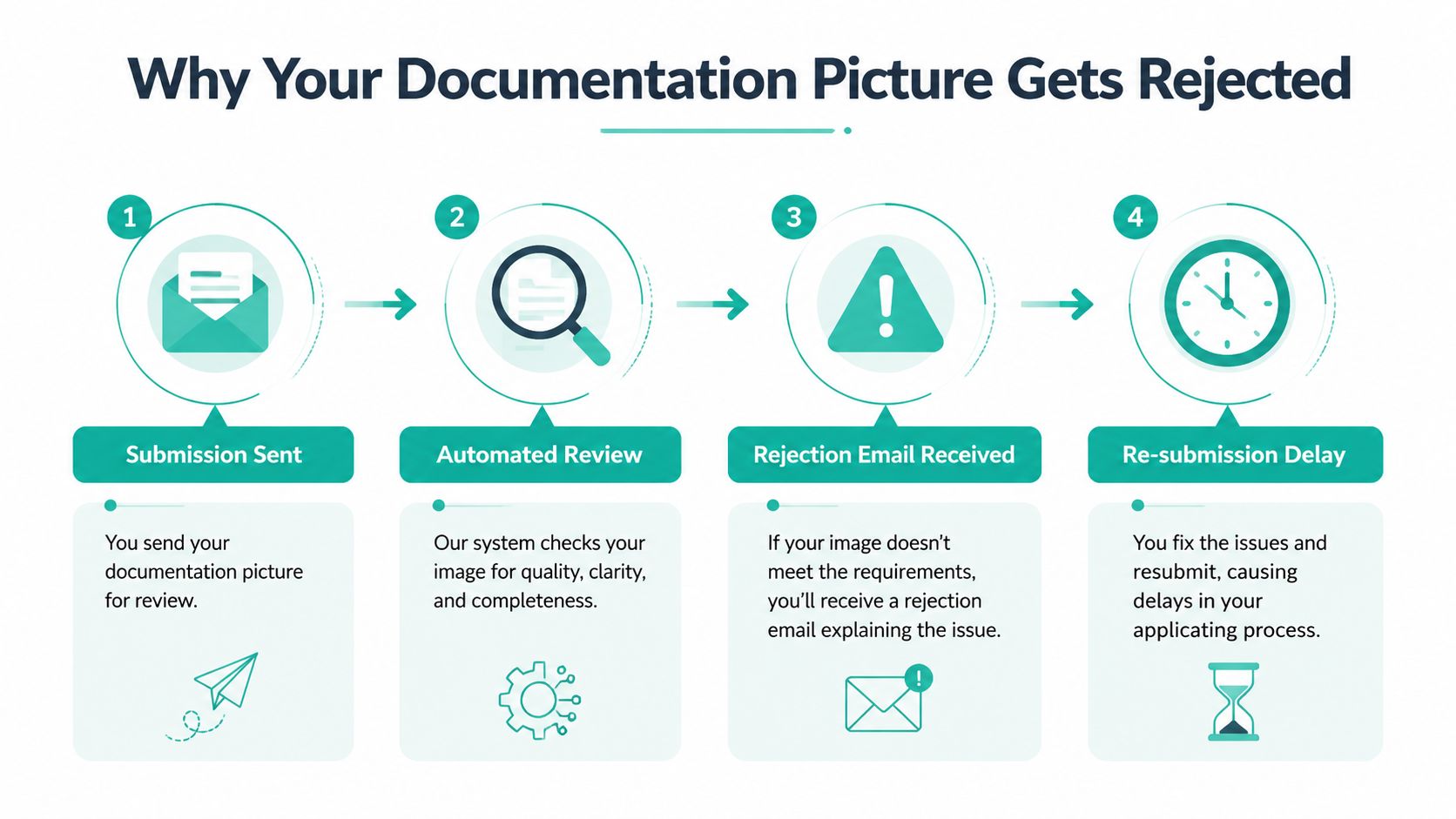
Why Your Documentation Picture Gets Rejected
A common failure starts with a phone photo that looks perfectly readable on a small screen. The owner sees the pet's name, vaccination date, and clinic stamp, uploads the file, and assumes the job is done. The review system sees something different: compressed characters, glare across a signature, or a cropped corner that may contain an expiration date.
That matters because OCR, or optical character recognition, must interpret the image before a reviewer or validation workflow can compare the contents. A NIST document-image quality study found that declining print and image quality can push character-recognition error rates from 1% to 74%. A separate document-understanding paper notes that recall and precision degrade significantly once OCR error rates exceed 20%, so a weak photo can affect more than simple readability.
Why timing creates a second failure
Timing can defeat an otherwise excellent image. For travel from a non-EU country into the EU, the animal health certificate must be issued by an official State vet no more than 10 days before arrival. The same certificate can remain valid for movement between EU countries for 6 months, or until the rabies vaccine expires, whichever comes first, as explained by Your Europe's pet travel guidance.
The sequence before that certificate matters too. EU guidance requires the pet to be microchipped before rabies vaccination, and after a first rabies vaccination, the traveler must wait at least 21 days before travel. The EU pet travel rules also say the vaccination date can't be earlier than the microchip identification date.
Practical rule: Treat the photo capture and the validity check as one task. A sharp image with the wrong date is still a failed submission.
For a fuller look at the verification process, review this documentation verification guidance. The safest approach is to photograph documents early for quality review, then confirm that the final certificate dates still match the route before submission.
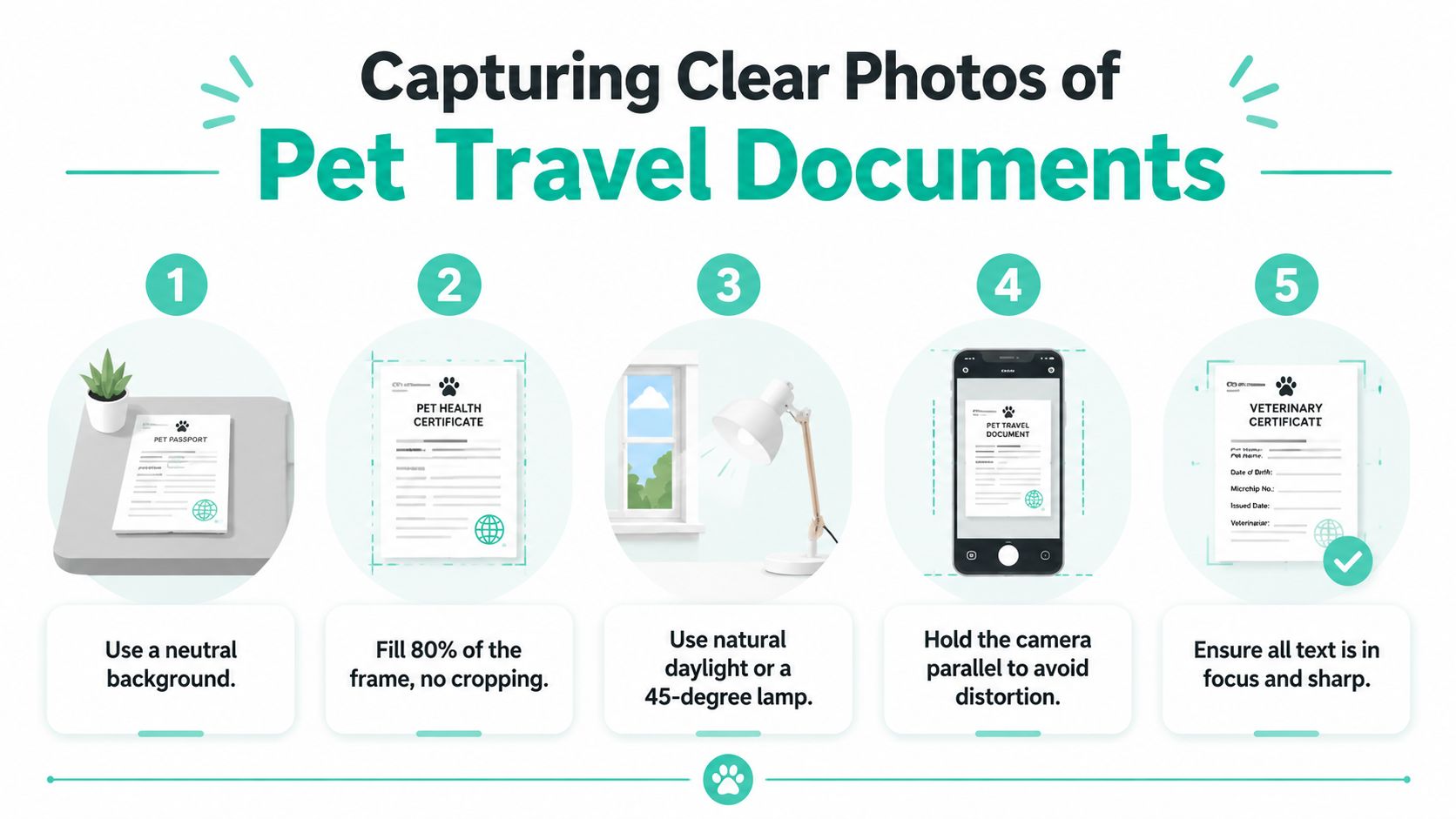
Capturing Clear Photos of Pet Travel Documents
Good capture starts with control, not an expensive camera. Place the document on a flat, neutral-colored surface, position the phone parallel to the page, and make the document fill about 80% of the frame without cutting off any edge. A tilted phone creates distortion, while a distant shot leaves too little detail for reliable text recognition.
Use natural daylight or place a desk lamp at roughly a 45-degree angle. Direct flash often creates bright hotspots on glossy certificates, and overhead light can hide text beneath shadows. Hold the phone steady, tap the text to focus, and check the image at full size before moving the document.
Match the setup to the document
Pet identification photos need a clear view of the animal's face, with both ears visible and the eyes open. Skip filters and distracting backgrounds. The image should help a reviewer identify the pet without guessing.
For a microchip certificate, capture the entire page and keep the barcode or QR code sharp. Those codes may be used during verification, so a close-up that excludes the pet's name or clinic details creates a mismatch risk.
A vaccination record or health certificate needs every relevant stamp, signature, date, and clinic detail readable. After taking the photo, zoom in and inspect the veterinarian's license number, clinic information, and certificate dates. Don't assume that a line is legible because the page looks crisp from a distance.
Choose quality over convenience
Set the camera to its highest available resolution, with a minimum capture equivalent of 300 dpi, and use PNG or a high-quality JPEG where the platform permits it. A camera-captured document study recommends at least 300 dpi and favors lossless formats such as TIFF over heavily compressed alternatives because noise, fading, broken characters, and unusual fonts can damage OCR results. The OCR improvement study also reported that preprocessing reduced average character error rate from 33.99% to 26.91%, a relative improvement of about 20.8%.
Photograph each page of an EU pet passport separately. Spreads often force the phone into an awkward angle, producing curved lines and uneven focus. If your clinic handles a high volume of records, professional document scanning for identity checks can help standardize capture for identity documents and structured records.
Common Rejection Reasons and Quick Fixes
A document can look acceptable on a phone and still fail review. A cropped stamp, unreadable date, or file format mismatch may not become obvious until the portal rejects the upload. Check each image at full size before submitting, while a replacement photo is still easy to take.
Rejection Reason | Quick Fix |
|---|---|
Low resolution | Move closer, fill the frame, and export at the highest permitted quality. |
Glare or bright spots | Turn off flash and move the lamp to a 45-degree angle. |
Cropped edges | Leave a narrow margin and confirm all four corners are visible. |
Blur or failed focus | Tap to focus, hold still after pressing capture, and retake the image. |
Unsupported format | Check whether the portal accepts PDF, PNG, JPEG, or another specified type. |
Expired document | Compare the certificate issue date and destination rules before submitting. |
Image defects that hide critical details
Low resolution can erase the small information reviewers need, including a vaccine batch reference, endorsement, or expiration date. Heavy compression creates blocky letter edges, and filters cannot restore characters that were never captured clearly. Retake the image rather than trying to repair a weak file afterward.
Glare and shadows cause the same approval problem. A reflection can cover part of a signature, while a dark strip may hide an entire line. Turn off the flash and use side lighting at a 45-degree angle. Soft daylight from a window is often clearer than a bright ceiling light.
File-level errors to catch before upload
Cropping deserves a full-page check because stamps, signatures, page numbers, and dates often sit near the edge. Keep all four corners visible, then enlarge the image and confirm that no required detail is cut off.
A file extension does not change the underlying format. Export the document as the type the receiving portal accepts, whether that is PDF, PNG, JPEG, or another specified format. Keep the original capture until the review is complete, so you can correct an export problem without retaking the document.
Date errors can also appear even when the picture is sharp. Airline timing and destination rules may differ. The 10-day airline limit described by the U.S. State Department explains the airline certificate timing issue is only one timing check, so compare the certificate dates with the rules for the destination before upload. For shipping logistics, keep labels and documents aligned with the USDA shipping label guidance, instead of reusing a file set from an earlier trip.
Labeling and Organizing Your Document Files
A folder full of files named IMG_4832.jpg makes a simple review surprisingly hard. It's easy to attach Luna's rabies record to Max's profile, upload an older certificate, or mistake a return document for a departure document.
Use a consistent name that identifies the pet, document type, date, and, when useful, the trip leg:
Bella_RabiesCertificate_2024-03-15.jpg
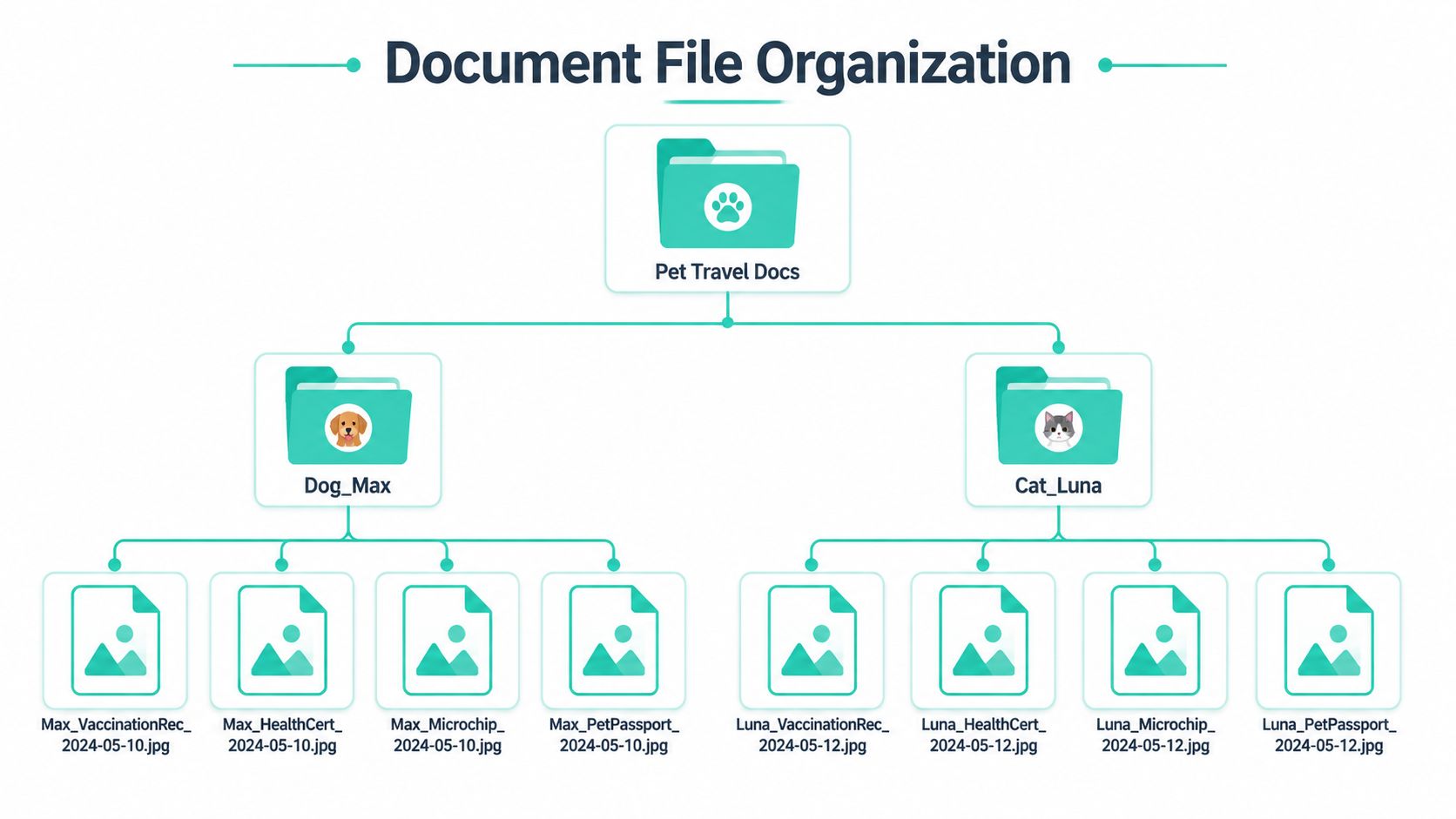
For a multi-pet household, create a main folder called Pet Travel Docs, then separate folders for each pet. Inside each pet folder, separate documents by trip or route when the itinerary includes multiple destinations.
Build a system your clinic can audit
A useful structure might look like this:
Pet Travel Docs: The single top-level folder for the application.
Dog_Max: Max's identification, vaccination, microchip, and health records.
Cat_Luna: Luna's equivalent records, kept separate from Max's files.
Departure and Return: Separate folders when different certificates or endorsements apply.
Use the actual document date in the filename, not the date you took the picture. If a veterinarian reissues a certificate with corrected details, add a clear version marker, such as Bella_HealthCertificate_2024-03-15_REISSUED.jpg, and move the superseded file into an archive folder. Never delete the original before the corrected document has been accepted, but don't leave both versions in the active upload folder.
For paper-heavy practices or owners who need old records converted into usable digital files, outside document scanning services can be useful when phone capture isn't producing consistent results. Keep the final approved files in a controlled folder, and use the pet travel document storage guidance to reduce accidental swaps and scattered copies.
Uploading Documents Through Passpaw
Start by creating the trip profile and entering the pet and route details carefully. Select the matching document category for each upload, such as the microchip record, rabies certificate, or EU health certificate. The category gives the validation workflow the right context for checking the image and its dates.
Use the original JPEG or PNG capture for a physical document. Screenshots aren't acceptable for this type of verification, and unnecessary editing can remove information or alter how the file is interpreted. If a file is too large, reduce its dimensions or compression cautiously, then zoom in to confirm that names, dates, stamps, and signatures remain readable.
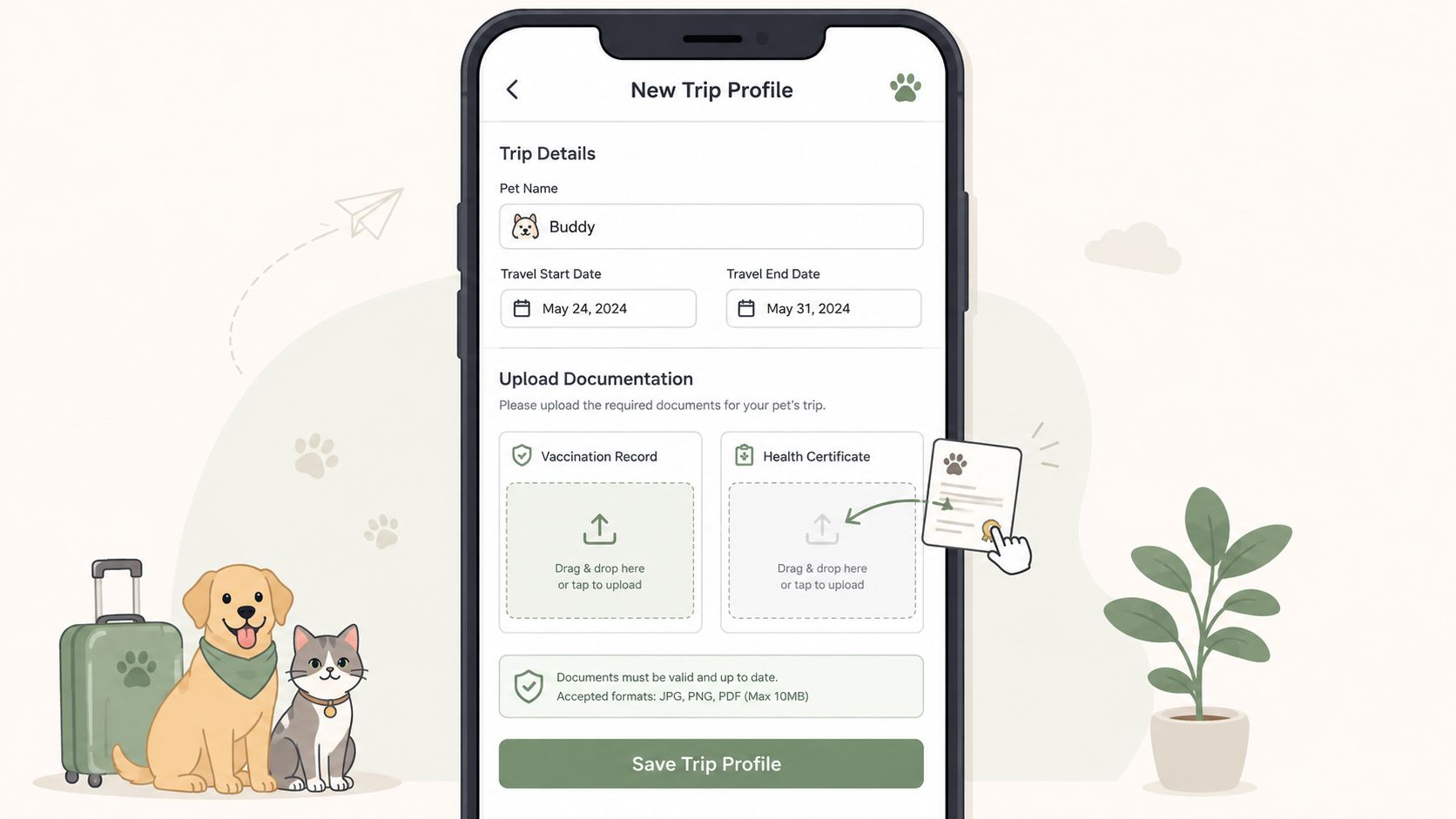
Review every status before submission
A green check indicates that the item has passed the current validation step. A yellow warning calls for human attention, even if the document may still be usable. A red flag means you should stop and inspect the image, pet details, dates, or document type before continuing.
Open the preview and look at the page orientation. An upside-down certificate, a sideways passport page, or a scan with a cut-off stamp can create avoidable delay. Add a reviewer note when the document is unusual, reissued, translated, or affected by a route-specific exception. A short factual note helps a reviewer understand what they're seeing without forcing them to infer the reason for an apparent mismatch.
Passpaw is one workflow option for uploading vaccination-record pictures, checking document details against pet information, and preparing travel forms. You can start a Passpaw trip profile once the source documents and route information are ready.
Final Pre-Submission Checklist for Pet Travel
Departure is close, and one reissued certificate has entered the folder. Before submission, review the route and the files together. Approval often depends on whether the document version, pet details, and travel plan still agree.
Make a timing decision before uploading
Route confirmation: Recheck the origin, destination, transit points, airline, and return plan against the destination's current rules. APHIS advises verifying country rules every time, so repeat this check after any route or schedule change.
Certificate version: If a certificate was reissued, upload the final signed version only. Compare its issue date, destination, pet details, and page count with the earlier copy, then remove superseded files to prevent conflicting records.
Vaccination sequence: Confirm the microchip and rabies entries are recorded in the order required for the route. If a clinic corrected either entry, ask whether the correction requires a new certificate or changes the travel plan. For EU routes, check the current sequence in the EU travel guidance.
Arrival calculation: Count the permitted certificate window from the actual arrival date, including transit arrangements. For non-EU travel into the EU, verify the applicable official State vet certificate process through Your Europe.
Inspect the final documentation pictures
Open every file at full size. Check names, microchip codes, dates, stamps, signatures, barcodes, and clinic details. Confirm all page edges are visible, lighting is even, and the format is accepted by the receiving platform. Match each filename to the document type, pet, date, and version.
Review every Passpaw status before sending. A yellow warning needs a factual reviewer note, while a red flag requires inspection before submission. For air shipments, compare the required document set with IATA's live-animal shipping guidance, including the import permit, health certification, and shipper's certificate where applicable.
Passpaw helps practices and pet owners organize uploaded travel documents, review image details, and prepare route-based health certificate workflows. Visit Passpaw to set up the documentation process before travel.

More articles
From regulatory changes to best practices for veterinarians and pet owners, our resources keep you ahead of the curve.