Are you a team member in a veterinary practice?
Are you a pet parent planning a trip with your furry pal?
Real Time Email Validation: How It Works and Why It Matters
A client submits an international pet travel application, but one character in the email address is wrong. The health certificate is ready, the vaccination reminder goes out, and the destination deadline keeps moving closer. Nobody notices the failed delivery until the owner calls, frustrated and already short on time.
Real time email validation helps stop that problem when the address enters your system. It isn't just a green check beside an email field. A useful validator works in layers, starting with fast checks and moving toward stronger delivery signals. The result should help your team decide whether to accept an address, ask for a correction, recheck it later, or involve a person.
That distinction matters for veterinary practices, pet travel agencies, shippers, and service providers. You need fewer bounced messages, smoother client communication, and less manual follow-up, but you also need to avoid rejecting a legitimate address because it looks unfamiliar. This guide explains how the layers work, where they fit in a workflow, and what validation can and can't prove. For broader list-management context, see this guide to veterinary email lists.
When a Typo Costs More Than an Email
A wrong email address can interrupt an entire pet travel process. A practice may need to request a missing vaccination record, confirm a travel date, send a certificate for review, or tell an owner that a destination authority needs another document. If the address fails after the message leaves the system, the front-desk team has to discover the problem, find another channel, and repeat work under pressure.
Checking the address at the point of capture changes the timing. A client who enters owner@gmial.com can correct the typo before an application depends on it. A domain that no longer accepts mail can trigger a follow-up task while the client is still completing the form. That small interruption is usually easier to handle than a missed deadline.
Email databases also change after collection. A 2022 analysis of email database decay reported that at least 22.71% of an email list became unusable or risky within 12 months, while 20.19% of the poor-quality contacts examined were outright invalid addresses. That figure is an industry benchmark, not a universal rate. List quality depends on how addresses were collected, where the audience is located, and how often people change jobs, domains, or inboxes.
Validation is a layered decision
A good system doesn't ask only, “Is this email valid?” It asks several smaller questions:
Does the address follow the expected format?
Does the domain appear able to receive mail?
Does the receiving server respond to a delivery-path check?
Does the address look temporary, shared, or otherwise risky?
Should the user confirm control of the inbox?
Each answer offers a different level of confidence. Syntax checks are fast and useful, but they can't prove that a mailbox exists. A server response can provide a stronger signal, but it still can't prove that the person will read a message.
Practical rule: Use the fastest checks during typing, deeper checks before important notifications, and human review when the cost of a mistake is high.
The same principle applies to security and data workflows. If a team is building a broader identity or access process, an invisible browser verification resource can help explain how unobtrusive checks fit into a user journey. Email validation remains a separate concern, but both systems benefit from making checks early without creating unnecessary friction.
The Five Layers of a Real-Time Email Check
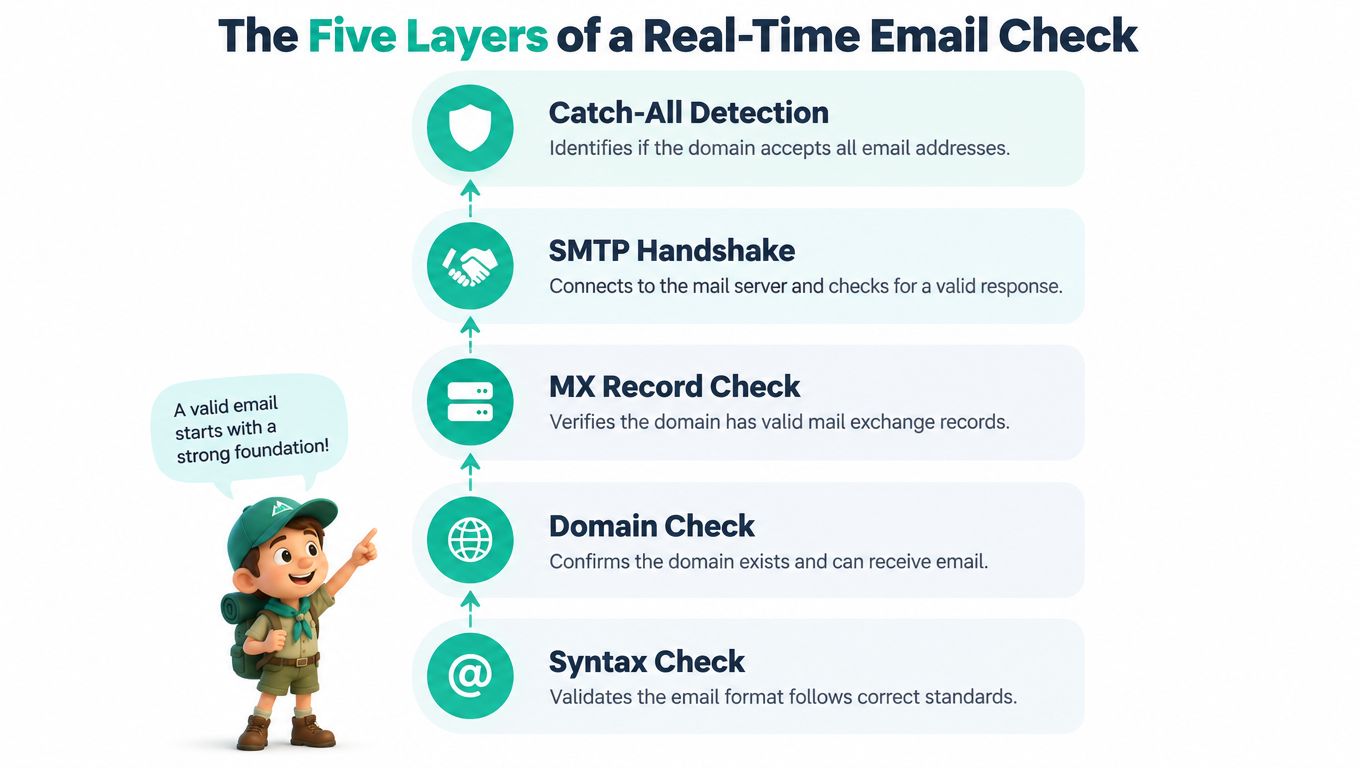
Think of a validator as a tiny scout sent ahead of a message. It checks the path, reports what it can see, and returns before your system commits to a delivery decision.
Start with the address itself
Syntax parsing looks for obvious mistakes. RFC 5322 describes an email address as a local part, an @ symbol, and a domain part. A practical check rejects missing or repeated @ symbols, leading or trailing dots, and consecutive dots in the local part. It can also check DNS naming rules, including the limit of 63 characters for a domain label and 253 characters for a complete domain, as described in real-time RFC 5322 validation guidance.
Next comes domain and DNS checking. The validator asks whether the domain exists and whether it publishes mail-exchange records. An MX record is like a building directory that says where mail for the domain should go. It doesn't confirm that a particular person has a mailbox there.
The third layer is an SMTP-level probe. The validator contacts the receiving server and tests the delivery path through the protocol stages defined by RFC 5321, stopping before any message content is transmitted. A permanent 5xx response generally points to an invalid or blocked recipient. A 4xx response often means the server is temporarily greylisting, throttling, or unavailable, so the system should retry later.
Add context, then proof
The fourth layer identifies role-based and disposable addresses. An address such as clinic@example.com may be useful, but it probably belongs to a shared inbox rather than one named client. A temporary address may work briefly and then disappear. Neither result automatically means “reject,” especially when a practice intentionally uses a shared mailbox.
The fifth layer is an optional verification token. Sending a link or code to the inbox can demonstrate that someone has access to it. This is stronger evidence of control than an SMTP response, although it still doesn't prove that the address is the right contact for a particular application.
A vendor specification should make these layers visible. Ask whether one API call performs syntax, DNS or MX, SMTP, risk classification, and optional confirmation, or whether your team must combine separate services. If you're managing sender reputation alongside recipient validation, a practical domain warmup schedule for B2B can provide useful background on the sending side.
For form design examples, compare these layers with real-time form validation. The key is to log the detailed result internally while showing the user a short, understandable message.
Why Each Layer Matters for Time-Sensitive Workflows
An owner starts an international health certificate application for a dog flying soon. The form accepts the email, but one letter in the domain is wrong. The syntax layer can catch that mistake immediately if the typo creates an invalid-looking address. If the address still looks tidy, the domain check may reveal that the destination doesn't exist.

Suppose the domain exists, but the mail server returns a temporary response. Blocking the application at that moment would create a different problem. The owner may have entered a real address, while the server is briefly greylisting or throttling requests. The better response is to save the application, mark the address as temporarily unconfirmed, and schedule a recheck.
Match the response to the risk
A permanent failure deserves a correction task. The practice can ask the owner to review the address before sending document requests or travel reminders. A temporary failure deserves patience, not an automatic rejection. A catch-all result deserves context, because the domain may accept mail without confirming whether the specific mailbox exists.
The operational difference is significant. A missed message can mean a forgotten vaccination reminder, a delayed owner response, or a veterinarian discovering that an approval request never reached the client. A real-time check won't solve every communication problem, but it can keep avoidable address errors from entering the workflow.
Email quality also affects the sender's future reach. A 2022 email-quality analysis reported that bounce rates above 2% can damage sender reputation and reduce inbox reach. The same source discusses common benchmark ranges, including below 2% as normal, 2% to 5% as a warning range, and above 5% as critical. These are benchmarks, not guarantees, because mailbox providers use different systems and soft and hard bounces describe different conditions.
A separate dataset from 2025 reported that 23% of more than 11 billion checked addresses were invalid or risky, as reported in the same source. That finding illustrates why one-time list cleaning can't replace checks at the moment a new address enters a time-sensitive process. Teams working with live records can also learn from real-time data validation, where the same principle applies beyond email.
A validator should protect the workflow, not punish the user for a server problem.
Choosing the Right Implementation Approach
There isn't one correct architecture. The right choice depends on where your team can run checks, how much detail you need, how sensitive the data is, and whether an inconclusive result should delay the user.
Implementation Approaches Compared
Approach | Speed | Validation Depth | Best Fit |
|---|---|---|---|
Client-side checks | Immediate for basic feedback | Mostly syntax and simple domain hints | Fast correction while a user types |
Server-side checks | Depends on the request path | Stronger control over DNS, SMTP, and policy | Forms, account creation, and workflow intake |
Third-party validation API | Usually quick, with depth depending on the provider | Can combine syntax, DNS, SMTP, disposable, role, and catch-all signals | Teams that want broad coverage without building mail checks |
Debounce plus user experience pattern | Fast first response, deeper result later | Local checks first, remote checks in the background | Time-sensitive forms where blocking is risky |
Client-side validation is the first layer of comfort. It can spot a missing @ symbol or an obvious typo before the form is submitted. It shouldn't hold the only decision-making authority, because users can bypass browser logic and local checks can't reliably inspect receiving mail servers.
Server-side validation gives your application control. The form handler can run a deeper check before creating a record, sending a notification, or starting an automation. Keep the user experience in mind, though. A slow server request shouldn't leave a client staring at a frozen submit button.
A third-party API can reduce engineering work by combining multiple checks behind one integration. Review the provider's response categories, retry behavior, data handling, and limits. “Valid” should not be the only response you receive. You want enough detail to distinguish a syntax error from a temporary server failure.
The debounce-plus-UX pattern often works well for pet travel intake. Give instant feedback for clear typos, wait briefly before calling a deeper service, and let the application continue when the result is unknown. Store the unresolved state so a background job can try again.
Choose by consequence, not fashion
Use browser checks when the main goal is immediate correction. Add server-side checks when the address controls workflow actions. Choose an API when your team needs deeper coverage without maintaining protocol behavior. Choose a deferred pattern when a validator outage mustn't block a time-critical intake.
Poor form design can defeat a strong integration. Don't erase the address after a warning, don't use technical error codes as user messages, and don't force a client to solve a problem your team can resolve later. Document-heavy workflows may also benefit from document validation software, but email status should remain one signal among several.
Privacy, Throttling, and Graceful Fallbacks
Email validation handles personal contact information, so reliability and trust belong in the product design from the start. A client should understand why the form is checking an address, while your team should avoid collecting more detail than the workflow needs.
Keep records useful and limited
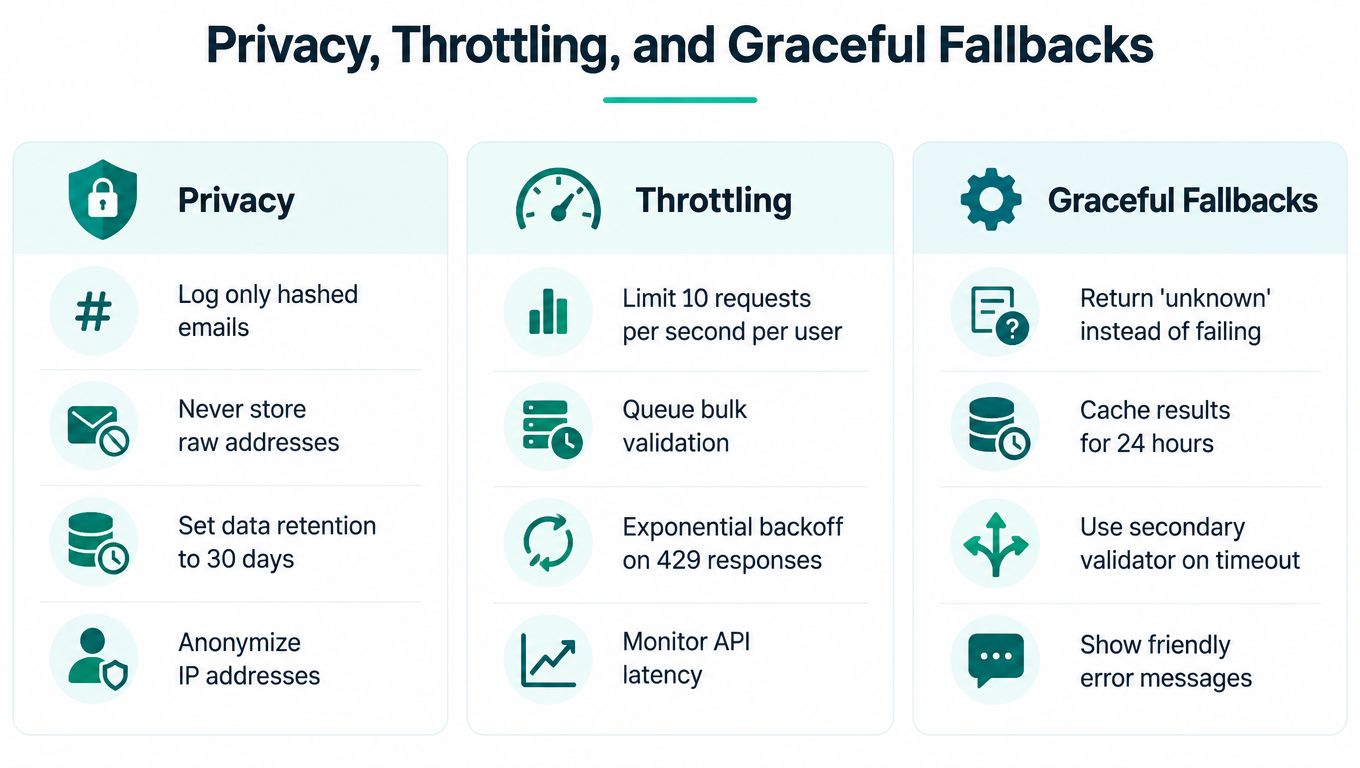
Log the validation outcome, the time of the check, and the reason for a user-facing decision. Avoid placing raw addresses in broad queues or diagnostic messages where many systems and staff can see them. If operational analysis doesn't require the full address, use a protected or transformed identifier instead.
Make the status understandable. “We couldn't confirm this address yet” is more helpful than “SMTP 451.” It tells the client what happened without exposing internal protocol details.
Throttling matters for both cost and abuse prevention. An unrestricted endpoint can be used to test many addresses and infer which ones exist. Require an authenticated server request where possible, limit repeated checks for the same address, and use delays after repeated failures. Queue bulk work separately from interactive form checks so a cleanup job can't consume capacity needed by a person completing an urgent application.
Design for uncertainty
A validator can be slow, unavailable, or unsure. Your application should have a deliberate response for each condition:
Unknown result: Save the address and mark it for a later check.
Temporary failure: Retry with increasing delays rather than treating it as invalid.
Service timeout: Let the user continue when the workflow is time-sensitive.
Repeated inconclusive result: Ask for a second contact channel or route the item to a team member.
Clear permanent failure: Ask the client to correct the address before sending critical notices.
Sender readiness is a separate part of the picture. Gmail's sender guidance says all senders must use either SPF or DKIM authentication, while bulk senders must use SPF, DKIM, and DMARC, including DMARC alignment. Recipient validation can't repair a sending domain that isn't properly authenticated.
Fallback principle: A slow validator should create an “unknown” state, not a blocked client.
Why Pass or Fail Is the Wrong Mental Model
A binary result looks tidy in a database, but it hides the question your team needs to answer: What should happen next? An address can have correct syntax and a working domain yet still be a shared mailbox, a catch-all, or an inbox nobody checks. Another address may look unusual but belong to a legitimate international client.
Aggressive blocking creates false positives. A veterinary clinic may intentionally use a role-based address for a shared travel desk. An agency may use a domain that a generic risk model has rarely seen. Rejecting both cases can delay the same communication your validation system was meant to protect.

Use response tiers
A practical policy can classify results like this:
Clear pass: Syntax, domain, and delivery-path signals look healthy. Continue the workflow.
Risky pass: The address appears usable but has a disposable, role-based, catch-all, or unusual-domain signal. Continue with a flag or request another channel when the message is critical.
Deferred check: The receiving server returned a temporary condition. Save the record and retry later.
Correction required: Syntax is broken, the domain doesn't exist, or the server gives a permanent rejection.
Human review: The result conflicts with the client's context or the communication has high consequences.
This approach separates deliverability, risk, and confidence. It also avoids treating every uncertain result as a failure. Maximum rejection isn't the goal. Reliable communication is.
A useful interface can show the client only what they need: “Please check the spelling of your email,” or “We couldn't confirm this address yet. You can continue, and we'll verify it again.” Staff can see the richer result, including the suspected issue and the next action.
A valid-looking address is not a promise that someone will read the message. A risky address is not always a reason to discard a real client.
For pet travel workflows, this balance matters. A missed document request is serious, but so is blocking a legitimate owner because their practice, employer, or country uses an unfamiliar mail setup. Risk tiers let the team protect delivery without turning the form into a gatekeeper.
Troubleshooting and a Monday Morning Checklist
Start with the symptom. A catch-all domain may look like a false positive, so flag it instead of rejecting it. A clinic or agency address may trigger a role warning, so allow it when the workflow expects shared inboxes. A slow API should produce an unknown state and a later retry, not a frozen form. A background job that never finishes needs visible retry status and a human escalation path.
On Monday, document five decisions:
Validate: Syntax, domain, MX, SMTP, and risk signals.
Place checks: Fast feedback in the browser, deeper checks on the server.
Log: Outcome, reason, timestamp, and retry state, while limiting raw address exposure.
Handle soft failures: Save the application and recheck temporary responses.
Escalate: Ask for another channel or human review when a critical message remains unconfirmed.
Teams improving broader contact records may also find these contractor CRM hygiene best practices useful for keeping validation outcomes actionable.
Passpaw helps veterinary practices manage international pet health certificates, validate documents in real time, prioritize tasks by travel timing, and keep owners informed throughout the process. Visit Passpaw to see how a clearer, more reliable workflow can reduce avoidable follow-up when every message matters.

More articles
From regulatory changes to best practices for veterinarians and pet owners, our resources keep you ahead of the curve.