Are you a team member in a veterinary practice?
Are you a pet parent planning a trip with your furry pal?
Real Time Data Validation Made Simple for Pet Travel
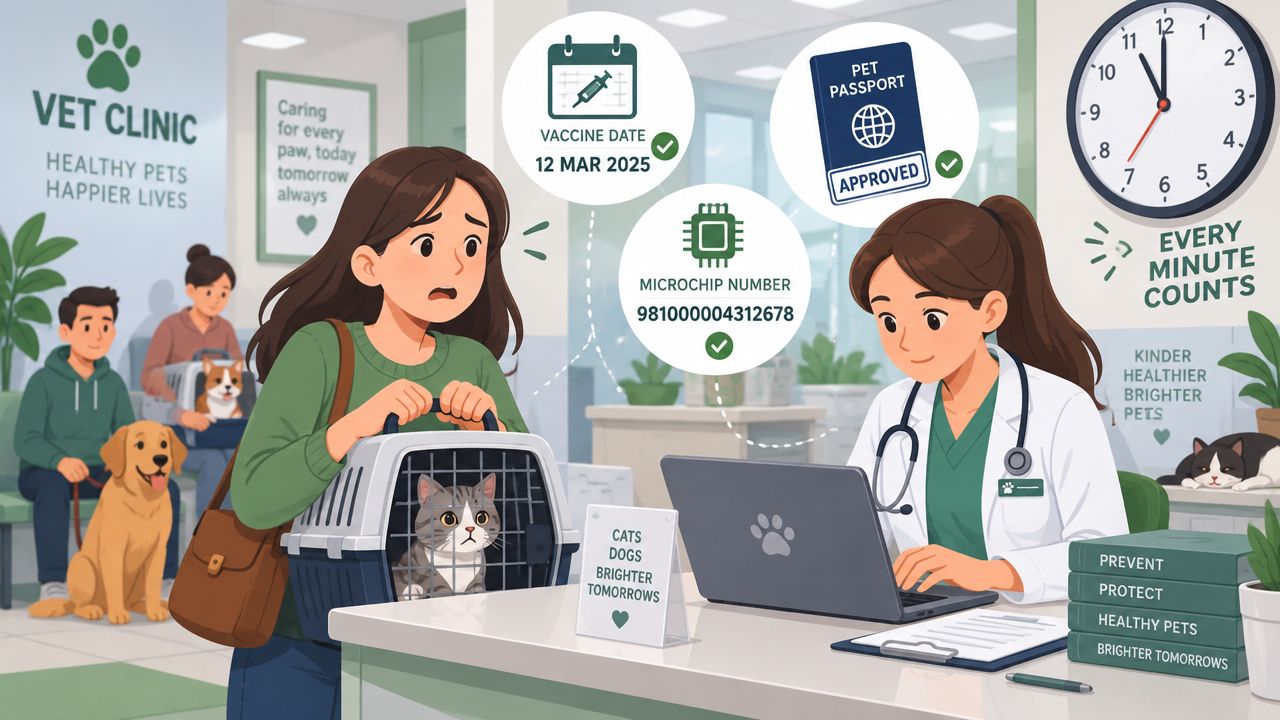
A pet's travel paperwork can unravel over one small mistake. A veterinarian may be checking a vaccine date while a pet owner confirms a microchip number, destination, and contact details, all while the departure deadline gets closer. If one digit is entered incorrectly or a required field is left blank, the problem might not appear until the documents are ready to submit.
That delay creates extra messages, repeated checks, and understandable worry. Real time data validation changes the timing of that work. Instead of waiting until information has been stored or reviewed later, the system checks it as it arrives, giving the clinic a chance to correct the issue while the details are still fresh.
Introduction Why Instant Checks Matter for Pet Travel
A clinic preparing travel documents may handle several pieces of information at once. The team could enter the pet's name, species, microchip number, vaccination details, owner information, and destination requirements. Each field may look simple on its own, but the final document depends on the details matching across records.
Consider a common moment. A pet owner is ready to travel, and the veterinarian uploads a health document. The vaccine date is correct on the certificate, but the date entered in the application is different. Or the microchip number contains one misplaced digit. A later review may identify the mismatch, but by then the clinic may need to contact the client, request a corrected document, and repeat part of the process.
Instant feedback feels very different. A clear message can point to the incorrect field before the record moves forward. The veterinarian can correct the entry, the pet owner receives a more dependable update, and the application keeps moving instead of chasing its tail.
The same principle applies to real-time form validation, where a form can identify missing or inconsistent information while someone is completing it. For pet travel, that timing matters because document preparation often involves several people, including the owner, veterinarian, travel coordinator, and reviewing authority.
This guide keeps the technical language light. You'll learn what real time data validation means, how it checks pet travel information, where speed and coverage involve tradeoffs, and how teams can assign responsibility when an alert appears. The aim is simple: catch small problems early, before they become large travel headaches.
Understanding What Real Time Data Validation Really Means
Think about spell-check while you're typing. If a word is underlined immediately, you can fix it before printing or sending the document. If the same check runs only after the document has been printed, you've already created extra work.
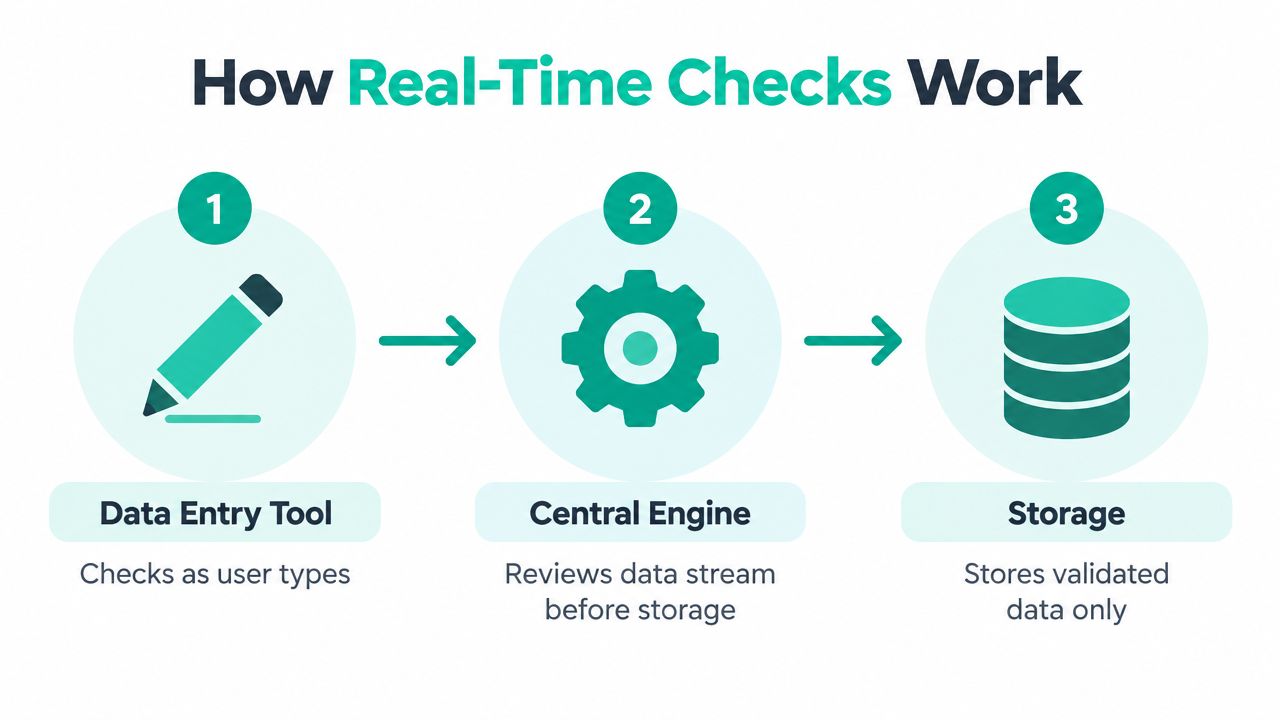
Real time data validation works in the same way. It checks information at the moment it's entered or received, before the data is saved, shared, or sent to another system. A later batch check can still find problems, but it may find them after other workflows have already used the information.
For a pet travel application, the process might look like this:
Enter the information. A user adds the pet's name, microchip number, vaccine details, owner contact information, and destination.
Check the structure. The system confirms that required fields exist and that values use the expected type or format.
Apply the rules. The system compares the information with configured travel requirements and internal document rules.
Give feedback. The user sees a useful message when something is missing, inconsistent, or formatted incorrectly.
Store the accepted record. Data that passes the relevant checks can continue to storage and later workflow steps.
Remember this: Validate first, store later.
A clinic can use checks inside the data-entry tool, or a central quality engine can process incoming data before it reaches a database. This second approach is useful when information arrives from several forms, uploads, or connected systems. Data Ladder describes both approaches to real-time validation, including checks in entry tools and central processing before storage.
Real time validation doesn't mean every decision is automatic or that every document is approved without human review. It means the system can identify known problems at the earliest practical point. A veterinarian may still need to confirm medical information, and a pet owner may still need to provide a missing document.
For readers who want a broader foundation, this guide to types and techniques of data validation offers useful context around common validation approaches. In a pet travel workflow, the most valuable checks are usually the ones tied directly to required fields, document consistency, and destination-specific rules. A focused document verification process can then help the team review the evidence behind the entered information.
How Real Time Validation Keeps Pet Travel Documents Accurate
The main benefit is timing. A missing value discovered during data entry is usually easier to fix than a missing value discovered after a document has passed through several systems or reached a final review queue.
Suppose an owner enters a phone number with the wrong format. The system can request a correction immediately. If a vaccination date doesn't match the uploaded certificate, the veterinarian can compare both records before relying on the application. If a destination requires a particular piece of information and the field is empty, the workflow can flag it before submission.
These checks support several practical moments in a pet travel process:
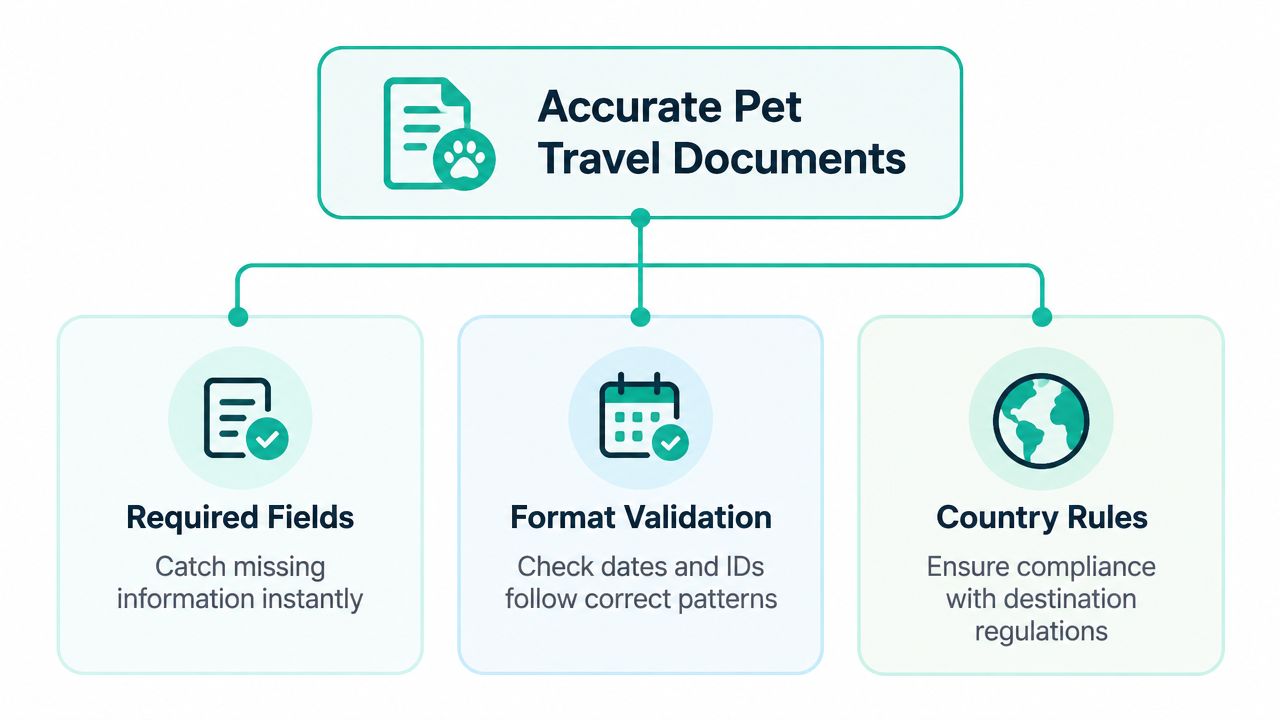
Required information: A blank owner contact field can be identified before the team needs to reach the client.
Correct formats: A microchip identifier or date can be checked against the expected pattern.
Matching records: Entered pet information can be compared with information on an uploaded document.
Document completeness: A missing page or supporting file can be flagged for follow-up.
Destination rules: Relevant requirements can be applied before the application moves to the next stage.
Why early feedback reduces rework
After-the-fact validation often creates a chain of corrections. Someone must find the issue, identify who can fix it, send a message, wait for a response, update the record, and check the result again. Real time feedback shortens that chain by placing the warning close to the original action.
A useful design doesn't merely say “invalid.” It explains what needs attention, such as a missing date, an identifier that doesn't match, or a document that doesn't contain expected information. Plain messages help busy clinic teams act without stopping to decode technical language.
Real-time quality systems can also route problematic records to a quarantine or dead-letter path instead of dropping them. That preserves the record for review while keeping questionable information away from downstream systems. Teams can monitor quality signals such as schema-validation failure rate, missing-field percentage, quarantine volume, freshness, and latency to spot drift or operational regressions, as described in Confluent's guide to scalable real-time data quality.
For pet owners, the result is less uncertainty. A correction request arrives while the application is active, rather than after the travel plan has already become urgent. That doesn't remove every complication, but it gives the people involved a cleaner path to resolve known issues.
When teams also review ID verification tips from AI Image Detector, they can think more carefully about document authenticity and consistency alongside basic field checks. The goal isn't to replace professional judgment. It's to make that judgment easier by surfacing relevant issues sooner.
Inside the Engine How Real Time Checks Actually Work
Real time validation usually combines a place where information enters with a set of rules that decides whether the information can continue. Some checks run directly in the form or upload tool. Others run in a central engine that reviews incoming records before storage.
A pet travel example might start with a form. As the owner types a microchip number, the entry tool can check its pattern. When a veterinarian uploads a certificate, a central service can compare key details with the application record. If the information passes, it moves onward. If it doesn't, the system can flag it, hold it, or route it for review.
The basic rule layers
A practical validation engine may use several types of checks:
Null checks: Is a required field empty?
Type verification: Is a date entered as a date, rather than as unrelated text?
Range constraints: Does a value fall within an allowed boundary?
Format validation: Does an email address, phone number, date, or identifier follow the expected pattern?
Referential integrity: Does the document refer to the same pet and owner as the application?
Business rules: Does the information make sense for the selected destination and workflow?
Thresholds help the system decide when a result should become an incident. Documentation from Validio identifies dynamic thresholds, fixed thresholds, and difference thresholds. A fixed threshold can enforce a direct boundary, such as rejecting an Age value below zero. A difference threshold can alert when a metric falls over consecutive windows, while a dynamic threshold can adapt to an established pattern. The Validio threshold documentation explains these modes and their use in incident detection.
Practical rule: A threshold should lead to a clear action, not merely create another notification.
A quick comparison
Check Type | What It Validates | Pet Travel Example |
|---|---|---|
Required-field check | Whether essential information is present | Owner contact details aren't blank |
Type check | Whether a value uses the expected data type | A vaccination date is recognized as a date |
Range check | Whether a value stays within an allowed boundary | A numeric field doesn't contain an impossible negative value |
Format check | Whether characters follow a defined pattern | A microchip number follows the accepted structure |
Match check | Whether two records agree | The pet name and identifier match the uploaded certificate |
Rule check | Whether information meets a workflow condition | Required destination information is included before review |
The engine doesn't need to treat every failure the same way. A typo in a phone number may return the form to the user for correction. A mismatch between a document and the pet record may create a review task. A nonessential anomaly may be logged for monitoring rather than blocking progress.
Teams evaluating document validation software should ask where checks run, how messages are presented, what happens to failed records, and whether staff can understand the reason for an alert. A technically capable engine still creates friction if its rules are hidden or its warnings are difficult to act on.
Balancing Speed Cost and Coverage Without Slowing Things Down
Every additional check uses some processing time and infrastructure. That doesn't make validation a bad idea, but it does mean teams should choose where and how to apply it.
For latency-sensitive pipelines, producer-side checks can add about 0.5 to 2 ms, while remote registry lookups can add another 1 to 3 ms unless they're aggressively cached, according to System Overflow's schema validation architecture coverage. High-throughput systems may need per-message validation under 1 ms p99 at around 200k events per second so validation doesn't become the dominant compute cost. These figures describe engineering constraints, not a promise for every platform or workflow.
Distribute the work deliberately
A producer can perform simple checks close to the point of entry. A stream processor or central engine can handle rules that need more context. Caching can reduce repeated lookups, and pre-materialized schema checks can avoid rebuilding the same decision for every message.
That division creates a practical balance:
Fast local checks catch obvious format and presence problems with limited overhead.
Central checks handle rules that require shared definitions or comparisons.
Deferred review gives people a place to investigate records that shouldn't block every workflow.
Monitoring shows whether the chosen design is causing latency, cost, or error growth.
Coverage also needs boundaries. Validating every dataset with the same depth can create unnecessary compute and may expose sensitive information to more temporary processing steps than needed. Streaming validation can involve substantial compute, specialized architecture, and in-memory handling, so privacy and access controls should be part of the design rather than an afterthought.
A focused rollout often makes more sense. Start with a small number of Tier 1 datasets, such as pet identity, vaccination records, and travel-critical owner details, then define explicit freshness and completeness service-level expectations for those flows. Less critical information can use lighter checks or later review.
The best design isn't the one with the most rules. It's the one that catches meaningful problems early while keeping the workflow responsive, affordable, and appropriately protected.
Making Validation Work in Practice Ownership Alerts and Best Practices
A validation rule only helps when someone knows what to do after it fires. A missing document might belong to the client communication team. A system error may belong to the platform team. A questionable medical detail may require veterinarian review. Without clear ownership, one alert can move between inboxes without being resolved.
Practitioner guidance on real-time data quality governance highlights a common failure pattern. Thresholds can become too aggressive, alert fatigue can grow, and incidents can involve source, platform, and business teams whose responsibilities aren't clearly defined. Detection logic may work perfectly while the operating model around it breaks down.
Give every alert a destination
Before activating a rule, write down four simple details:
Owner: Which person or team handles the issue?
Meaning: What does the alert indicate?
Action: Should someone correct, review, quarantine, or escalate the record?
Timing: How quickly should the team respond relative to the pet's travel date?
A clinic may prioritize an incomplete application for a client leaving soon, while a lower-priority record can wait for routine follow-up. Clear statuses help everyone understand whether a document is awaiting information, under review, ready for another step, or blocked by a specific issue. A consistent system for document status types makes those handoffs easier to follow.
Make alerts useful, not loud
An alert should explain the failed rule and identify the affected record. It should avoid sending repeated messages for the same unresolved problem. Teams can begin with conservative thresholds, review the alerts they receive, and adjust rules when they discover that normal variation is being treated as an incident.
Freshness and completeness expectations also need to be agreed upon before launch. For one workflow, fresh data may mean information appears promptly after entry. For another, the important requirement may be that every travel-critical field is present before a review task is created. The team should define these expectations in plain language and connect them to actions.
Automation can reduce repetitive mistakes, but it shouldn't hide responsibility. A good workflow tells the client what is missing, gives the clinic a clear task, and records what happened after the correction. That combination keeps the process practical for people and gentle on the data, with no need to let every alert bark.
Putting It All Together Your Next Steps to Pawsitive Data Quality
Real time data validation is best understood as an early-warning and early-correction system. It checks information when it enters the workflow, compares it with known structure and rules, and helps the right person respond before an issue reaches a later stage.
For pet travel, start with the information that can interrupt the application most easily. That usually includes pet identity, owner details, vaccination information, uploaded documents, and destination-specific requirements. Then decide what the system should do when a check fails, whether it should request a correction, create a review task, quarantine the record, or log the event.
A practical starting checklist
Choose a critical flow: Begin with one travel document workflow where errors create the most follow-up.
Define the fields: Mark which information is required and which can remain optional.
Add simple checks first: Use presence, type, format, date, and matching rules before introducing more complex logic.
Set useful thresholds: Configure alerts around incidents the team can investigate and resolve.
Assign ownership: Give each alert a named team or role.
Protect sensitive information: Limit access to temporary data, logs, and review screens.
Monitor the workflow: Watch failure patterns, quarantine volume, freshness, and latency.
Improve gradually: Adjust noisy rules and expand coverage only after the first workflow is manageable.
High-speed streams leave little time for rigorous checks, and poorly designed validation can increase latency, compute needs, and privacy exposure, as discussed in independent coverage of streaming data validation challenges. That's why focused coverage is often more useful than trying to validate everything at once.
The result is a calmer experience for clinics and pet owners. Small errors get attention while they're still easy to fix, documents remain easier to track, and each pet's journey has fewer avoidable bumps along the way.
Passpaw offers tools for managing pet travel documents, checking uploaded documents against entered pet information in real time, and alerting users when something is missing or incorrect. Visit Passpaw to explore a more organized way to handle validation, client communication, and travel-document workflows.

More articles
From regulatory changes to best practices for veterinarians and pet owners, our resources keep you ahead of the curve.