Are you a team member in a veterinary practice?
Are you a pet parent planning a trip with your furry pal?
Document Status Types for Pet Travel Explained
Tuesday morning is already moving quickly when a client calls about a Labrador's rabies certificate for travel to Frankfurt. The front desk finds the file, but nobody can tell whether it's still being typed, waiting for a rabies titre result, in veterinary review, or ready to send. The certificate is sitting in limbo, and the departure date isn't.
That kind of confusion is why document status types matter. A status gives every person involved, from the receptionist to the veterinarian and pet owner, the same view of a certificate's progress. If you're still building your terminology, this plain-language guide to what is a certificate offers useful background before you apply status logic to pet travel paperwork.
Why Pet Travel Certificates Need Clear Status Labels
A certificate without a clear status is like a kennel card without the pet's name. The file may exist, but the team can't safely tell what it means or who needs to act next.
At a busy clinic, one person may enter the owner's details, another may check the microchip number, and the veterinarian may need to confirm the clinical findings. If the file appears as “open,” each person has to inspect the contents or ask around. Staff may rely on memory, sticky notes, inbox searches, or group chats, and important follow-up can disappear between handoffs.
A status label turns that paper trail into a shared map. Draft means someone is still building the certificate. Pending signals that the team is waiting for information or action. In review tells the veterinarian that the document is ready for a formal check. Those labels make a queue easier to sort because the status carries meaning before anyone opens the file.
Practical rule: A status should answer one question immediately, who owns the next action?
Clear labels also prevent a common mistake: treating a document as travel-ready because the fields look complete. A certificate can be filled in but still need a veterinary review, a laboratory result, an official signature, or a date check. The status should reflect the certificate's real position, not how polished the form appears.
Good status design helps teams:
Prioritise work: Staff can filter certificates that need review instead of scanning every open case.
Target reminders: The client receives a follow-up request when information is missing, not after the certificate has already been released.
Protect edits: A document in review can be restricted so a routine change doesn't alter the version being checked.
Handle exceptions: Rejected, bounced, and declined files can return to the right person with a visible reason.
The labels don't replace destination-specific guidance. They make it much easier to apply that guidance consistently, so a certificate doesn't wander through the workflow like a curious cat in a treatment room.
The Core Lifecycle of a Travel Document
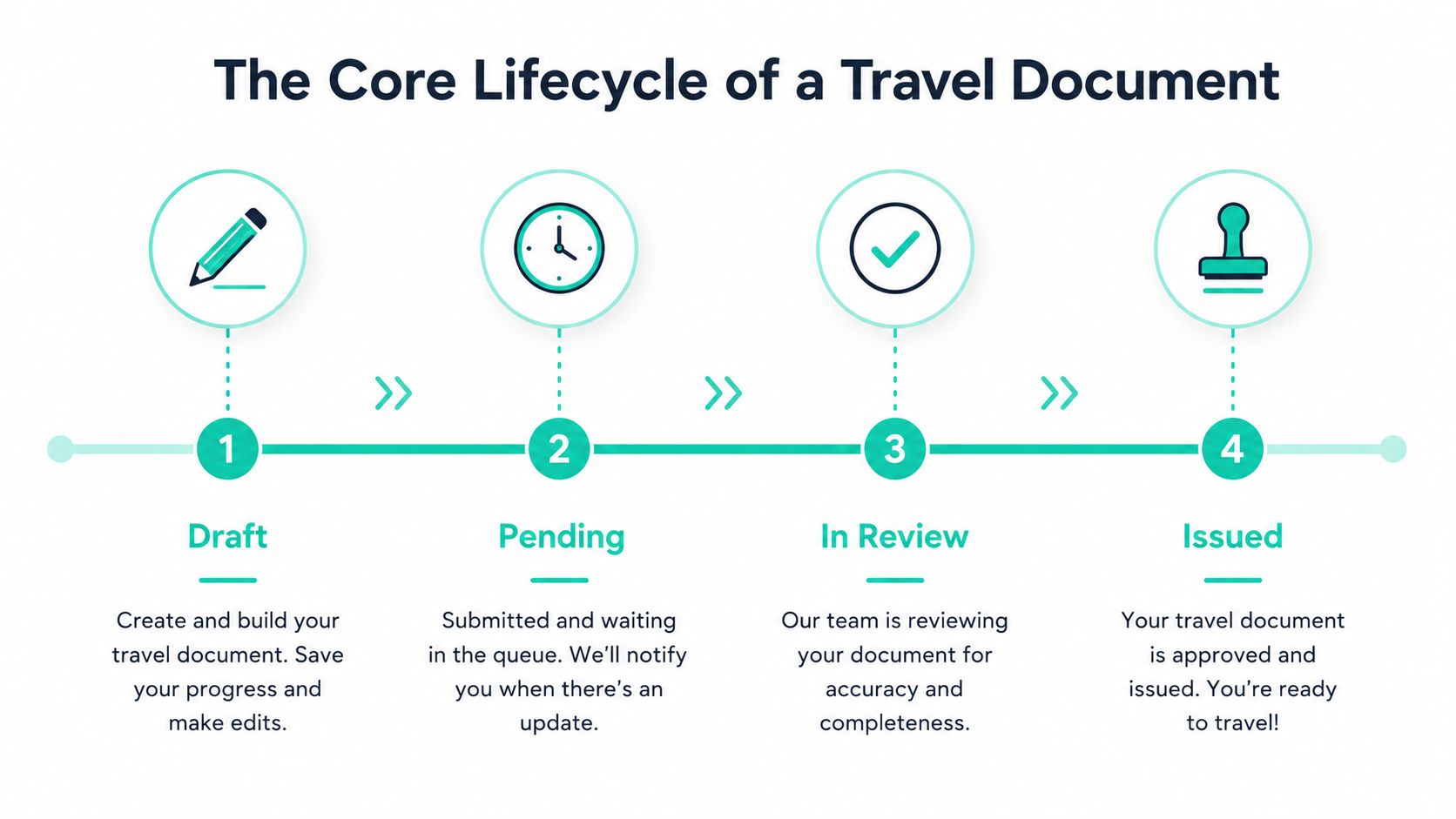
Most pet travel certificates follow a broad progression, even though the required forms and official steps vary by destination. The file starts as a working document, pauses while the team gathers or checks information, moves through review, and reaches an issued state only after the responsible people have completed their work.
Four useful gates
Draft is the editable starting point. The team may have the owner's details and destination but still need to enter the microchip number, vaccination information, or examination findings.
Pending means the work has paused because someone or something is needed. That might be a laboratory result, a client response, a scan, or confirmation from the veterinarian. The file shouldn't sit in the same queue as documents ready for sign-off.
In review is the checking gate. The assigned veterinarian or authorised reviewer compares the certificate with the available records and the destination requirements. A system may limit editing during this stage so the reviewer knows what information they're approving.
Issued or released means the usable document has been delivered to the client or sent through the required official channel. It doesn't mean the document will remain useful forever. The certificate still needs its relevant dates and conditions monitored.
Words such as “pending,” “validated,” and “approved” often overlap in everyday speech, but they shouldn't automatically mean the same thing in a workflow. A certificate can pass a data check while waiting for a veterinarian's decision. It can be approved internally but not yet delivered. Separating those gates protects the team from sending a document downstream too early.
For a broader view of controlled progression, the document life cycle guide provides helpful context. In practice, the simplest model is this: edit first, wait for missing inputs, review carefully, then issue only when the right person has completed the right check.
Draft, Pending, and In Review
The early status types describe work that is not ready to support a travel decision. They need to stay separate because each one points to a different reason the certificate hasn't advanced.
A draft is the working copy. The clinic may have loaded a template and entered the pet's name, owner details, destination, and microchip number, while the rabies section or examination details remain incomplete. The person creating the document owns the next action, and the file should generally stay away from client-facing delivery.
A pending certificate has been submitted for input or checking but can't move forward yet. The team might be waiting for a laboratory result, a missing vaccination record, a client attachment, or a veterinarian's availability. Pending is not a rejection. It's a visible pause.
In review is more controlled. The veterinarian checks the microchip information, rabies dates, clinical findings, and destination requirements. If the system restricts editing for most users at this point, it reduces the chance that a field changes while the reviewer is signing off.
Status | Who owns it | Editing rules | Typical trigger to advance |
|---|---|---|---|
Draft | Certificate creator or assigned coordinator | Broad editing while information is collected | Required fields are entered and the file is submitted |
Pending | Coordinator waiting on a person, record, or result | Edit only the information needed to resolve the hold | Missing input arrives or a reviewer is assigned |
In review | Veterinarian or authorised reviewer | Limited editing during formal checking | Reviewer validates the certificate, requests correction, or rejects it |
A useful operating rule is to make the transition event explicit. Saving or loading a template creates the draft. Submitting it moves the file to pending. Opening it as the assigned reviewer starts the review stage. The exact automation can vary, but the team should always know what action changes the status.
The documentation verification resource can help teams think through the difference between gathering information and confirming it. Until the certificate leaves this early group, nobody should treat it as cleared for travel.
Validated, Approved, and Released
These three states are close together, but they answer different questions.
Validated means the certificate's information has passed a structural or consistency check. The required fields may be present, formats may be acceptable, and related details may agree with one another. For example, the microchip number might match the clinic record, while the vaccination information is entered in the expected format.
Approved means the responsible veterinarian or authorised official has completed the substantive review. Approval is a decision by the person with the right role, not merely a green light from an automated form check.
Released marks dispatch. The certificate has been delivered to the client or submitted through the destination authority's process, depending on the workflow. A file can be validated but not approved, or approved but not released, and each gap matters when staff need to reconstruct what happened.

Dates still govern the outcome
A status doesn't override a travel rule. It gives the team a way to check whether the certificate reached the right gate at the right time.
For pets entering the EU from a non-EU country, the EU says an animal health certificate must be issued by an official State vet no more than 10 days before arrival. The same certificate can support travel between EU countries for 6 months or until the anti-rabies vaccination expires, whichever comes first. These timing conditions come from the EU pet travel guidance, so a released status still needs a date review.
Rabies timing creates another important checkpoint. After a primary rabies vaccination, it becomes valid only after at least 21 days, as explained in the European Commission guidance for bringing pets into the EU. A certificate may be structurally validated before that waiting period ends, but the team shouldn't confuse validation with permission to travel.
The status trail should show both the workflow decision and the date logic behind it. That gives the clinic a clearer record when someone asks why a certificate was held, approved, or sent.
Rejected, Bounced, and Declined
“Not yet” can mean several different things. Using one generic failure label hides the recovery path and makes it harder to tell whether a person, a portal, or the certificate itself caused the interruption.
A rejected certificate has received a formal refusal after review. For example, the microchip number may not match the laboratory record, or a required rabies titre may be missing. The team needs to correct the underlying issue, not resend the same file.
A bounced document usually returns earlier in the process. An upload portal might reject the file automatically because the PDF fails a schema check, or a client upload may fail before an authority has reviewed the content. Bounced means the document may never have reached substantive review.
A declined application sits between those outcomes. A reviewer has decided that the request can't proceed with the information currently available, such as when the clinic needs an updated vaccination history. The case may be recoverable, but someone must provide the missing evidence or make a new decision.
State | Typical trigger | Example cause | Who acts next | Recovery path |
|---|---|---|---|---|
Rejected | Formal review refusal | Microchip number doesn't match the lab record | Assigned veterinarian or coordinator | Record the reason, correct the issue, and create a controlled revision |
Bounced | Automated or delivery failure | PDF fails a portal schema check | Coordinator or technical support contact | Fix the file or upload issue, then return it to pending |
Declined | Reviewer pauses or refuses progression | Updated vaccination history is needed | Client, veterinarian, or records team | Gather the missing history and reopen the appropriate workflow stage |
The recovery process should preserve what was already entered. Don't delete the original certificate and start from memory. Add the reason for the outcome, notify the person who owns the next task, and move the corrected version back to draft or pending according to your system's rules.
The status guide from SignWell's document workflow reference is useful for distinguishing delivery outcomes from review decisions. That distinction keeps a small technical error from looking like a clinical refusal, and it gives the client a clearer explanation.
Expired, Voided, and Withdrawn
Closing states tell the team why a certificate is no longer available for normal use. They shouldn't be treated as interchangeable because the reason affects follow-up, reporting, and the audit trail.
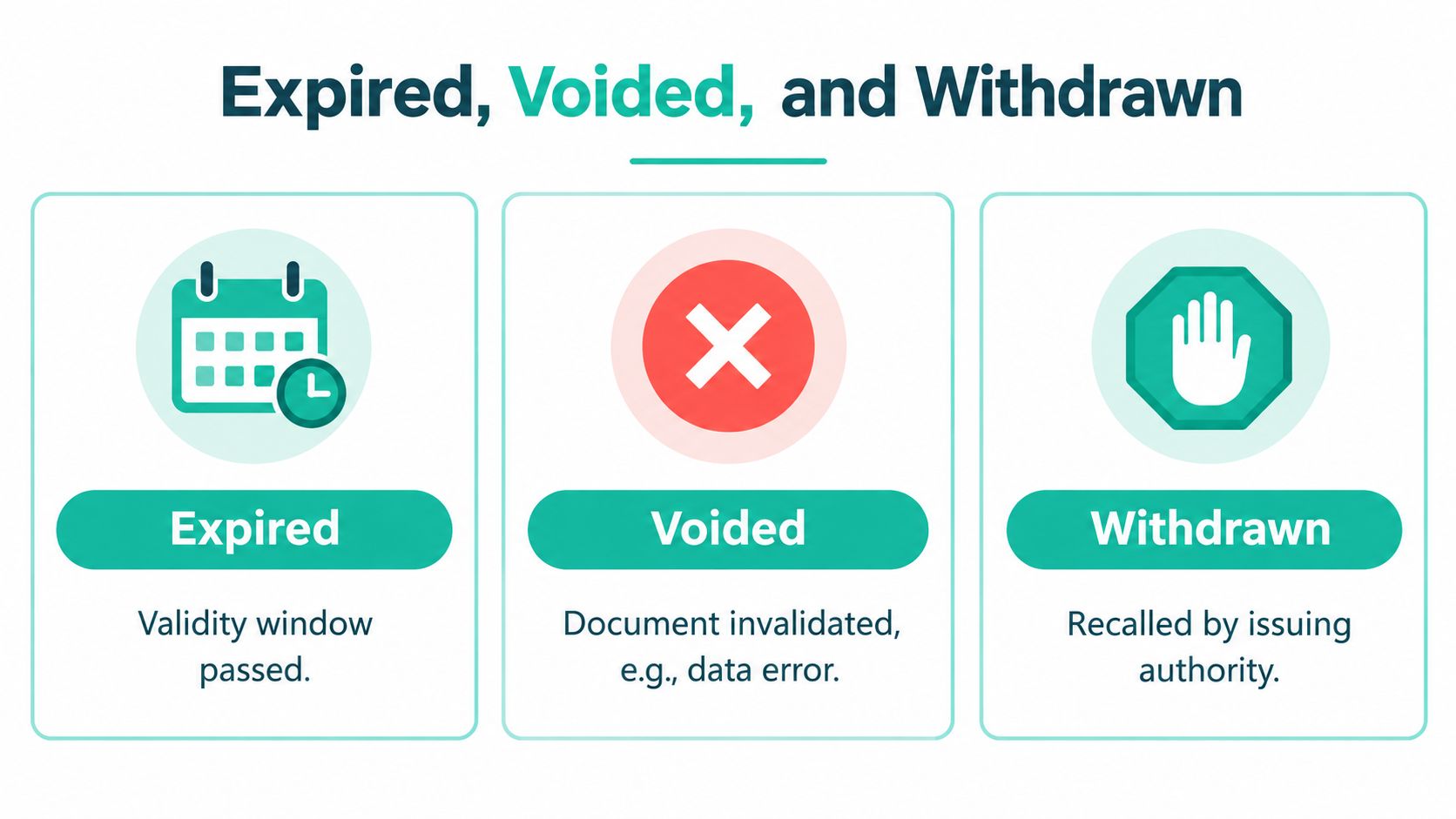
Expired is driven by time. The certificate has passed the relevant validity window, so the team should check whether a new examination, signature, or supporting document is needed. Expiration is a normal lifecycle outcome, not automatically a sign that anyone made a mistake.
Voided is usually driven by an internal decision. A duplicate certificate, incorrect data entry, or flawed document may need to be invalidated before travel. The record should remain visible with its reason, while the replacement follows a fresh controlled path.
Withdrawn means the document was pulled back from use. The owner may cancel the trip, change the destination, or report that the pet is no longer fit to travel. In some systems, an issuing authority may also recall content, so the team should record who initiated the withdrawal and why.
Closing state | Main driver | What it tells the team |
|---|---|---|
Expired | Calendar or validity condition | The document's useful period has ended |
Voided | Clinic or authorised operator action | The document was invalidated because it shouldn't be used |
Withdrawn | Owner, clinic, or issuing authority action | The document was recalled or the travel plan stopped |
This distinction helps a manager interpret the record. A group of expired certificates may reflect normal travel changes or timing issues. Voided files may point to duplicate creation or data-entry problems. Withdrawn files may need client communication, rebooking, or refund handling.
The reason for every closing transition should be mandatory. A short note such as “destination changed” or “duplicate certificate” gives the next staff member enough context without forcing them to reconstruct the case from email threads.
How Status Types Power Daily Workflows
On a Monday morning, the front desk shouldn't need to open every certificate to decide what needs attention. A queue filtered to pending and in review can show which cases need information and which are waiting for a veterinarian's check.
The veterinarian's view can be narrower. It might show only certificates that contain the required client and pet details and are ready for clinical sign-off. That keeps unfinished forms out of the review queue and makes the handoff more respectful of the vet's time.
The practice manager can monitor a different set of signals:
Pending cases: Follow up with clients, laboratories, or staff members who still owe information.
In-review cases: Confirm that assigned veterinarians have a clear next action.
Validated cases: Check which documents are waiting for approval or release.
Rejected cases: Route the form back to the originating team member with the reason attached.
Date-sensitive cases: Review certificates whose examination or entry window is approaching.
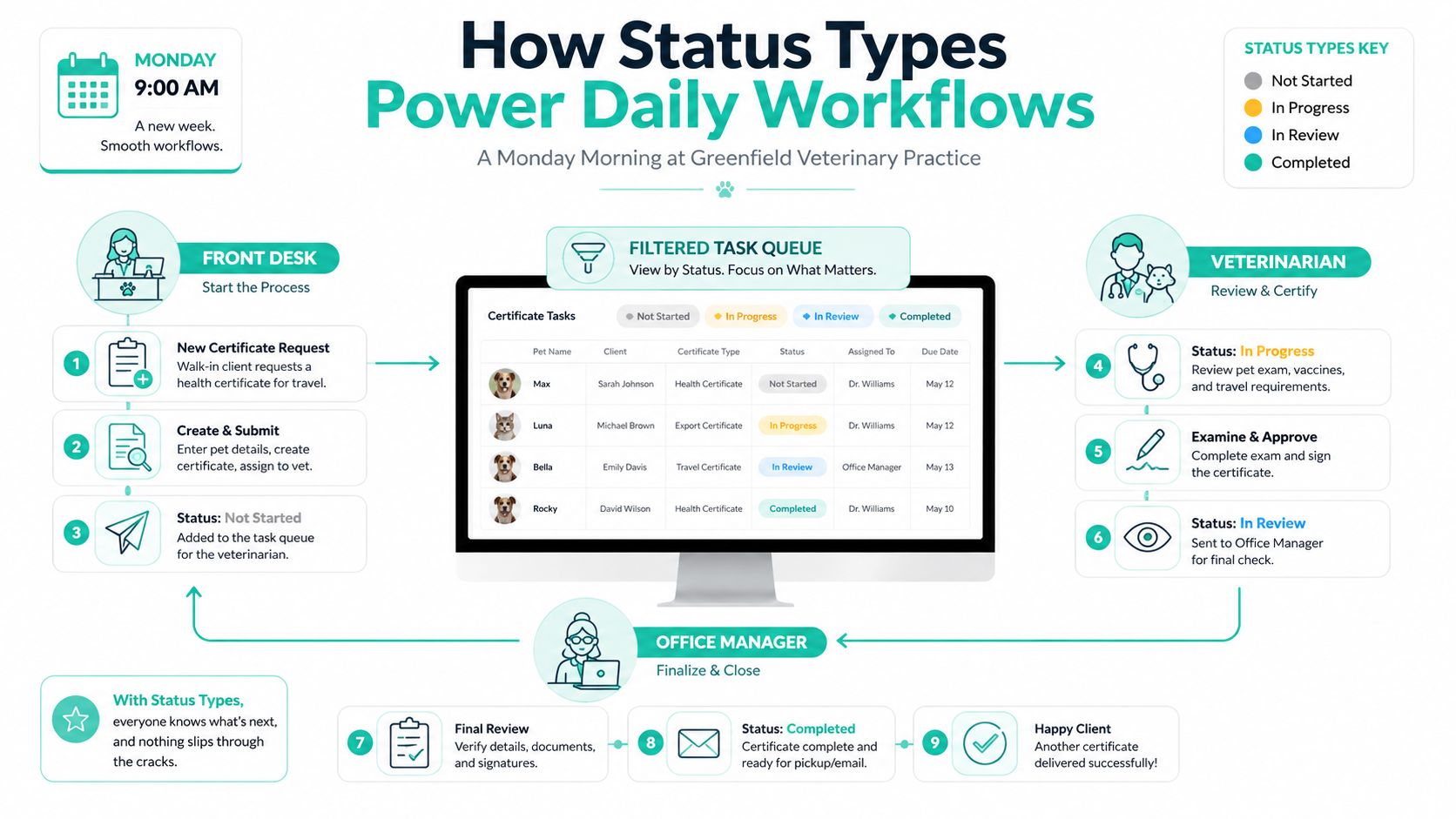
Status changes can also trigger communication. A move from in review to validated may prompt an internal notification, while release can send the client the next instruction. A rejected form can return to the assigned veterinarian with a comment trail instead of disappearing into a shared inbox.
Teams reviewing automation patterns may find this practical guide from digna useful for thinking about task routing and event-based actions. In a pet travel workflow, the important principle is simple: every status should connect to a queue, reminder, notification, permission, or handoff.
For practices that want a central place to track applications and document states across devices, Passpaw's document validation software is one option to evaluate alongside internal tools and established practice systems. The right choice depends on how your team collects records, assigns reviews, communicates with clients, and monitors destination requirements.
Keeping Every Document in the Right State
A short daily review can prevent certificates from drifting into the wrong queue. The team doesn't need complicated language. It needs consistent checks before each transition.
Use this checklist at the export station or inside the workflow:
Before draft ends: Confirm the owner's details, pet information, destination, and microchip number.
Before pending advances: Check that the requested laboratory results, vaccination records, and client attachments have arrived.
Before review begins: Make sure the assigned veterinarian can see the full record and knows what needs checking.
Before validation: Compare the certificate with the destination's current requirements and relevant validity windows.
Before approval: Confirm that the responsible reviewer has completed the clinical and document checks.
Before release: Verify that the final recipient and delivery channel are correct.
After a rejection: Record the reason, notify the next owner, and preserve the previous entries.
After voiding or withdrawal: Archive the record rather than deleting it, and document who made the change.
During daily closeout: Review expired and rejected items so no pet travel case stalls.
A good status system creates a reliable chain from draft to pending, review, validation, approval, release, and closure. It also keeps exceptions visible instead of burying them under a single “problem” label. For more ideas on organising supporting records, a structured documentation hub can help your team keep certificates and related files together.
The simplest rule is the most useful: if a certificate's status doesn't match its real situation, the workflow is already broken.
Passpaw helps veterinary practices manage international pet health certificate applications, track document statuses, validate information, prioritise tasks, and communicate with clients in one workflow. Visit Passpaw to see how a clearer status trail can help your team move each certificate from first draft to the right final state.

More articles
From regulatory changes to best practices for veterinarians and pet owners, our resources keep you ahead of the curve.