Are you a team member in a veterinary practice?
Are you a pet parent planning a trip with your furry pal?
Documentation Tools for Pet Travel Workflows
Tuesday morning starts with three pet travel cases at once. One client needs a health certificate checked because a rabies vaccine date no longer fits the destination rules. Another is calling about a missing microchip number on a dog's paperwork. A third wants a cat's documents sent to an outside agency before its limited morning submission window closes.
The hard part isn't typing names into forms. It's keeping requirements, patient details, approvals, signatures, files, and client handoffs aligned from the first travel consultation to the final document delivery. A good set of documentation tools can turn that chain into a visible workflow, where staff know what's missing, which version is current, and who needs to act next.
Why Pet Travel Paperwork Needs Better Tools
Pet travel paperwork creates friction because several small details must remain accurate at the same time. A vaccine date may be correct in the medical record but unsuitable for a particular destination. A certificate may contain the right pet information but still need a microchip number, test result, signature, or endorsement step. When staff manage those details through email threads, shared folders, and handwritten notes, the process becomes difficult to inspect.
The problem grows when several cases have similar names, overlapping travel dates, or different destination requirements. A receptionist may save a revised certificate without replacing the older file. A veterinarian may approve a document while a technician is still working from an earlier template. The client then receives a file that looks finished but still needs correction.
The hidden work behind a “simple” certificate
Documentation systems developed beyond basic file storage because organizations needed better search, retrieval, collaboration, and workflow control. A historical marker from a Forrester study cited by Tiny describes 97% of organizations as having minimal or no digital document processes, while 72% still used a mix of paper-based and digital processes in 2020. The same summary reports that employees spent 3.6 hours per day searching for information on average. Those figures are discussed in Tiny's history of the document management software market.
A veterinary practice may recognize the same pattern on a smaller scale. Staff search for the latest certificate template, check whether a client uploaded a required record, and scroll through messages to find a veterinarian's approval. Each search interrupts patient care and increases the chance that someone acts on incomplete information.
Practical rule: Treat every pet travel file as an active case with owners, deadlines, requirements, and approvals, not as a loose collection of attachments.
Why the market shift matters to practices
Document management is now a major enterprise software category. One neutral market report estimates the market at USD 10.51 billion in 2025, with a projection of USD 19.81 billion by 2030, implying a 13.5% compound annual growth rate. Another analysis estimates USD 7.68 billion in 2024 and projects USD 18.17 billion by 2030, with a 15.9% CAGR from 2025 to 2030. These estimates appear in document lifecycle management market data from Verdocs.
Those figures don't mean every clinic needs a large enterprise platform. They do show that structured document handling has moved well beyond paper archives. For pet travel teams, the practical lesson is simple: choose tools that control validation, version drift, and handoffs, rather than buying a storage folder and hoping staff remember every next step.
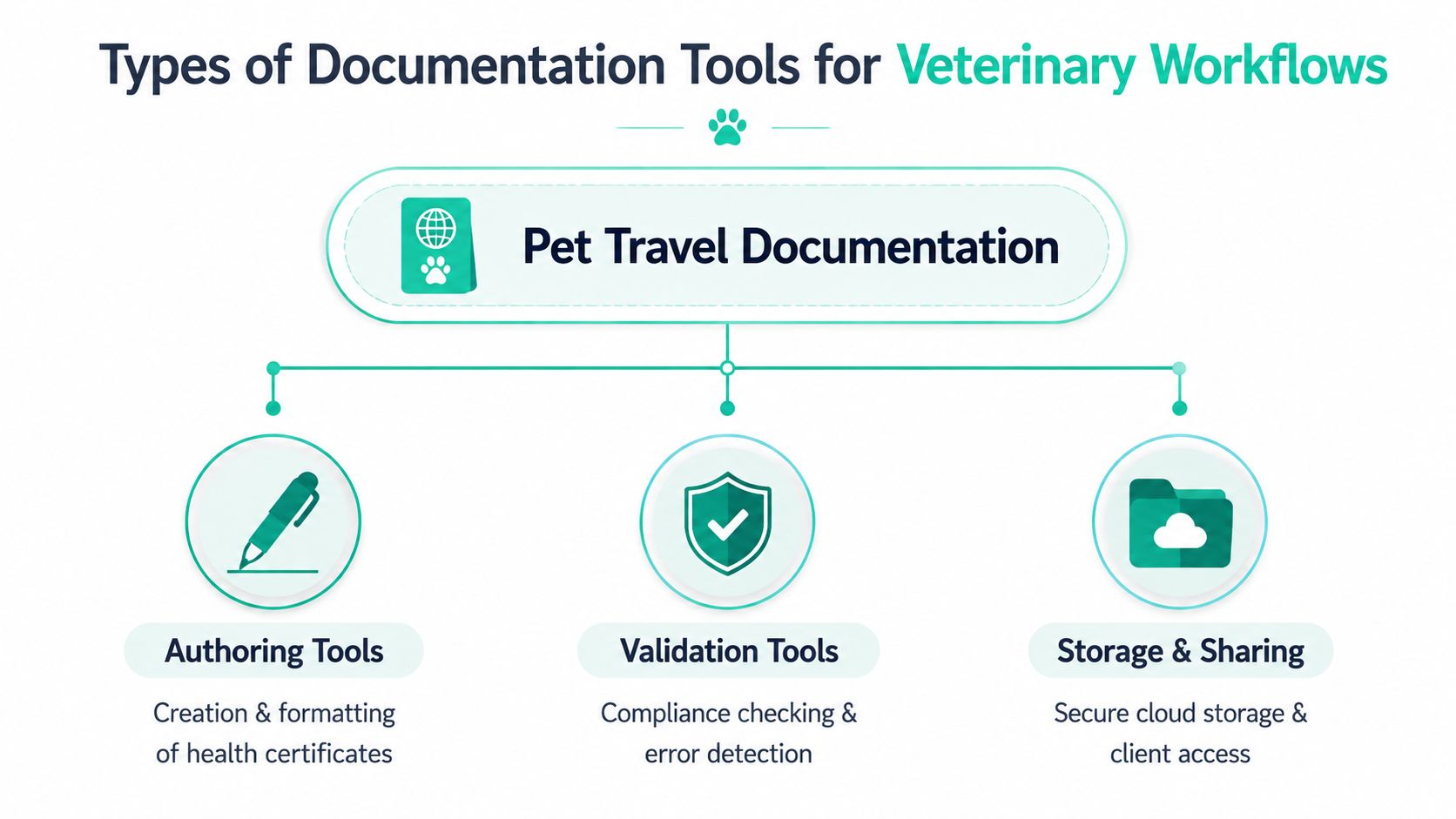
Types of Documentation Tools for Veterinary Workflows
Start by separating the jobs your tools need to perform. A certificate authoring tool creates the file. A validation tool checks whether the file and patient data meet defined rules. Storage and sharing tools preserve the record and make the right version available to the right person.
Authoring and signing tools
Authoring tools help staff create health certificates, vaccination records, and supporting forms from reusable templates. Useful templates can pull patient details from a practice management system, guide staff through destination-specific fields, and reduce manual copying. The benefit isn't fancy formatting. It's removing repeated data entry where a mistyped name or number can create another round of work.
E-signature tools can support digital approval by veterinarians and clients when the workflow allows it. They're useful when a client shouldn't need to visit the clinic to sign a completed document. Still, a signature feature alone won't solve missing data or an outdated form. Signing should happen after validation, not before.
Validation tools
Validation tools check incoming files against predefined rules. They can verify required fields, compare values with reference data, flag discrepancies, and route exceptions to the appropriate reviewer, as described in Zenphi's explanation of document validation.
For a veterinary team, that might mean checking whether a microchip number matches the patient record, whether a date is present, or whether a supporting file has been uploaded. This moves quality control closer to intake, where staff can fix problems before a document reaches final approval or submission.
Storage, workflow, and client access
A searchable repository should keep the current approved version visible while preserving prior revisions. Workflow automation then moves the file through stages such as create, route, review, approve, and store. Document workflow software is designed for this staged movement, with permissions and routing that help create a paper trail, as explained by Wrike's guide to document workflow software.
Client portals add another layer. Clients can upload records, check status, and receive messages without calling the front desk for every update. For general principles on organizing files and permissions, F1Group SharePoint document tips offer useful context, even if your practice uses a different platform.
Key Features to Evaluate for Pet Travel Compliance
A tool can have an impressive feature list and still fail at the front desk. Evaluate it against the points where your team loses time: unclear requirements, repeated data entry, missing approvals, outdated templates, and client follow-up.
Start with rules and records
A destination-aware template library is valuable because staff shouldn't have to hunt through old folders for the form that might apply. Ask how the vendor maintains templates, records changes, and communicates requirement updates. A library that looks broad but depends on staff to notice every change can create a false sense of security.
Validation should compare document information with patient records and destination rules. Look for visible exception messages rather than vague “incomplete” warnings. The reviewer should know whether the issue is a missing field, a mismatch, an unsupported format, or a requirement that needs professional judgment.
Audit trails matter for more than inspections. They help answer everyday questions, such as who changed a date, who approved a file, and which version went to the client. A sound version log records the revision number, revision date, author, approver, change summary, effective date, and reason for revision, according to document version control guidance from Document Compliance.
Then test the handoffs
Integration with your practice management system can reduce re-entry of names, microchip numbers, and vaccination history. Ask whether the connection uses an available API, what data formats it supports, and how it handles an incomplete or conflicting record. A fast integration that automatically overwrites information is worse than a slower process that shows staff what changed.
Permission controls should fit each role. A technician might prepare a draft, a veterinarian might review and sign, and a client might upload supporting files without editing clinical information. Mobile or offline access can also help when a team needs to check a case away from a reliable connection, but confirm what functions remain available and how updates sync later.
For broader context on keeping veterinary records organized, see veterinary record-keeping requirements.
Feature Category | Why It Matters | Red Flags to Avoid |
|---|---|---|
Destination templates | Gives staff a consistent starting point for each case | Old templates with no visible revision history |
Real-time validation | Finds missing or mismatched information before submission | Generic warnings that don't explain the exception |
Version control | Keeps the approved file distinct from drafts | Multiple files labeled “final” |
Audit trail | Shows edits, approvals, and handoffs | Activity logs that omit users or dates |
Practice management integration | Reduces manual copying from patient records | One-way syncing with unclear overwrite behavior |
Role-based access | Limits editing to the people who need it | Shared logins or unrestricted client access |
Client portal | Reduces email chains and status calls | A portal that hides missing tasks from clients |
The strongest tool is the one that makes the next action obvious. If staff still need a separate spreadsheet to track missing records and a shared inbox to track approvals, the platform may be storing documents without managing the workflow.
Building Your Documentation Toolchain
Most practices don't need one giant platform. They need a connected path from draft to delivery, with each layer solving a distinct problem.

A typical pet travel toolchain starts when a client books a consultation. Staff capture the destination, travel date, pet identity, and available records. The authoring layer creates the right document from a template, while an e-signature tool can collect approvals where appropriate.
The validation layer checks the draft before it moves forward. It should identify incomplete fields, mismatched patient information, and missing supporting documents. At this stage, a workflow stops being a digital filing cabinet and starts acting like a control point.
Four layers, two practical approaches
You can assemble the layers separately:
Author: Use templates and a signing platform.
Validate: Use a destination checklist or rule-based validation tool.
Store: Keep approved documents in a controlled repository with revision history.
Handoff: Use a client portal or structured delivery process.
This modular approach can work well when your practice already has reliable systems. It also creates more connections to maintain, and every handoff between systems becomes a possible failure point.
A consolidated platform can reduce those gaps by bringing document preparation, validation, task tracking, storage, and client communication into one case workflow. Passpaw is one example of a cloud-based platform for international pet health certificate workflows. It provides document validation, connects tasks to travel dates and pet information, and supports centralized preparation and communication.
Keep specialized tools when they earn their place
A separate tool may still be sensible if it handles a job your main platform doesn't. For example, a practice might retain a general repository for long-term records while using a purpose-built pet travel workflow for active cases. The decision should depend on whether the extra system adds a clear capability or merely duplicates storage.
Use Passpaw's documentation hub as a useful reference point when mapping how documents, tasks, and client communication could sit together. The goal isn't to collect more software. It's to give each case one dependable route through preparation, review, approval, and delivery.
Implementation and Integration Best Practices
A new system won't fix a workflow nobody understands. Rollout should begin with the current process, including the workarounds your staff created because the old process leaves gaps.
Map the work before configuring software
Write down every handoff from travel inquiry to document delivery. Mark where staff search for information, copy data, wait for signatures, send reminders, and confirm receipt. Include exceptions, such as a client uploading an unreadable scan or a veterinarian finding a mismatch during review.
Choose a small pilot team that includes the people who touch the process every day. A veterinarian, technician, and front-desk user will notice different problems. Give them representative cases and ask them to record confusing screens, duplicate entry, and missing status signals.
Connect carefully to the practice system
If your practice uses Cornerstone, ezyVet, or IDEXX Neo, check integration details before promising a smooth connection. Confirm which patient fields can be read, whether vaccination histories transfer in the required format, and how the system handles corrections. Test audit trail behavior as well. A record should show whether information came from the practice system, a staff edit, or a client upload.
A phased rollout protects busy clinics from avoidable disruption. Start with new travel cases, keep the old process available during testing, and define when the new workflow becomes the official record. Train with realistic templates instead of abstract demonstrations, then hold regular feedback meetings during the early adoption period.

Make ownership visible
Assign an owner for template maintenance, an owner for integration questions, and an owner for client-facing instructions. Staff should know who handles an exception instead of forwarding it through a growing email chain.
Review the complete document lifecycle, from creation through approval, storage, and eventual retention or removal. Passpaw's document life cycle resource can help teams frame that review. Adoption improves when staff can see that the tool removes a task, rather than adding another screen to an already crowded day.
Real-World Use Cases and Success Stories
A careful guide shouldn't invent before-and-after results for veterinary practices. Without verified practice records, claims about turnaround times, error reductions, client satisfaction, or adoption timelines would be guesswork. The useful approach is to examine realistic workflow scenarios and identify what a tool should change, without attaching unsupported performance figures.
A busy urban clinic
A high-volume clinic may begin with template hunting, email attachments, and a front-desk spreadsheet. A stronger process gives each case a destination, travel date, patient record, document checklist, and visible owner. The system can route a draft for review, send a reminder when an action is overdue, and keep the approved version separate from working copies.
The improvement is operational clarity. Staff can answer “What's missing?” and “Who has the next action?” from the case record instead of reconstructing the answer from messages.
A rural mixed-animal practice
A rural practice may have fewer travel cases but less administrative coverage during the day. Version drift becomes especially troublesome when one person works from a locally saved template and another uses a newer file. Centralized templates, validation rules, and a clear approval state reduce reliance on memory.
The workflow should also make exceptions easy to escalate. A flagged mismatch can go to the veterinarian, while a missing client upload can go back to the owner without pulling clinical staff into routine chasing.
A multi-location practice
Branches often develop their own habits. One location may store documents by client name, another by travel date, and a third by patient number. A shared workflow standardizes the stages and permissions while leaving room for local staffing patterns.
Practice Type | Before | After | Key Improvement |
|---|---|---|---|
High-volume urban clinic | Email chains, manual template searches, unclear ownership | Case-based routing, validation, and client status updates | Fewer hidden handoffs |
Rural mixed-animal practice | Local files and inconsistent document versions | Shared templates with controlled approval states | Less version confusion |
Multi-location practice | Branch-specific folders and procedures | Common stages with role-based access | Consistent handling across sites |
For practices deciding whether they need a dedicated role or clearer ownership, Passpaw's documentation specialist resource provides a useful way to think about responsibilities. The key measure isn't a promised percentage improvement. It's whether staff can locate the right file, identify the next step, and explain the case status without starting over.
Choosing the Right Tools for Your Practice
Select tools around your biggest friction point, not the longest feature list. A solo practice with occasional travel cases may need structured templates, validation, and secure client delivery. A multi-location group may need shared permissions, integration, audit history, and centralized template ownership.
Score each pain point as low, medium, or high:
Compliance uncertainty: Are staff unsure which fields or supporting records are required?
Client communication gaps: Do owners repeatedly call to ask what's missing?
Workflow bottlenecks: Do documents wait in inboxes for review or signature?
Version drift: Can more than one “final” file circulate?
Data re-entry: Do staff copy patient details between systems?
Then pilot the tool that addresses the highest-scoring problem. Keep the test narrow, define the intended workflow, and review real cases with the staff who use it. The right toolchain may be modular or consolidated, depending on what your existing systems already handle.
Practice Profile | Priority Tools | Key Considerations | Estimated Monthly Investment |
|---|---|---|---|
Solo or small practice | Templates, validation, client delivery | Ease of use and low administrative overhead | Obtain vendor pricing and compare it with current rework |
Growing practice | Workflow automation, storage, permissions | Clear ownership and practice-system integration | Compare options against staff time and duplicate tools |
Multi-location practice | Centralized workflows, audit trails, role controls | Standardization without blocking local operations | Assess total platform and implementation costs |
Don't judge value only by subscription price. Include staff time spent searching, correcting, chasing signatures, and answering status calls. A short pilot will give you a more honest view than a feature comparison alone.
Passpaw provides a cloud-based workflow for international pet health certificates, including document validation, task tracking connected to travel details, and client communication. If those are the friction points slowing your practice, visit Passpaw to review how it could fit your pet travel process.

More articles
From regulatory changes to best practices for veterinarians and pet owners, our resources keep you ahead of the curve.