Are you a team member in a veterinary practice?
Are you a pet parent planning a trip with your furry pal?
Mastering the Documentation Life Cycle: Vet Practice Guide
If you've ever had a pet travel file sitting open on one screen, a client in the lobby asking for an update, and a certificate waiting on one more check, you already know the problem. The work isn't just writing documents. It's keeping every version, signature, attachment, and date in the right place so the right record is used at the right time.
That's what the documentation life cycle is for. In a busy veterinary practice, it's the difference between a file that behaves like a well-trained collie and one that bolts under the couch when someone needs it most.
What the Documentation Life Cycle Looks Like
A practice can have a decent template library and still feel buried in paperwork if the lifecycle is loose. The lifecycle is the path a document follows from the moment it's created until it's archived or retired. In pet travel, that path usually includes creation, review, approval, distribution, validation, update, and archival.
The point isn't to add ceremony. It's to keep the current version easy to find, easy to trust, and easy to trace later. That matters because the document lifecycle is now treated as a governance framework in enterprise systems, and the market around it has grown accordingly, with the global document management system market valued at $8.85 billion in 2024 and projected to reach $27.43 billion by 2033, according to VerDocs' document lifecycle management statistics. Cloud systems already account for 70.34% of market revenue in that same source.
Documentation Life Cycle Stages at a Glance | ||
|---|---|---|
Stage | What Happens | Pet Travel Example |
Creation | The document is drafted or collected | A veterinarian starts a health certificate packet |
Review | Details are checked for accuracy | Microchip number and vaccine dates are verified |
Approval | The record is signed off | The final certificate is authorized |
Distribution | The right people receive it | The client gets the travel file set |
Validation | The record is checked against requirements | Destination rules are matched to the file |
Update | The document is revised when facts change | A rabies record or annotation is corrected |
Archival | The finished version is stored safely | The practice keeps a closed copy for reference |
Practical rule: if a record can change, it needs a clear next step. Otherwise, the practice ends up using yesterday's paperwork for today's trip.
That simple structure keeps pet travel from turning into guesswork. It also gives the team a shared language, which helps when a front desk coordinator, technician, and veterinarian all touch the same file.
Why the Documentation Life Cycle Matters for Pet Travel
A client once arrives thinking everything is ready, only to learn the health certificate is outdated, missing a required detail, or tucked into the wrong folder. The pet is healthy, the family is packed, and the trip still stalls because the file isn't current. That kind of mess doesn't feel dramatic in the moment, but it can derail a schedule fast.
Pet travel work lives on timing. Documents need to match the destination, match the pet, and match the latest version of the rules the practice is following. When the lifecycle breaks down, the clinic loses more than neat filing. It loses confidence, and the client feels that stress right away.
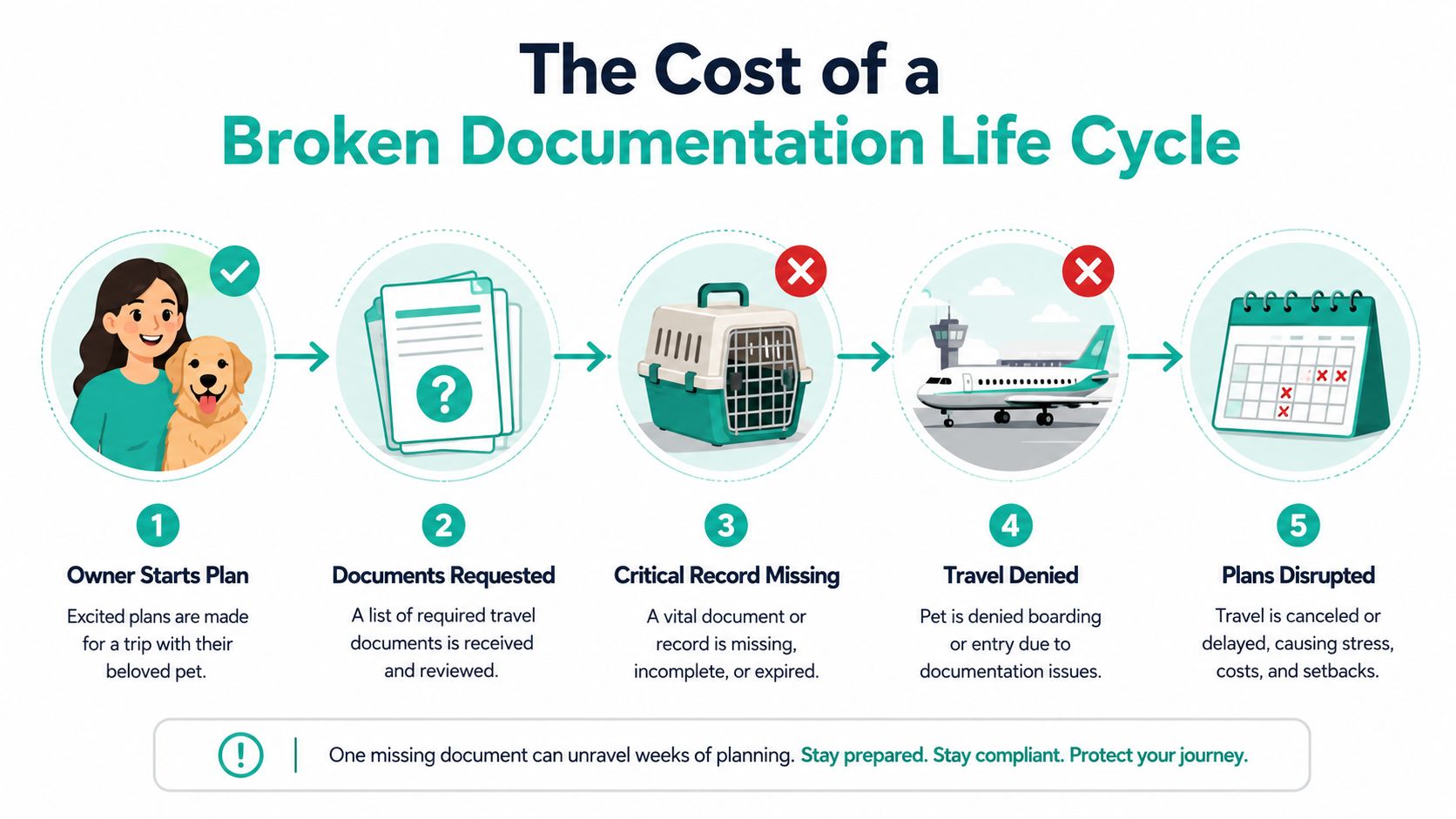
A broken lifecycle also creates hidden waste. Staff start searching for the latest copy, asking who approved what, and redoing work that already should've been finished once. That's why it helps to think of the lifecycle as a control system, not a filing habit.
The right document has to be the current document, and every version needs a trail.
For practices that support international travel, that traceability protects the workflow as much as the paperwork. If you want a practical look at where gaps usually show up, this breakdown of documentation gaps is worth a read. It lines up with what many clinics already feel, even if they haven't named it yet.
The bigger lesson is simple. Poor document control doesn't just create admin friction. It can frustrate clients, slow down approvals, and make your team look less organized than it really is. That's a rough trade for a practice that's otherwise doing solid clinical work.
The Seven Stages of the Documentation Life Cycle Explained
1. Creation
Creation is where the file starts, whether that's a health certificate draft, a microchip record, or a rabies vaccine entry. This is also where bad naming, missing fields, and rushed typing cause trouble later. If the first version is sloppy, every later step has to work harder.
A good start means using the right template and capturing the right details the first time. In pet travel, that often means patient identifiers, dates, and destination-specific items being entered with care. The document development life cycle starts with audience needs and planning, not just writing, which is a useful reminder for clinics building forms and client-facing records, as described by Devopedia's DDLC overview.
2. Review
Review is the reality check. Someone else looks at the record, compares it with the file source, and catches what the creator missed. That can be a vet confirming the certificate details, or a technician spotting a mismatch before the document moves forward.
This stage should feel slower than creation, and that's a good thing. Review exists because mistakes made here are cheaper to fix than mistakes made after the client has already booked travel. A peer-reviewed paper on electronic clinical documents shows how fine-grained these workflow states can be, with draft, preliminary, and signed statuses separated cleanly in a controlled process (PMC study).
3. Approval
Approval is the point where the practice says, “This is the version we stand behind.” In a clinic, that usually means a veterinarian signs off after the needed checks are done. Without that stop, teams can drift into sending half-finished records.
The failure mode here is familiar. Someone assumes another person approved it, and the document moves anyway. That's why approval needs a visible state, not a memory test.
4. Distribution
Distribution is getting the right document to the right person at the right time. In pet travel, that might mean the client receives a final packet, or the practice shares a record internally with the person handling the next step. If distribution is messy, people work from different copies and nobody's sure which one is active.
5. Validation
Validation checks whether the document still fits the task. A certificate can be signed and still be wrong for the destination, wrong for the pet, or wrong for the timing. This stage is where a practice confirms the file matches the travel requirements before moving ahead.
6. Update
Update matters because documents age. A rabies date changes, an annotation gets corrected, or a rule shifts and the file needs a fresh version. The trap here is leaving old copies in circulation after the new one exists.
Practical rule: if a change affects travel, it needs a controlled update, not a quiet edit in a random folder.
7. Archival
Archival is the safe shelf at the end. The work is done, but the record still needs to be findable and preserved. That's where a practice keeps closed versions away from day-to-day use while still maintaining a usable history.
The scale of that back-end control is bigger than many people expect. One enterprise summary says the average enterprise manages about 2.5 billion documents, with retention periods ranging from 3 to 100 years depending on document type and jurisdiction, and it lists examples such as SOX: 7 years, HIPAA: 6+ years, IRS: 3–7 years, and SEC: 3–6 years (Kevin Sanchez's industry summary). For a veterinary team, the exact rule set will differ, but the point is the same. Retention isn't random.
Mapping the Life Cycle to Workflows and Automation
Manual pet travel work usually breaks at the same places. Someone has to check dates, chase signatures, copy details into a new file, and remember which client needs which follow-up. That's doable with a small volume of cases, but it gets sticky fast when multiple applications are moving at once.
What changes with automation
A modern workflow tool can tie each lifecycle stage to a real action. Creation becomes a template-based intake. Review becomes a routed task. Approval becomes a tracked sign-off. Distribution becomes a controlled handoff. Validation happens before the record moves forward, not after someone spots a problem.
Passpaw fits into that kind of workflow by helping practices manage travel documents, sequence requirements, validate uploaded documents against pet information, and keep tasks tied to travel dates. That means the team spends less time hunting for the right file and more time moving the case forward. If your practice also handles broader workflow design, custom job management solutions from Osher Digital are a useful reference point for thinking about how a system should route work, not just store it.
The win is not flashier software. It's fewer handoffs that depend on memory. A clinic can still use a careful human review, but the system can carry the routine parts, like reminders and task queues, so the staff aren't babysitting every step.
Where the workflow gets cleaner
A useful automation setup does three things well. It prioritizes work by travel date, it flags missing information early, and it keeps the client loop from getting messy. Those are the spots where manual processes usually wobble.
That same mindset shows up in documentation guidance from Passpaw's workflow article, where the sequence matters more than the folder name. A process that's visible and repeatable is much easier to train than one that lives in someone's head.
Practical rule: if the team needs three reminders to finish one file, the workflow is carrying too much human memory.
That's also where a platform like Passpaw can feel less like a software purchase and more like a pressure release valve. It doesn't replace judgment, but it can remove the little paper cuts that make the day harder than it needs to be.
For practices building their own systems, continuous improvement with Doczen is a solid reminder that standard operating procedures matter when the team wants the same result every time. The trick is to keep the process simple enough that people will use it.
Implementing Lifecycle Management in Your Veterinary Practice
Start with one document path, not the whole universe. If pet travel is your most painful workflow, pilot there first. That lets the team see what changes without asking everyone to relearn every form in the clinic at once.
A practical rollout path
Audit the current flow. Watch where files stall, who touches them, and where versions go missing. The goal is to find friction, not blame people.
Digitize one key document. Choose a file that causes frequent back-and-forth, then make that path cleaner first.
Assign one owner. A champion keeps the process from drifting. Without that, good systems slowly turn into loose habits.
Build the template set. Standard forms keep the team from improvising in the middle of a busy day.
Set up the repository. One governed home for the current version cuts down on scavenger hunts.
Train the core team. If the first group gets it right, the rest of the practice has a model to follow.
Scale and refine. Add reminders, routing rules, and review checks only after the basics are steady.

The hardest part is usually not software. It's change. Staff members get skeptical when a new process looks like extra work, so the rollout has to show a lighter load, not a heavier one. That's why a small pilot beats a grand redesign in most practices.
For teams that want a tighter operating rhythm, Passpaw's documentation hub is a good example of how related resources can sit in one place instead of getting scattered across inboxes and shared drives. A structured hub makes training easier and reduces the “where did we save that?” problem.
Practical rule: if the new process doesn't save time for the people using it, adoption will sag.
When the workflow is clear, the team stops treating the documentation life cycle like a chore and starts treating it like muscle memory. That's a much better fit for a practice that already has enough moving parts.
KPIs, Compliance Checklists, and Next Steps
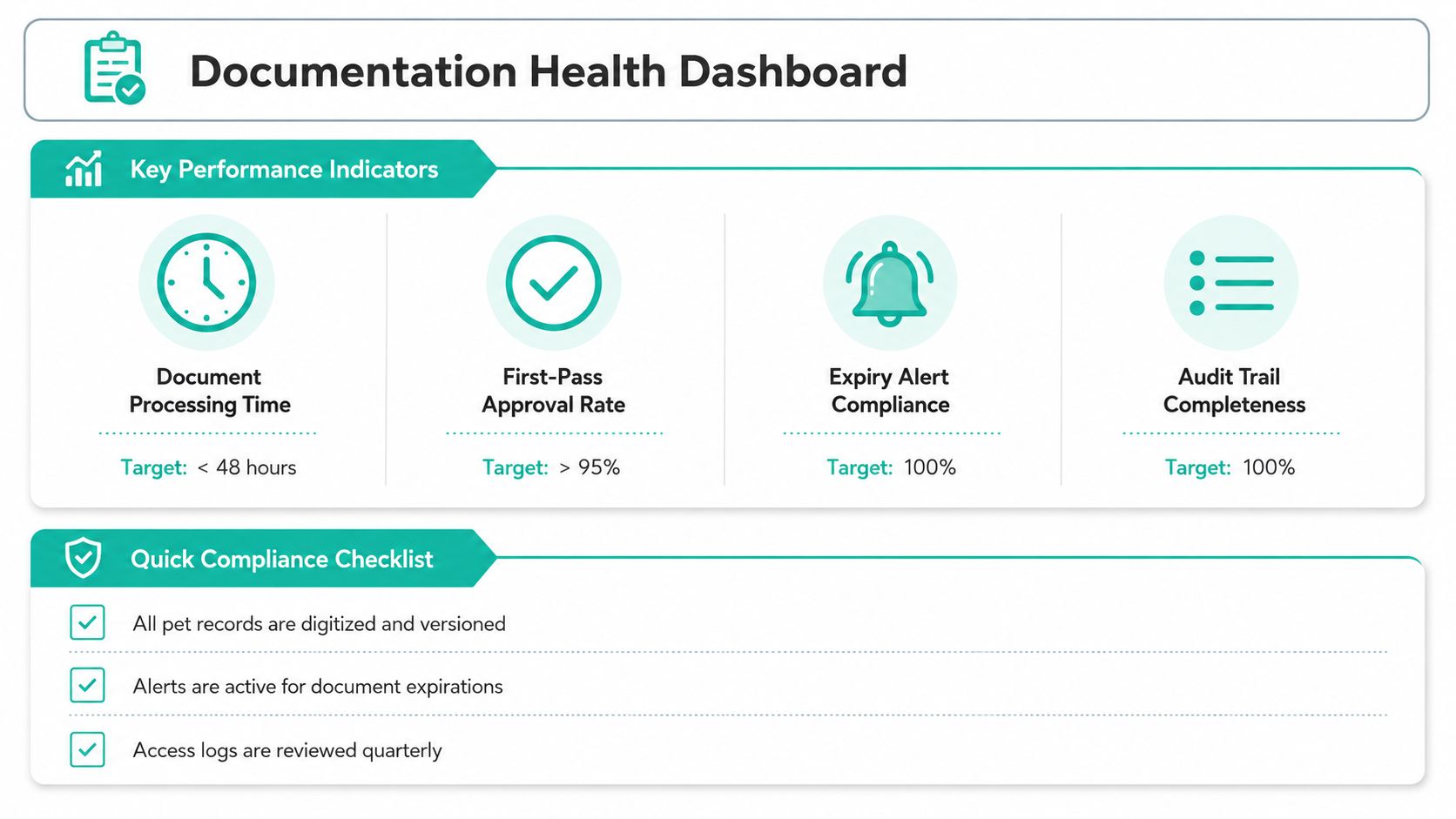
A documentation system should be judged by what it does, not by how tidy it looks. If files still bounce around, reviews still stall, or expired records still sneak through, the process needs tuning. Metrics make that visible.
Useful KPIs to watch
Document processing time, from request to finished file.
First-pass approval rate, which shows whether the review step is catching issues early.
Update frequency, which tells you whether active documents are staying fresh.
Audit trail completeness, which shows whether the record of actions is intact.
Those measures are more useful when paired with a simple checklist. If a team can inspect the process quickly, it's easier to keep it healthy week after week.
Quick compliance checklist
Creation: the current template is used, and core fields are filled correctly.
Review: a second set of eyes confirms the details before approval.
Approval: the final version is clearly marked and signed off.
Distribution: the right version reaches the right person.
Validation: the file matches the travel need before it moves.
Update: changed details replace old copies cleanly.
Archival: the closed version is stored where the team can find it later.
For a deeper look at record handling basics, Passpaw's veterinary record keeping guidance is a useful companion piece. It pairs well with the lifecycle view because the record only helps if it stays accurate and reachable.
The best next step is simple. Pick one document path, measure the friction, and clean up the stage where people lose the most time. If your practice supports pet travel, Passpaw can help manage the document flow, validation, and client communication around that work so the process feels less like a scramble and more like a system that holds up when the pressure's on.

More articles
From regulatory changes to best practices for veterinarians and pet owners, our resources keep you ahead of the curve.