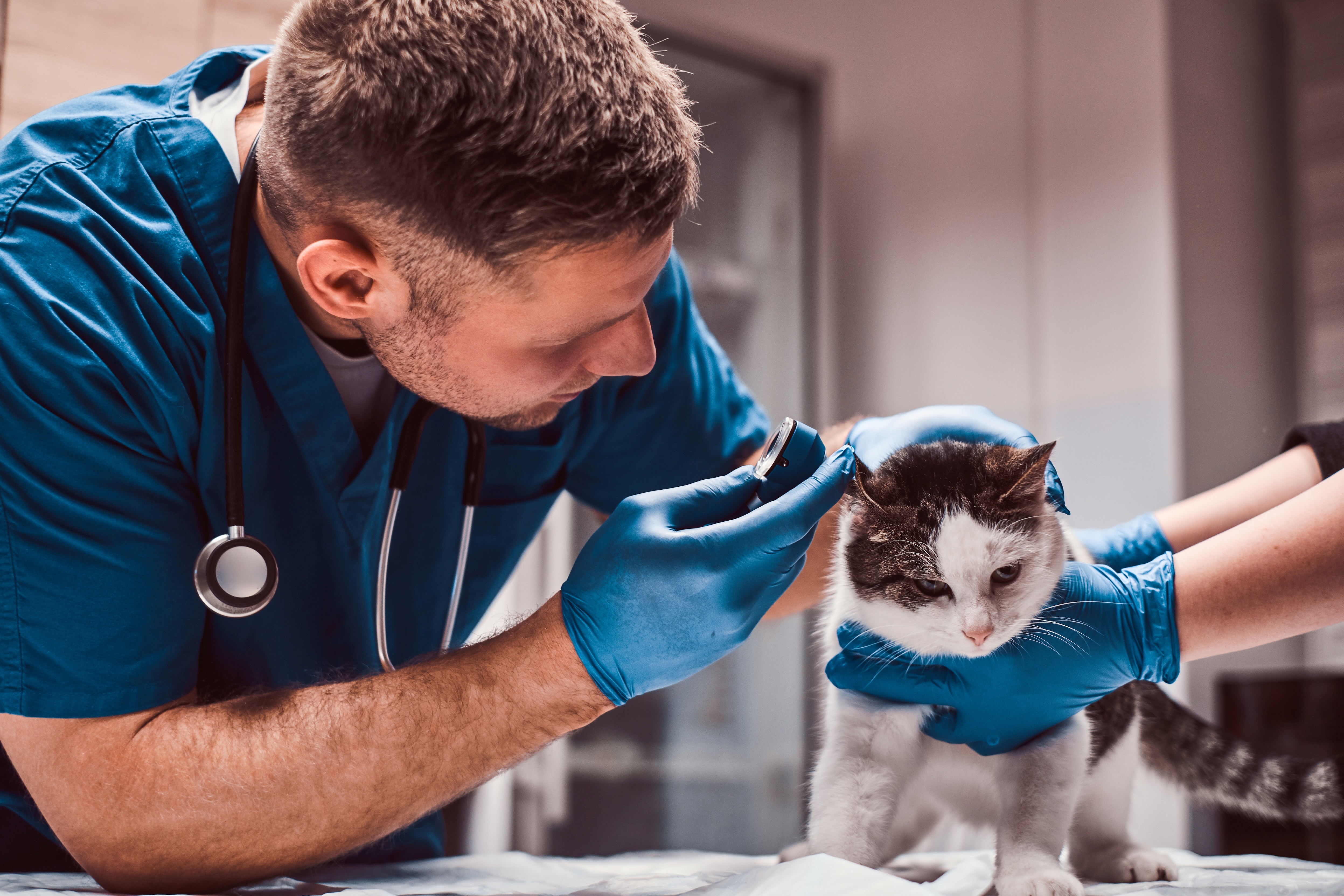
Are you a team member in a veterinary practice?
Are you a pet parent planning a trip with your furry pal?
Documentation Hub for Vet Practices: Streamline Pet Travel
Right now, someone on your team is probably hunting for the right airline form, a destination checklist, or the latest import rule while a client keeps asking, “Are we still okay for Friday?” The inbox has one version, a spreadsheet has another, and the paper folder on the front desk has yesterday's answer. That kind of scramble is exactly where a documentation hub earns its keep, because pet travel work doesn't slow down just because the paperwork is scattered.
For vet practices, the goal isn't to build a fancy file dump. It's to create one calm place where the right document shows up fast, the team knows what's current, and nobody has to guess which version to trust. When travel dates get close, that difference can keep a busy day from turning into a full-on tail chase.
The Pre-Travel Paperwork Scramble
A pet owner calls at 4:40 p.m. Their flight is next week, the destination changed, and now they're not sure whether the rabies timing, airline letter, or import form is the one your clinic used last month. Someone on your team searches email, someone else checks a shared drive, and a third person asks whether the client already uploaded the documents in a text thread that nobody can find. That's how a routine travel case turns into a kennel full of loose papers.
The stress usually starts with small gaps. One form is saved under the client's name, another under the destination country, and a third lives in a photo on someone's phone. A documentation hub gives the team one place to land all of that, so the process feels less like a scavenger hunt and more like a normal workflow. For clients, that often means fewer last-minute surprises and a clearer sense that the clinic has the details under control.
A simple way to think about it is the same logic behind tips for organizing travel documents, except applied to a clinic setting where several people may touch the same case. Pet travel cases move faster when each document has a home, a label, and a clear owner.
If your practice already feels the strain of missing paperwork, the pain points line up closely with the issues described in documentation gaps.
What Is a Documentation Hub for Vets
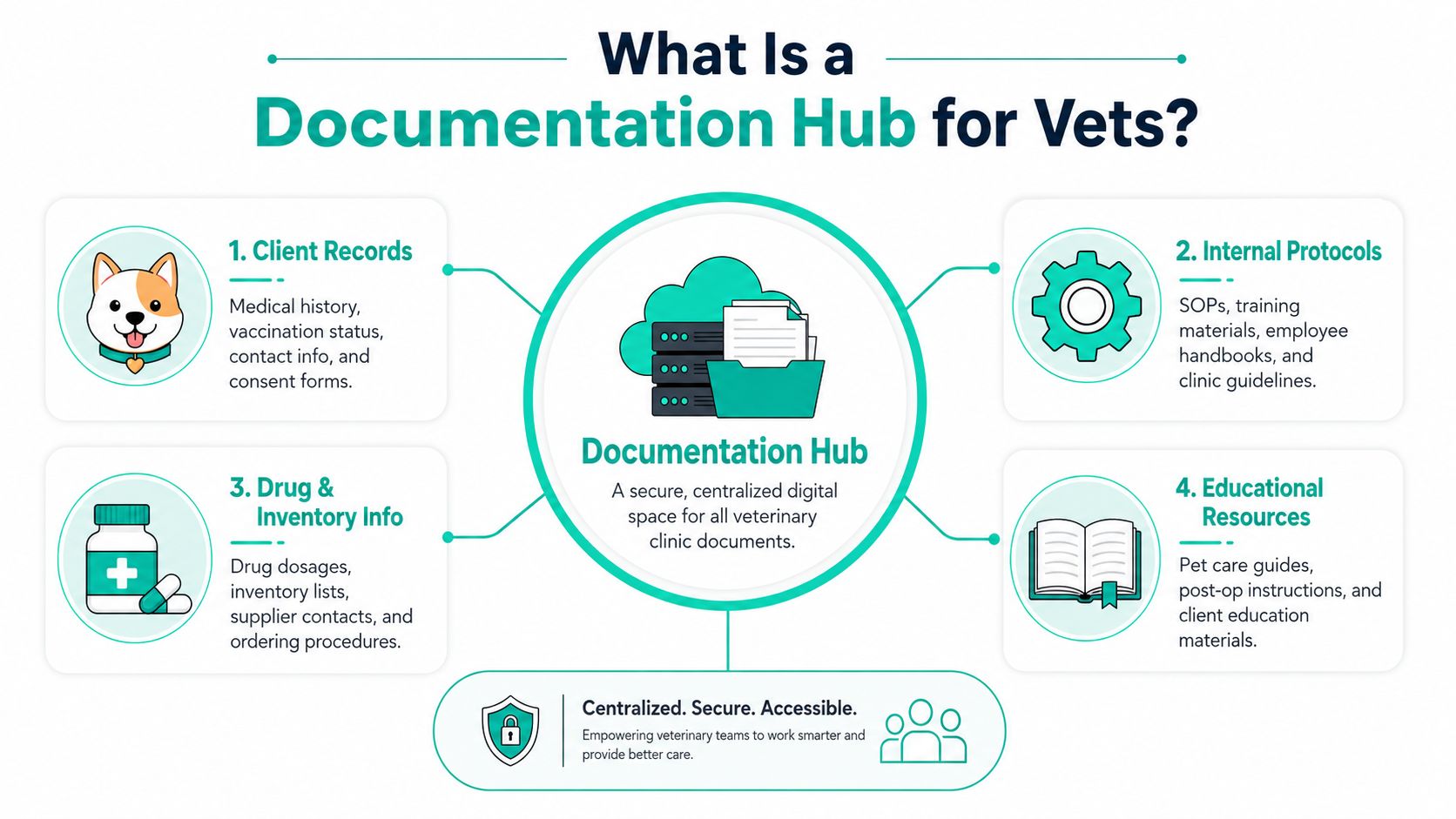
Think of a documentation hub as a digital library for pet travel. Instead of storing forms in random folders, inboxes, or desk drawers, the practice keeps them in one organized space with clear labels and rules for who can see what. That central setup matters because unified search, role-based access, and version control reduce time spent hunting for the right file and lower the risk of staff working from stale or conflicting documents, which is what turns a passive archive into an active operational system (Docsie).
The parts that matter in daily clinic work
A hub works best when it behaves like a well-run reference shelf, not a junk drawer. One team member needs the latest destination requirement. Another needs the client's consent form. A third needs the version of the instruction sheet that matches the current travel route.
Practical rule: if two staff members can open different versions of the same file and both think they're right, the system is too loose.
That's where the core features come in:
Centralized storage keeps travel forms, checklists, and internal notes in one place instead of scattered across email and shared drives.
Powerful search helps the front desk or nurse find a document by destination, date, or client name without digging through layers of folders.
Access controls limit who can edit sensitive files, which helps keep the record clean when several people support the same case.
Version history shows which document is current, so the clinic doesn't hand out outdated instructions by mistake.
For clinics that already use structured record workflows, a guide to electronic records for growth teams is useful background because it shows how organized digital records support repeatable work without adding more paper.
The same idea appears in the internal note on documentation panels, where the focus is on making the right information easy to surface at the right moment.
Key Benefits for Your Practice and Clients
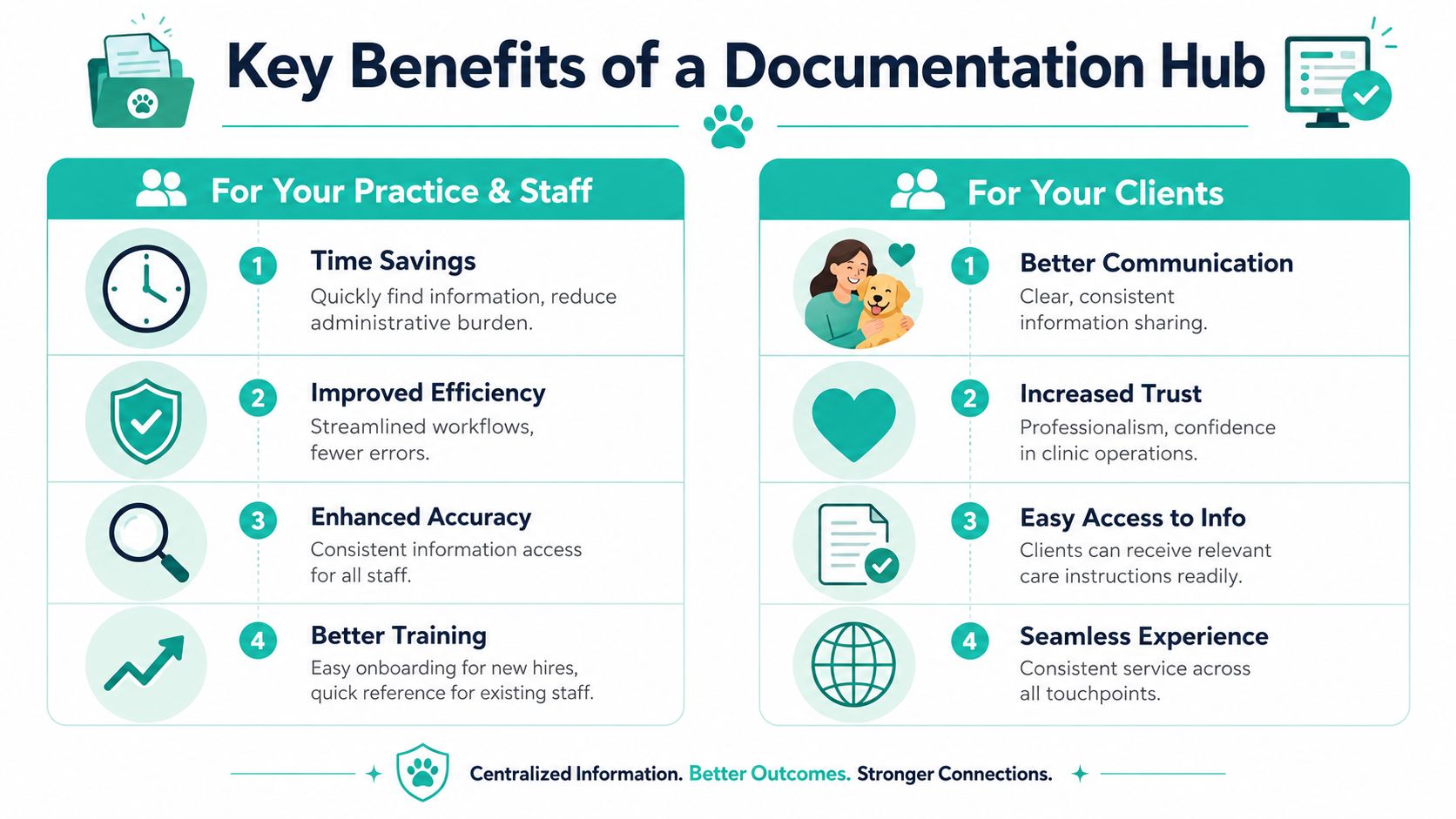
A well-run hub changes the feel of travel cases almost immediately. Before, staff are piecing together answers from memory, email, and old attachments. After, the practice has one place to check, one process to follow, and one version of the truth.
For your practice and staff
The first win is time savings. When the right form is easy to find, your team spends less time sorting and more time serving clients. The second is fewer mistakes, because a strong search structure and internal linking help people land on the right material faster (OMR).
A hub also makes training less painful. New hires can learn where the travel documents live, how the clinic names files, and which forms need review before they go out. That matters in a busy practice, where staff turnover or schedule changes can otherwise leave one person holding all the knowledge like a very overworked cat on a windowsill.
For your clients
Clients feel the difference when the clinic's communication is steady and clear. They're not re-explaining the same trip details three times, and they're less likely to get mixed messages about what's needed next. That kind of consistency builds trust, because the process feels professional instead of improvised.
When people know what comes next, they relax. That's true for pet owners, too.
If your practice also wants to think about how this affects workflow and service value, the practice revenue calculator can help frame the service in practical terms.
A hub doesn't just tidy files. It gives the clinic a steadier hand, which clients notice when they're already stressed about travel, timing, and their pet's comfort.
How to Build Your Documentation Hub
A useful hub doesn't need a giant software rollout. It needs a clear starting point, a sensible structure, and people who know what belongs where. That's why managed documentation works best as a recurring system with templates, a central storage location, and regular clean-up time, not a one-time file dump (Atlassian).
Start with the map, not the tools
Before anyone uploads a single form, decide how the clinic will sort content. Some practices do better by destination country. Others need folders by travel date, pet name, or case owner. The right structure is the one your team can follow on a busy day without stopping to ask, “Where does this go?”
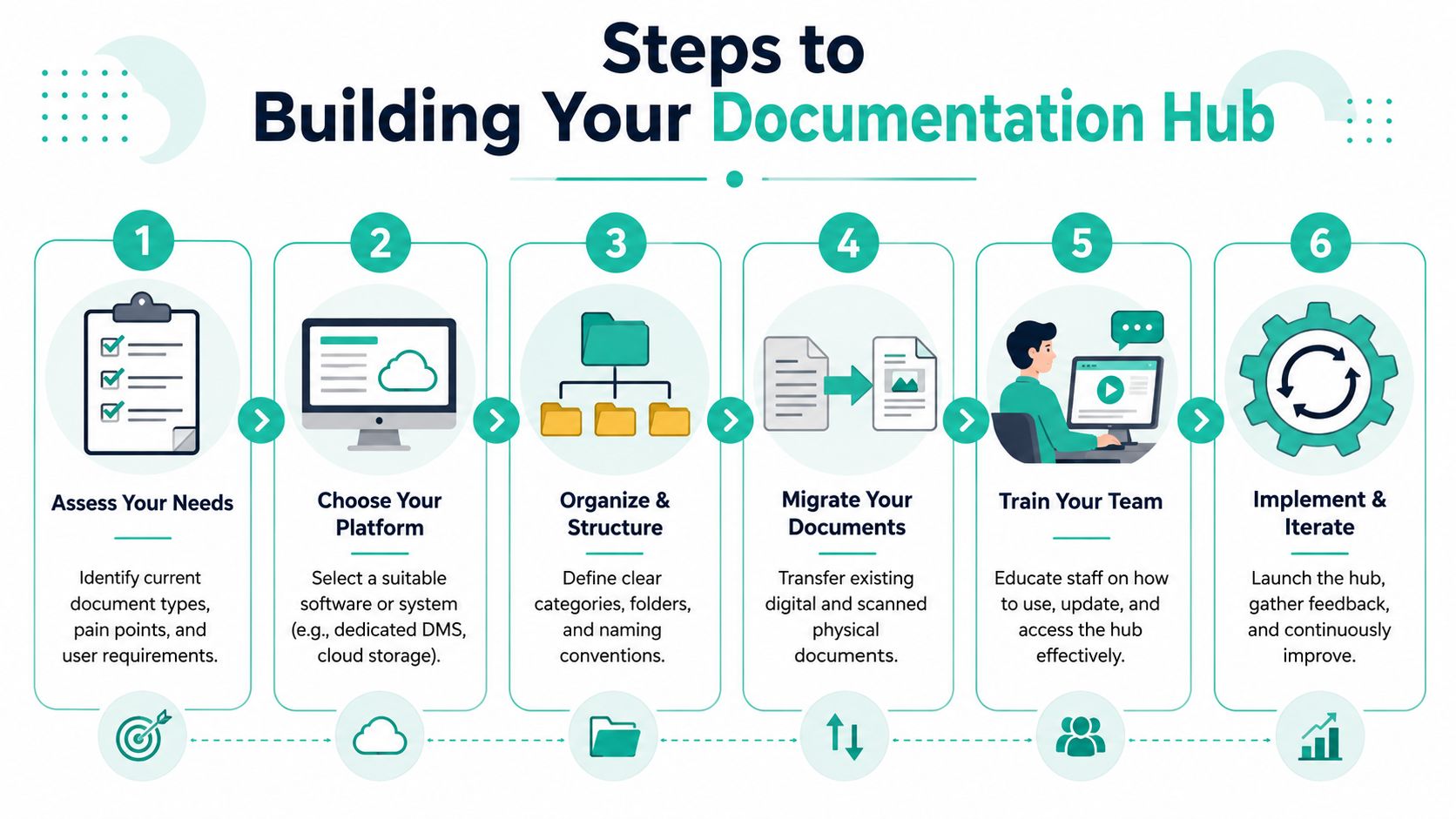
A clean hub usually needs these basics:
Assess your needs. List the document types your clinic handles most often, then note where people lose time now.
Choose the place. That might be a cloud folder, a document system, or a shared portal that the team already knows.
Set the structure. Use clear folder names and naming rules so the next person can find files without guessing.
Move the old files. Bring over the current versions, then archive the outdated ones so they don't keep resurfacing.
Train the team. Show staff how to add, find, and update documents, and keep the instructions simple.
Review and improve. Check what's working, what's being ignored, and where the folder tree still feels clumsy.
Keep ownership visible
A hub gets messy when nobody knows who updates what. Assign one owner for each document set, such as destination sheets, client handouts, or internal checklists. If a form changes because a country rule changes, there should be a clear person who updates it and a second pair of eyes that confirms it before the new version goes live.
For a deeper workflow model, the guide to central knowledge hubs is a useful reference because it reinforces the same core idea, organize first, then publish.
That approach keeps the whole system from drifting into “I thought someone else handled it” territory, which is where good intentions go to nap.
Best Practices for a Well-Groomed Hub
A hub only helps if people trust it. If staff open it twice and find two different answers, they'll go back to email and memory, and the whole system loses value. That's why the clinic needs clear ownership, simple rules, and a review habit that matches how often travel details change.
High-quality pages should have a clear purpose, plain-language explanations, and practical context like use cases or platform requirements, because the point is to help someone make a decision, not just read filler (Hubkub). In a vet practice, that means each page should answer a real question, such as what the document is for, who uses it, and when it should be updated.
Build rules people can follow
Start with content ownership. One person should know who can edit a page, who approves changes, and when the next review is due. Without that, a hub slowly turns into a digital junk drawer with a nicer layout.
Then set a review rhythm. Travel requirements, airline rules, and client instructions don't stay still, so the team should check the most active pages on a schedule instead of waiting for someone to notice a problem. A page that's still accurate is useful. A page that's probably accurate is a risk.
Good practice: write the page so a new staff member could use it without a side conversation.
Keep the writing useful
Avoid long blocks of vague explanation. Put the important detail up front, use plain words, and show the next action clearly. If a page is about a destination requirement, include what the document is, who it applies to, and where the latest version lives.
The clinic can also keep a simple quality habit in place:
Clear purpose so every page has one job.
Plain language so busy staff don't have to decode it.
Practical context so the page works in real cases, not just in theory.
Regular review so stale details don't linger.
The internal guide on how to document processes fits well here, because process writing and travel documentation both live or die on clarity.
A tidy hub is not about perfection. It's about making sure the next person can do the job without starting from scratch.
How Passpaw Functions as Your Pet Travel Hub
Passpaw brings the hub idea into a pet travel workflow without asking the clinic to build everything from zero. It supports the same basics you'd want in a good documentation system, centralized records, clearer task flow, and fewer gaps between the people who prepare the paperwork and the people who rely on it.
That matters because pet travel cases usually need more than a static folder. They need a place where travel documents can be managed, checked, and shared in a way that keeps the process moving. Passpaw's real-time document validation and client communication tools line up with that need by helping teams catch issues earlier and keep owners informed through the process.
It's a practical fit for the kind of work a busy practice already handles. The hub concept keeps the clinic organized, and Passpaw gives that structure a dedicated workflow built around international pet travel instead of general file storage.
If your practice is tired of chasing down forms, versions, and client updates, explore Passpaw and see how a purpose-built pet travel hub can bring more order to the process. It's a straightforward way to keep travel documents, task flow, and client communication in one place so your team can spend less time sorting papers and more time helping pets get where they need to go.

More articles
From regulatory changes to best practices for veterinarians and pet owners, our resources keep you ahead of the curve.