Are you a team member in a veterinary practice?
Are you a pet parent planning a trip with your furry pal?
10 Client Communication PDF Resources for Pet Travel
An owner calls your clinic with an international flight only weeks away. Their dog needs an international health certificate, but the practice still has to collect the destination, route, travel date, pet details, and supporting records. Someone must explain which tasks come first, request missing documents, obtain signed forms, and keep the owner informed while requirements are reviewed.
A well-built client communication PDF can turn that scramble into clear client steps. It can hold a checklist, explain responsibilities, record decisions, or return as a signed approval. The right tool can also create the PDF, send it, collect information, manage signatures, track versions, and remind clients about outstanding tasks.
This list includes ready-to-use communication resources and platforms that help veterinary teams create, send, sign, and manage documents. Treat templates as starting points, not universal legal or compliance advice. Review every document against the destination's current requirements and your practice's own process. The same principle applies when you automate document workflows in law firms, because a useful document workflow must reflect the work people perform.
1. Passpaw Features
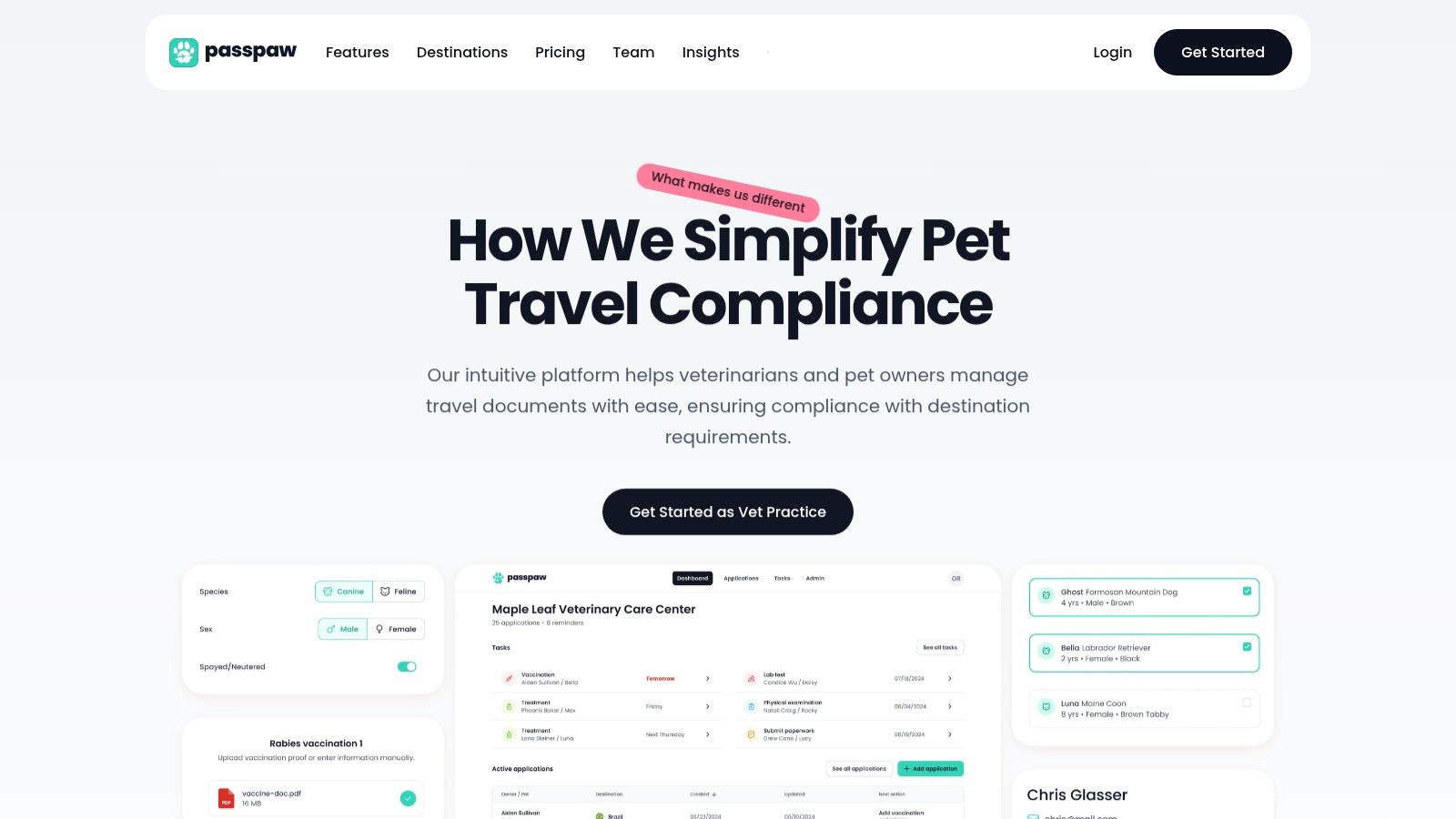
A clinic handling an international pet trip must collect the pet's details, destination, route, travel date, records, consent, and other documents in the right order. Passpaw places those communication and document tasks in one cloud-based workflow, rather than spreading them across inboxes, shared folders, and handwritten notes.
The process begins with the information that affects the application, such as the pet's details and travel date. Staff can organize tasks around those details and see which client requests need attention first. Real-time document validation can identify missing or incorrect information during processing, giving the team time to correct it before paperwork creates a last-minute travel problem.
Why it fits pet travel communication
A travel client needs more than a PDF attachment. They need to know what the clinic received, which items are still missing, what they should do next, and whether the application is progressing. Passpaw supports that exchange with status updates and routine workflow automation, so staff can send consistent information while keeping human review in the process.
Centralized records: Keep travel documents, requests, and related communication together for easier retrieval.
Deadline-aware tasks: Sort work by travel date and pet information, keeping urgent applications visible.
Document validation: Check paperwork as it is handled and identify incomplete or incorrect details sooner.
Client updates: Show owners clearer progress information while the practice manages the application.
Changing requirements: Adjust tasks when destination requirements change, while leaving room for manual review.
The trade-off is practical. Passpaw needs internet access and a subscription-style service, and staff must learn its workflow. Rare or highly specific destinations may still require close manual review. Before launch, assign an owner to each task and use client communication best practices to shape messages around what the client knows and still needs to provide.
Practical rule: Use the platform to coordinate the journey, then retain a human review step for destination-specific requirements and unusual cases.
Review the Passpaw features page for its document and communication workflow.
2. Adobe Acrobat and Acrobat Sign
When a veterinary team already edits PDFs regularly, Adobe Acrobat is a practical choice for preparing travel instruction sheets and collecting signed acknowledgments. It supports PDF preparation, form filling, review links, comments, and document markup. Acrobat Sign adds electronic signature workflows, so staff can prepare a document, request client review, and collect approval without switching between unrelated tools.
Its review process suits documents that need several eyes on them. Staff or clients can open a review link, add threaded comments, use mentions, receive notifications, and consolidate feedback. Clients can comment without downloading another copy, which helps reduce confusion over which attachment is current.
Best use in a clinic
Acrobat fits a practice with established PDF templates that need client-specific updates. Add fillable fields for the pet's details, travel dates, contact information, or acknowledgments. Use Acrobat Sign when the owner must sign the completed form.
Use it for: Editing existing PDFs, adding travel instructions, reviewing drafts, and collecting signatures.
Choose it when: Your team needs detailed PDF annotation and already works in the Adobe ecosystem.
Watch for: Premium pricing may be difficult to justify for a small practice that only sends documents for signing occasionally.
A clinic can access Acrobat through desktop, web, and mobile applications, with controls for managing document access. That flexibility helps when an owner reviews a form from a phone while traveling or when a veterinarian approves the final version away from the clinic.
The trade-off is workflow coverage. Acrobat does not interpret destination requirements, prioritize cases by departure date, send a complete reminder sequence, or assign ownership for missing documents. The practice still needs a separate process for those tasks. Treat Acrobat as the PDF preparation and review layer, rather than the entire client communication system.
Explore Adobe Acrobat for PDF creation, collaboration, and Acrobat Sign options.
3. DocuSign eSignature
For clinics where signature tracking is the bottleneck, DocuSign eSignature provides the administrative oversight many simpler tools cannot match. It supports signing across devices, real-time status visibility, comments, audit trails, access controls, and self-service signing through PowerForms or embedded workflows.
In a pet travel workflow, staff can prepare the client communication PDF, identify the owner or other required signers, send it, and monitor completion from one place. An outstanding request remains visible, so the team can follow up instead of guessing whether the form was overlooked in an inbox.
Where DocuSign earns its place
DocuSign fits practices when signing volume, administration, or integrations justify a dedicated system. Its audit trails and enterprise controls provide a clear record of who received, reviewed, and signed each document. AI-assisted preparation features may place fields more quickly, but staff should check every field before sending.
A typical sequence is simple: confirm the pet, destination, departure details, and required acknowledgments; send the form; then review the status before assembling the travel file. That sequence supports a broader documentation verification workflow, because a signed PDF confirms approval without confirming that every destination requirement has been met.
DocuSign remains a signing specialist, not a destination-requirements database. The clinic must supply accurate content and maintain its own review process. That limitation matters when a case includes changing rules, multiple certificates, or documents from outside providers.
Strong fit: High-volume signed approvals, integrations, and administrative oversight.
Less suitable: A small practice that sends occasional forms and wants the simplest possible setup.
Budget caution: Envelope-based pricing can become expensive as usage grows, while advanced API and enterprise features may require higher-tier plans.
See DocuSign eSignature for its signing, integration, and administration capabilities.
4. Dropbox Sign
Dropbox Sign, formerly HelloSign, trades advanced workflow features for simplicity. It fits a veterinary practice that needs clean PDF signing while keeping document storage in a familiar Dropbox folder structure. The signer experience is straightforward, with phone-based signer verification, audit trails, embedded signing, and support for common document formats.
The Dropbox connection is its clearest distinction. A clinic can store draft travel documents and completed PDFs in organized folders, while staff send and monitor signatures through the same file workflow. This arrangement works best when the practice already uses Dropbox for client records and team collaboration.
A simple path from draft to signed PDF
Create a reusable travel communication PDF with fields for the owner, pet, destination, departure date, and required acknowledgment. Send it through Dropbox Sign, then save the completed file using a consistent name in the appropriate case folder. Staff still need a separate process to confirm travel requirements and collect information that does not belong on the signature page.
The free plan includes up to three send-for-signature requests per month, with unlimited self-signing, according to the product plan described by Dropbox Sign. That gives a small practice room to test a basic consent workflow before choosing a broader plan.
The trade-off is limited depth for more involved operations. Bulk sending, advanced administration, and some workflow capabilities may require a paid tier or support enablement. Dropbox Sign does not manage the full pet travel process, so reminders, application progress, and destination-specific document checks remain staff responsibilities.
Choose it when Dropbox folder organization is part of the clinic's daily routine and signed travel PDFs need to land there cleanly. Look elsewhere if the practice needs one system to coordinate every detail of a pet's journey.
5. PandaDoc
When a client needs more than a signature line, PandaDoc can assemble instructions, document requests, service details, and acknowledgments into one branded travel packet. Its templates, content library, document tracking, pricing tools, and delivery methods support a fuller client communication sequence than a standalone consent form.
The content library helps staff reuse approved wording for travel timelines, owner responsibilities, document-upload instructions, and appointment preparation. Build the packet from those components instead of copying text into each case. This keeps explanations consistent, while still allowing staff to adjust destination-specific requirements.
When a packet is better than a single form
A packet works well when the owner must read instructions, provide documents, review services, and sign in a defined order. PandaDoc can send it by email, link, or embedded flow, with recipient controls that direct each person to the appropriate fields. After signing, a certificate is appended to the document for the practice's records.
Tracking supports targeted follow-up. Staff can check whether the client opened the packet, identify a missing signature, and confirm which version the owner received. These status details reduce guesswork, but they do not replace the veterinary team's review of destination rules or the accuracy of submitted travel information.
The trade-off is PandaDoc's content-library complexity and cost scaling. A practice needs time to organize approved sections, control revisions, and prevent an overgrown library from slowing packet creation. Advanced features can also raise costs as usage expands, so test one real pet travel packet before migrating every document.
Choose PandaDoc when the workflow includes repeatable education, document exchange, and completion tracking. Visit PandaDoc to review its document automation and e-signature options.
6. Jotform and Jotform Sign
A pet owner arranging travel often needs to provide destination, travel date, pet, contact, and consent details before the veterinary team can prepare documents. Jotform handles that intake through an online form rather than asking the client to type into a static PDF. Its PDF Editor can convert submitted answers into a branded record, while Jotform Sign can send the document for electronic signature.
The workflow is useful when the practice wants structured information at the start. Guided questions can make phone-based completion easier, and staff can review the resulting PDF for missing travel details before issuing instructions or certificates. It also separates data collection from document delivery, although the veterinary team still needs to check whether each answer meets the destination's requirements.
Start with the next action each field supports. Ask for the travel date and destination, identify the pet and owner, collect consent where required, and flag information the client may not know yet. Configure the generated PDF so staff can find those items quickly, then set the signing step only after the content is ready.
Sharing options: Send the form by email, publish a link, use a QR code, or embed it on the practice website.
Document output: Generate a consistent PDF from the submitted information.
Signing: Use Jotform Sign for signatures, audit trails, and workflow automations.
Pilot path: Test one intake-to-signed-document workflow on the free tier before expanding.
Enterprise options include SSO and HIPAA features, but the practice should confirm that the chosen plan and configuration match its information-handling process. Usage caps may become restrictive as submission volume grows. Map the workflow with practical documentation tools first, then remove questions that do not affect the next clinical or administrative step.
Review Jotform for form building, PDF generation, and signing.
7. Formstack Documents and Formstack Sign
A pet travel case can require different documents for different destinations, transport methods, and stages of preparation. Formstack Documents generates those files from approved templates, merging client and pet information into PDF, DOCX, or PPTX files. The completed document can then be sent by email or passed to another system. Formstack Sign adds electronic signatures to the same workflow.
For a veterinary practice, the main task is document control. Staff can collect the travel date, destination, owner, pet, and required consent once, then place that information into the appropriate instruction sheet, declaration, or authorization form. Templates reduce manual editing, but the team still needs to confirm that the selected document matches the destination's requirements.
Strengths and limits
Formstack suits practices with many document variations. Workflow rules can use information from a form, CRM, practice system, or project-management tool to select templates, route files, and apply consistent names. Salesforce-native options and enterprise features may fit larger veterinary groups with established systems.
Setup takes more work than a basic e-signature product. Someone must define templates, fields, routing rules, naming conventions, and exception handling. That effort makes sense when staff prepare many travel documents, but a small clinic sending a few standard PDFs may find the configuration excessive.
Collect information once, then reuse it wherever the workflow needs it.
Before client use, send a test case through document generation and signing with realistic travel details. Check the PDF layout, merged fields, signature placement, delivery method, and any handoff to staff. Some plans include document deliveries with unlimited e-signatures, so confirm the selected plan's terms and limits with Formstack.
8. ShareFile Client Portal
A pet travel case rarely ends with one signed PDF. Owners may need to provide vaccination records, review instructions, sign declarations, and respond to follow-up requests. ShareFile Client Portal gives the practice a central place to send documents, collect uploads, show the current version, and track what still needs attention.
For veterinary staff, that means separating “waiting for client” from “ready for veterinary review.” Request lists, versioned files, access controls, and secure sharing support that process. Branding can also make the portal feel connected to the clinic instead of like an unfamiliar file drop.
Why a portal changes the conversation
Email remains the most widely used client communication tool in the 2023 communications survey. The survey reports email at 62% of respondents, compared with Slack and project management tools at 11% each, phone at 9%, and face-to-face communication at 3%. The figures come from the Project.co communications survey. A practical workflow can use email for the invitation and reminders, while the portal holds the working documents in one stable location.
ShareFile fits pet travel agencies, larger veterinary groups, and practices that exchange files with owners or outside partners repeatedly. It can support document collection after the initial consultation, status checks before submission, and a clearer handoff when several staff members handle the case.
The trade-off is setup and cost. A clinic that sends an occasional instruction PDF may find a portal unnecessary, and pricing can vary by plan, users, and selected features. Define naming rules and decide who reviews uploaded records before inviting clients.
Use a portal when the recurring problem is finding the current file, identifying outstanding items, or avoiding attachment confusion. A defined documentation hub can create similar clarity, whether the practice chooses ShareFile or another platform. Visit ShareFile to assess its client portal and document exchange features.
9. GoFormz
GoFormz turns forms into digital workflows while preserving the usefulness of a printable or savable PDF. A practice can upload an existing PDF, build a form from scratch, add e-signature fields, and generate a signed PDF for download or printing. That makes it a natural fit for intake forms, waivers, checklists, and owner acknowledgments.
Its mobile experience deserves attention. Pet owners may complete a travel form from a phone, and staff may need to review or finish a form away from a desktop. GoFormz supports public links, multi-signature flows, and bulk actions, giving practices more flexibility than a static attachment.
A useful middle ground
GoFormz sits between a plain PDF and a full document automation suite. It adds structured fields and signatures without requiring the practice to rebuild every process around a large client portal. Existing paper forms can become digital while still producing a familiar PDF record.
The limitation is scope. GoFormz is primarily a forms platform, not a complete pet travel case-management system. Advanced routing, destination-specific logic, or deeper communication updates may require integrations. Staff must also decide where completed PDFs live and how reminders are handled.
For a small team, start with one form that causes repeated friction. A travel-details intake form or signed client checklist is a better pilot than converting every document at once. Check the finished PDF on desktop and mobile, make sure signatures appear clearly, and confirm that the file name makes sense to the person who will retrieve it later.
See GoFormz for mobile forms, e-signatures, and PDF outputs.
10. Zoho Sign
Zoho Sign is an appealing choice for practices that want budget-conscious PDF signing or already use Zoho applications. It supports bulk sending and signing, in-person signing, signer attachments on selected plans, desktop and mobile access, APIs, and embedded or public signing through SignForms.
The ecosystem connection is its clearest advantage. A practice using Zoho CRM or Zoho Workplace can keep client communication closer to its existing records instead of introducing a separate signing environment. That can simplify routine approval requests, especially when staff already understand the Zoho interface.
When it makes sense
Zoho Sign works best when the practice needs repeatable signing and wants to send several similar documents. Bulk capabilities can reduce manual preparation, while audit trails help staff retain a record of the signing event. In-person signing can also support a client who completes an acknowledgment during a clinic visit.
The product publishes United States pricing across Free, Standard, Professional, and Enterprise tiers. Feature availability varies by plan, so practices should compare the exact requirements for bulk signing, attachments, integrations, and embedded flows before choosing a tier.
Zoho Sign isn't automatically the best choice just because it costs less than a larger incumbent. Its value is strongest when the practice already uses Zoho broadly. If the team only needs an occasional signature and has no Zoho workflow, a lighter tool may be easier to maintain.
Evaluate Zoho Sign against the complete path from client request to filed, signed PDF.
Client Communication PDF Tools: Feature Comparison
Solution | Core features | UX / Quality | Value / Pricing | Target audience | Unique selling point |
|---|---|---|---|---|---|
Passpaw | Real-time document validation, task prioritization, workflow automation, client messaging | ★★★★☆ • 🏆 Compliance-focused | 💰 Subscription, saves admin time | 👥 Veterinary practices & pet owners | ✨ Built specifically for international pet-travel rules |
Adobe Acrobat / Acrobat Sign | PDF creation, review-for-feedback, fillable forms, e‑sign workflows | ★★★★☆ • Strong PDF tooling | 💰 Premium, best with Adobe stack | 👥 Teams needing robust PDF review + signing | ✨ Industry-standard PDF annotation + review links |
DocuSign eSignature | Send-for-signature, PowerForms, audit trails, enterprise controls | ★★★★★ • 🏆 Enterprise-grade compliance | 💰 Premium, envelope/volume costs | 👥 Regulated orgs & high-volume senders | ✨ Mature compliance, integrations, AI-assisted prep |
Dropbox Sign | Simple e‑sign, embedded signing, Dropbox file integration, free tier | ★★★★☆ • Fast signer experience | 💰 Freemium, good for small teams | 👥 Small teams / Dropbox users | ✨ Tight Dropbox workflow & easy setup |
PandaDoc | Document automation, templates, content library, quote/price tools | ★★★★☆ • Good tracking & analytics | 💰 Mid–high, scales with advanced features | 👥 Sales teams & complex client docs | ✨ Templates + quoting in one document suite |
Jotform + Jotform Sign | Form builder → branded PDFs, signatures, automations, HIPAA options | ★★★★☆ • Fast form→PDF flow | 💰 Freemium, usage caps apply | 👥 Practices needing intake + signed records | ✨ Rapid form creation to polished signed PDFs |
Formstack Documents + Sign | Data-driven PDF assembly, template merges, delivery + e‑sign | ★★★★☆ • Robust generation logic | 💰 Suite pricing; enterprise/HIPAA tiers | 👥 Teams with many templates/CRM/EHR integrations | ✨ Strong template merging and Salesforce-native options |
ShareFile Client Portal | Branded client portal, secure exchange, requests, e‑sign | ★★★★☆ • Professional client experience | 💰 Quote-based, portal-focused | 👥 Organizations needing branded client portals | ✨ Centralized, secure branded client workspace |
GoFormz | Mobile-first forms, eSign fields, PDF outputs, bulk actions | ★★★★☆ • Excellent mobile UX | 💰 Mid, form-centric pricing | 👥 Field teams & mobile intake workflows | ✨ Mobile-first multi-signature and bulk handling |
Zoho Sign | Bulk send, embedded signing, API, apps integration | ★★★★☆ • Cost-effective & practical | 💰 Competitive tiers, budget-friendly | 👥 Budget-conscious teams & Zoho users | ✨ Best-value e-sign inside Zoho ecosystem |
Choose the PDF Workflow That Fits Your Practice
The best client communication PDF resource depends on the task creating the most work. If staff spend their days chasing travel details, checking documents, sorting deadlines, and answering status questions, an end-to-end pet travel workflow platform is the better starting point. Passpaw is designed for that coordination layer, with travel details, task prioritization, document validation, and client updates connected in one workflow.
Choose a PDF editor when the clinic already has reliable content but needs better preparation and review. Adobe Acrobat and Acrobat Sign are strong for editing, commenting, fillable fields, and signatures. Choose a dedicated e-signature tool when signed approvals are the main bottleneck. DocuSign, Dropbox Sign, and Zoho Sign each fit different levels of volume, administration, and ecosystem commitment.
A form builder is better when the practice needs to collect structured information before producing a polished record. Jotform, GoFormz, and Formstack can turn intake into a repeatable document process, but they differ in how much automation and configuration they support. For repeated document exchange, ShareFile provides a client portal approach. PandaDoc fits packets that combine reusable content, instructions, tracking, and signing.
Don't judge a tool by a polished demo alone. Test one complete journey, from the first client email through the final signed PDF. Use a real internal example, record where staff pause, note what the client doesn't understand, and check whether the finished file is easy to find.
A practical implementation checklist should cover:
Plain-language instructions: Explain one action at a time and avoid assuming the owner understands travel terminology.
Clear file names: Include the pet, document purpose, and version in a consistent format.
Travel-date prompts: Ask for the departure date early and make it visible to the team.
Reminder timing: Define when staff request missing information and when they follow up again.
Version control: Make it obvious which PDF is current and prevent old instructions from being reused.
Review step: Check destination-specific requirements before the document goes to the client.
Communication quality affects whether clients understand what they need to do. A financial-advisor communication survey found that clients contacted rarely understood 54% of what the advisor covered in a typical meeting, compared with 71% among clients contacted frequently, and 79% preferred contact at least every three months, according to the 2024 YCharts Advisor Client Communication Survey. The lesson for veterinary teams is practical, not financial: a PDF works best as part of a planned cadence, with clear updates and follow-up rather than a one-time attachment.
Digital delivery is also familiar to many clients. Broadridge reports that consumers receive 81% of bills and statements digitally, including 46% exclusively through digital channels and 35% through a print-plus-digital mix, while nearly half remain underwhelmed by company customer experiences, as reported in its 2023 CX and communications report. A digital PDF won't fix unclear instructions or slow responses. It needs a clean workflow behind it.
For veterinary teams, keep the content short and customized. Veterinary communication guidance recommends a concise post-exam summary and advises limiting discussion to a maximum of three important issues, each paired with a solution and the pet's benefit, according to Royal Canin's veterinary communication guidance. That rule is useful for travel documents too. Give the owner the next actions, the reason for each action, and a clear way to ask for help.
A well-run workflow should also explain contact methods and expected response times during the first visit or through a signed communication document. Auto-replies can reinforce those expectations and tell clients what to do in urgent situations, as described by IDEXX's veterinary communication guidance. When the practice combines those expectations with a reliable PDF process, owners spend less time wondering what happens next, and staff spend less time untangling the paper trail.
If you're also improving related administrative documents, a clear professional invoice template can support the same naming, layout, and client-experience standards.
Passpaw helps veterinary practices collect pet travel details, request documents, send deadline reminders, validate paperwork, and keep owners updated through the international health certificate process. Visit Passpaw to see how a coordinated client communication workflow can make pet travel paperwork clearer for your team and your clients.

More articles
From regulatory changes to best practices for veterinarians and pet owners, our resources keep you ahead of the curve.