Are you a team member in a veterinary practice?
Are you a pet parent planning a trip with your furry pal?
How to Check Status of Travel Document for Pets
Your flight is booked, the carrier has accepted your pet's space, and the health certificate is sitting in your inbox. Then someone asks the question that stops every pet owner cold: “What's the status of the travel document?” An issued certificate isn't automatically ready for boarding or border entry. It may still need a government endorsement, airline review, destination approval, or a correction.
I've coordinated enough international pet journeys to know that the safest way to check the status of a travel document is to treat it as a workflow, not a green-or-red answer. You need to know who currently holds the document, what label that office uses, and what action moves it forward.
What You Need Before Checking Travel Document Status
Start with the document itself, not the clinic's name or your pet's name. Most status systems need an exact reference, and a nearly correct search can return nothing or, worse, the wrong file.
Gather these details before calling or logging in:
Certificate or endorsement number: This connects the health certificate to the issuing veterinarian's record.
USDA submission reference: This identifies the file in the USDA APHIS endorsement queue when the certificate was sent for federal review.
Microchip number: This confirms that the pet listed in the record is the pet linked to the travel documents.
Issuing veterinarian's license number: The clinic may need this to locate or verify the certificate.
Most recent rabies vaccination date: Destination rules often depend on the vaccination timeline, so compare the date with the certificate and import requirements.
Destination import permit: Keep the permit number or approval notice available when the destination requires one.
First, identify which document you're checking. A domestic health certificate, an interstate CVI, and a USDA-endorsed international health certificate follow different paths. A clinic portal may show a domestic certificate as completed, while an international packet still waits for USDA APHIS action.
Confirm the document was actually submitted
A veterinarian may have created and signed a certificate without sending it for endorsement. Ask the clinic directly: “Was this document submitted to USDA APHIS, and what is the submission reference?” If nobody can provide a submission reference, don't treat the certificate as being in the government queue.
Also check names and numbers character by character. A mismatched microchip ID, an incorrect passport or permit number, and a rabies date copied incorrectly can all create avoidable corrections. If the destination requests translated material, review the requirements early and use a resource such as avoid passport translation delays to prevent a language issue from becoming a last-minute hold.
For a practical overview of the records commonly needed for pet journeys, keep travel documents for pets available while you assemble your file. Your target is a complete reference pack, not just a PDF.
Where to Check Status of Travel Document Step by Step
The right status screen depends on who has the document. Follow the file through each handoff, and don't assume one office's “approved” label means every other party has finished.
Start with the issuing veterinary practice
Call the clinic or sign in to its patient portal. Confirm that the veterinarian completed the examination, signed the certificate, entered the microchip number correctly, and submitted the file through the required channel.
Ask for the exact internal status and the date of submission. Useful wording is: “Is this certificate still in draft, signed and waiting for upload, or submitted to USDA APHIS? Please send me the reference number.”
If the practice uses electronic workflows, the veterinarian may be able to see whether a document needs a missing field, a new signature, or a supporting attachment. If the clinic sent the packet by fax or email, request confirmation of the transmission rather than relying on a verbal “it should be there.”
Check USDA APHIS endorsement progress
For eligible international certificates, the veterinary practice generally handles the USDA APHIS submission. The practice should check the USDA APHIS eFile system when that route applies, or follow the applicable fax or email process where a legacy channel remains in use.
Look for labels such as Submitted, In Review, Endorsed, or Returned for Correction. The reference number matters more than the pet's name because it points staff to the specific file in a high-volume queue.
California may use a separate endorsement routing desk, so ask the clinic whether your certificate was sent through the correct state pathway. Hawaii's Animal Quarantine Station portal applies to the 5-Day-Plus program, which is a separate checkpoint from ordinary airline document review.
Practical rule: If the clinic can't confirm where the file was sent, escalating to the wrong office won't make the paperwork move.
Ask the airline's pet or cargo desk
Airline acceptance usually doesn't appear in the ordinary passenger booking flow. Contact the airline's cargo desk, live-animal desk, or designated pet-travel team and provide the route, booking reference, pet details, and document type.
Ask whether the airline has received the endorsed certificate and whether its own review shows Accepted, Pending Verification, or Correction Required. A carrier can require a document format, copy, translation, or validity window that differs from the destination authority's list.
Use documentation verification as a reminder to compare the certificate against the airline's process, not just the destination checklist.
Verify the destination-country record
The final check belongs to the destination authority. For EU entry, the relevant record may appear through TRACES. For travel involving the United Kingdom, the appropriate animal movement or PETS process may provide confirmation through the responsible authority or agent.
Destination confirmation may not appear until the endorsed certificate is complete. If the destination system still shows no record, ask whether the authority needs the endorsed document uploaded, an import permit number matched, or a local agent to complete the filing.
Understanding Status Labels and What They Mean
Status labels are shorthand for responsibility. They tell you who has the file and what must happen next, but they don't always mean the same thing across systems.
A clinic's Draft usually means the veterinarian started the certificate but hasn't completed or submitted it. Pending Submission generally means the certificate was signed or prepared and is waiting for upload or transmission. In Endorsement Queue indicates that USDA APHIS received the file and it's waiting for review by a veterinary medical officer.
Endorsed is the meaningful government completion label. It indicates that the required federal signature or seal has been applied. Still, don't confuse endorsement with airline acceptance. The carrier must check its own requirements, and the destination authority may have another confirmation step.
Status Label | What It Means | Next Action |
|---|---|---|
Draft | The veterinarian has started the certificate, but it isn't ready for submission. | Ask the clinic to complete missing fields and confirm the signing step. |
Pending Submission | The signed document is waiting for upload or transmission. | Request the submission date and exact reference number. |
In Endorsement Queue | USDA APHIS has received the file and it's awaiting review. | Monitor the government queue through the submitting clinic. |
Endorsed | The government endorsement has been applied. | Send the final document to the airline and destination contact for verification. |
Returned | The reviewer found an error or missing requirement. | Ask the veterinarian to correct the cited issue and resubmit. |
Voided | The certificate has been replaced or cancelled. | Use the corrected certificate, not the superseded version. |
Treat “Processing” as incomplete
“Processing” is too vague to guide a travel decision. Ask which office owns the next action, what information is missing, and what checkpoint should change afterward.
A certificate can show Endorsed in USDA eFile while the airline still displays Pending Verification. Those are independent pipelines. The practical answer is to wait only while the responsible office confirms the file is complete. If the airline hasn't received the endorsed copy, send it through the carrier's required channel and request written confirmation.
For a deeper breakdown of the workflow vocabulary, see document status types. Don't book confidence around a label alone. Book it around the label, the owner, and the next confirmed action.
Real-World Scenarios for Pet Travel Document Checks
The cleanest way to understand status checks is to follow the handoffs. These are representative coordinator scenarios, showing how I'd read each update and what I'd ask next.
A dog traveling from the United States to the EU
The clinic portal first showed Issued after the veterinarian completed the health certificate. That wasn't the finish line. I asked the practice to confirm the USDA APHIS submission reference, then watched for Submitted and In Review in the endorsement workflow.
Once USDA marked the document Endorsed, I sent the final packet to the airline's pet desk. The airline didn't update the passenger booking immediately. Its separate review changed from Pending Verification to Accepted after staff checked the certificate against the route and departure window.
The important timing issue was the short certificate window. For pets traveling from Great Britain to the EU, official guidance says an animal health certificate is valid for travel only within 10 days after the veterinarian issues it, while the first rabies vaccination course must be completed at least 21 full days before the trip. The same certificate can support onward travel within the EU for up to 6 months, and up to 5 pets can be listed on one certificate, according to UK government guidance on getting an animal health certificate. Always match the rule to the departure country and route.
A cat traveling from Canada to Japan
This file appeared complete at the clinic, but the tracking record showed Pending Lab Review because the rabies titer result had not cleared the required review step. I didn't ask the airline to solve it. The lab or veterinary practice owned that status.
The clinic checked the laboratory record, confirmed the sample identity and microchip number, and contacted the destination authority about the required format. Only after the lab stage cleared did the broader export packet move forward.
A brachycephalic dog traveling from Australia
The veterinarian's file showed Complete, and the airline had tentatively recorded Documents Received. The destination authority then returned the import permit as Rejected, citing formatting rather than the dog's health.
The fix was specific. The agent requested the destination's required permit template, the Australian practice prepared the corrected version, and the authority changed the record to Accepted. Brachycephalic breeds can also trigger airline handling questions, so I kept the airline's pet desk involved instead of relying only on the government permit.
For owners comparing specialized transport choices, an midsize private jet buyers guide may help explain aircraft considerations, but private or commercial travel still requires route-specific animal documentation. Fancy transport doesn't make a missing approval disappear.
What to Do If Your Travel Document Is Delayed
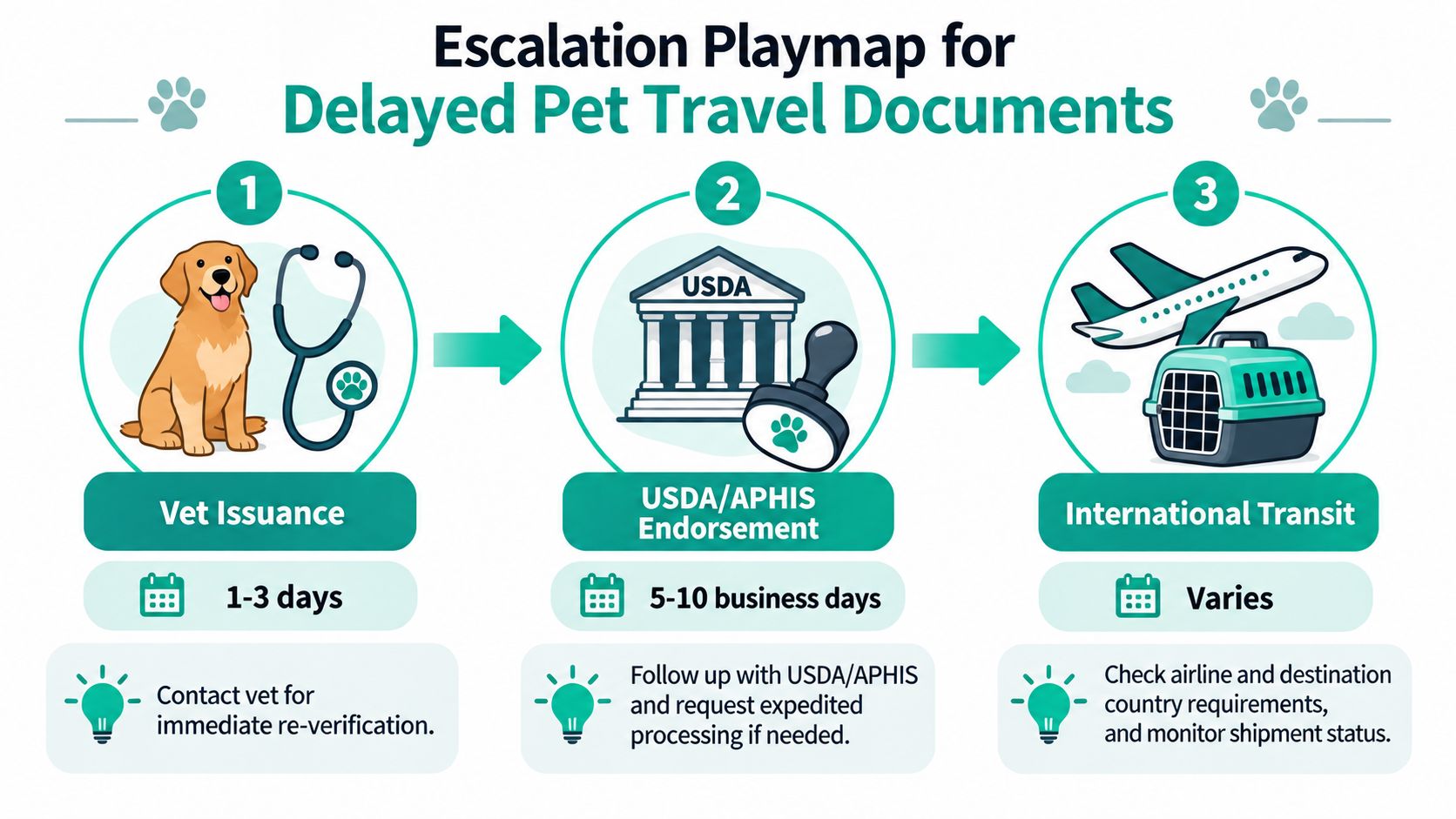
A delayed file needs an owner, a reference number, and a written next step. Don't send the same question to every office at once. That creates noise and often leaves the bottleneck untouched.
Use these planning windows as working estimates, not guarantees:
Veterinary issuance: Often takes 1 to 3 days when the examination and records are complete.
USDA APHIS endorsement: Commonly takes 5 to 10 business days, with longer waits possible during peak periods.
Destination import permit: Can take 3 to 30 days, depending on the country and application.
The figures above are operational planning ranges supplied for this workflow. Confirm the current route requirements with the responsible authority before relying on them.
Escalate in the correct order
Confirm submission with the vet. Ask, “Was the certificate transmitted, on what date, through which system, and what reference number was assigned?” If the answer is unclear, the delay may be at the clinic rather than USDA.
Contact USDA APHIS Veterinary Services about an endorsement hold. Give the submission reference, pet name, microchip number, travel date, and the exact status label. Ask, “Is the file awaiting review, missing an attachment, or returned for correction?”
Contact the destination animal health authority for permit questions. Include the route, species, microchip number, permit reference, and endorsed certificate if available. Ask, “Does the authority require a corrected format, additional approval, or a new submission?”
Request a corrected certificate from the veterinarian. If the issue is a technical error, ask the clinic to identify the changed field and confirm whether the original certificate was voided.
Rebook only after written confirmation. A phone assurance from one office doesn't prove that the airline and destination system are updated.
Check the rejection triggers
Compare the rabies vaccination date, microchip number, pet name, owner details, route, and certificate validity window across every page. A mismatch can send the file back even when the certificate itself exists.
For international pet certificates, U.S. guidance says airlines typically require health certificates no older than 10 days, and most countries require a federally accredited veterinarian plus USDA endorsement. Some destinations use shorter windows, so a flight change or weekend closure can turn an acceptable document into an unusable one, as explained in U.S. State Department pet-travel guidance.
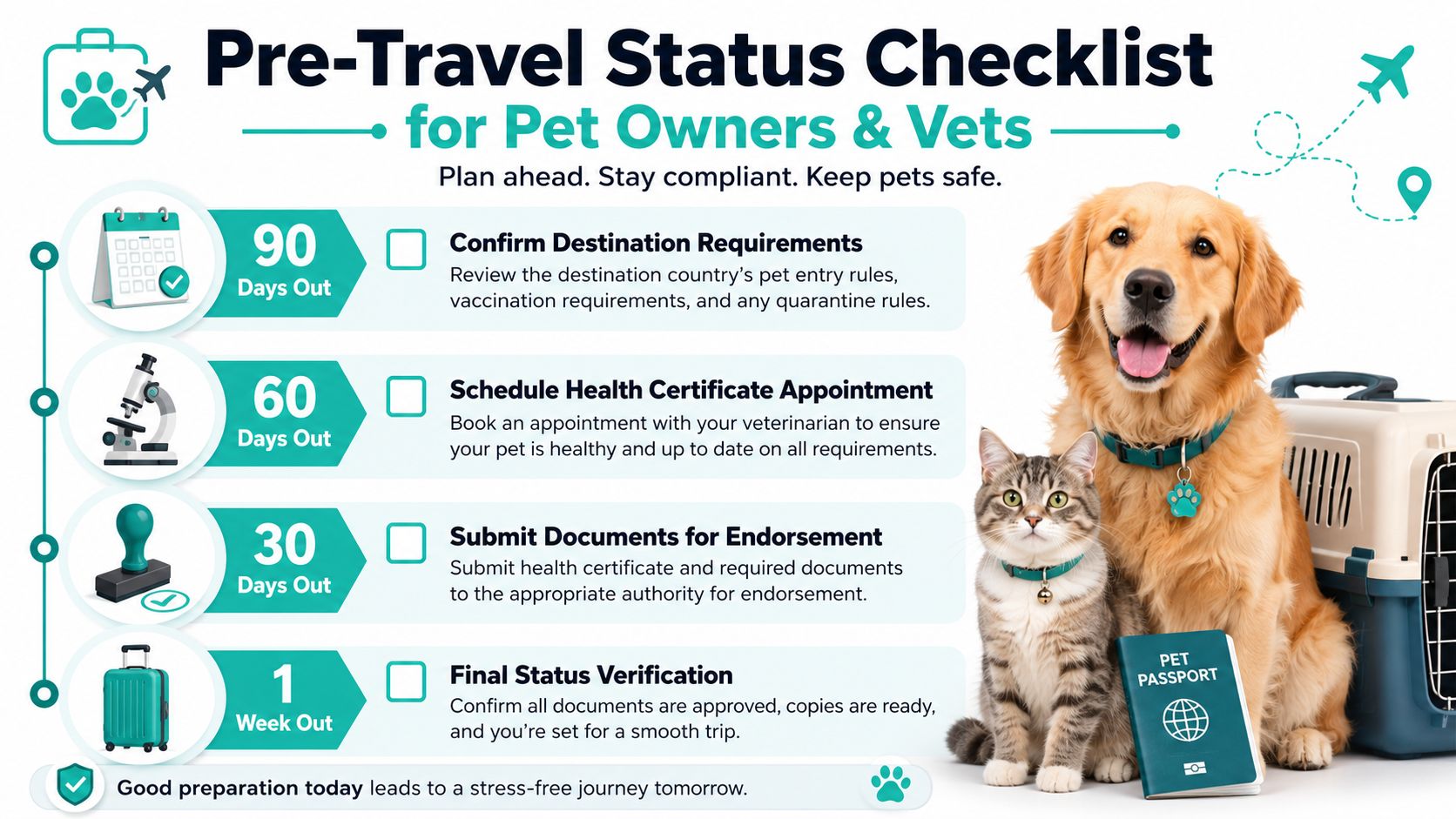
Pre-Travel Status Checklist for Pet Owners and Vets
Save this checklist and run it for every trip. The exact authority can change by route, but the sequence stays useful because it follows the document from planning through boarding.
90 days out: Confirm destination requirements with the country's official animal health authority, then ask the airline's pet desk for its document list. Verify the microchip at the veterinary clinic and record the exact ID.
60 days out: Schedule the health certificate appointment and ask the veterinarian whether the route needs a rabies titer, import permit, translation, additional tests, or government endorsement.
30 days out: Complete the required examination, vaccination records, and blood work. Check the clinic portal for Issued or Ready for Submission, then confirm that the veterinarian has the correct destination and travel date.
14 days out: Submit the certificate through the required USDA APHIS route when applicable. Keep the submission reference, payment record, and a copy of every page.
7 days out: Check the endorsement status daily through the submitting clinic or applicable USDA system. Send the endorsed document to the airline and ask for a written Accepted or Pending Verification response.
48 hours out: Print the endorsed certificate, pack originals and copies, and photograph every page. Confirm that the destination permit or entry record matches the endorsed packet.
Day of travel: Check the airline status once more before leaving home. Carry the paper file, digital backups, permit details, vaccination records, and microchip information together.
For a route-specific preparation review, use documentation requirements alongside the destination authority and airline instructions. Passpaw can help veterinary practices track travel-document applications, show validation warnings, and keep owners informed as a file moves through its stages.
Passpaw gives veterinary practices and pet owners a shared way to track international health-certificate applications, monitor document validation, and see which tasks still need attention. Visit Passpaw to organize your pet's document workflow before the next status check turns into a boarding-day scramble.

More articles
From regulatory changes to best practices for veterinarians and pet owners, our resources keep you ahead of the curve.