Are you a team member in a veterinary practice?
Are you a pet parent planning a trip with your furry pal?
Travel Document Storage for Pets: A Practical Guide
You're at the airport with a carrier in one hand, a leash in the other, and a clerk asking for the one paper you can't find. The folder was in your bag. The photo was on your phone. The phone is now showing a loading spinner, and your pet is giving you the kind of look that says this trip has already gone sideways. That's the moment travel document storage stops being a tidy admin task and becomes the thing that keeps the whole journey moving.
For pet trips, storage means more than saving files. It means keeping passports, rabies certificates, international health certificates, microchip records, vaccination histories, airline approvals, import permits, and emergency contacts in a setup that still works when you're tired, offline, or using a borrowed device. A good system has organization, protection, and recovery built in, because the paper you need might be in a hotel safe while the scan you need is on a cloud account you can't reach.
The basic idea is simple, but the practice is where people get stuck. Most travelers have one folder, one phone, and one hope. Better travel document storage uses layers, so a lost wallet, dead battery, or delayed airport connection doesn't become a full stop for your pet's trip.
What Travel Document Storage Really Means for Pet Trips
The trouble usually shows up at the worst possible time. A health certificate gets a little faded in transit, the phone won't load the cloud folder, and the desk agent wants a clean copy right now. That's when you realize travel document storage isn't just about keeping files somewhere safe, it's about making them easy to find, easy to open, and easy to share under pressure.
For pet travel, storage has a wider job than people expect. You're not only holding the “main” travel papers, you're managing the documents that may get checked at different points in the trip, such as vaccination history, microchip paperwork, airline approvals, import permits, and emergency contact details. The practical question is not “Do I have these files?” It's “Can I recover the right one quickly when someone asks for it?”
A simple way to think about it is through three pillars. First comes organization, so you know what you have. Then comes protection, so the right people can't casually see or change sensitive files. Finally comes recovery, so you can still reach the documents if one device, one bag, or one account fails. That layered approach matches modern guidance that favors originals, separate copies, and digital backups stored in more than one place, including a secure device or cloud backup with at least one copy away from the original set. travel document organization guidance
Practical rule: if a document would be painful to reissue at a foreign airport, it needs at least one backup you can reach without digging through every bag you own.
For pet owners, that often means a folder on your phone, a printed set in a different bag, and a backup copy you can hand to a travel partner or clinic contact if needed. It's a small system, but it saves a lot of tail-chasing.
Passpaw's veterinary health certificate guide is a useful companion if you want to understand how health certificates fit into the bigger pet travel process.
Build Your Document Inventory Before Anything Else
Start with a list before you scan a single page. A clean inventory keeps you from wasting time on the wrong files and helps you spot missing items before departure day. A simple four-column sheet is enough for most pet owners, with document type, expiration date, physical location, and digital location.
That expiration column matters more than people think. A paper can be neatly filed and still be useless if it's out of date, and that's especially true for health certificates, rabies titles, and microchip registrations. When you track validity in one place, you stop relying on memory, which is usually the first thing that fails when a trip gets busy.
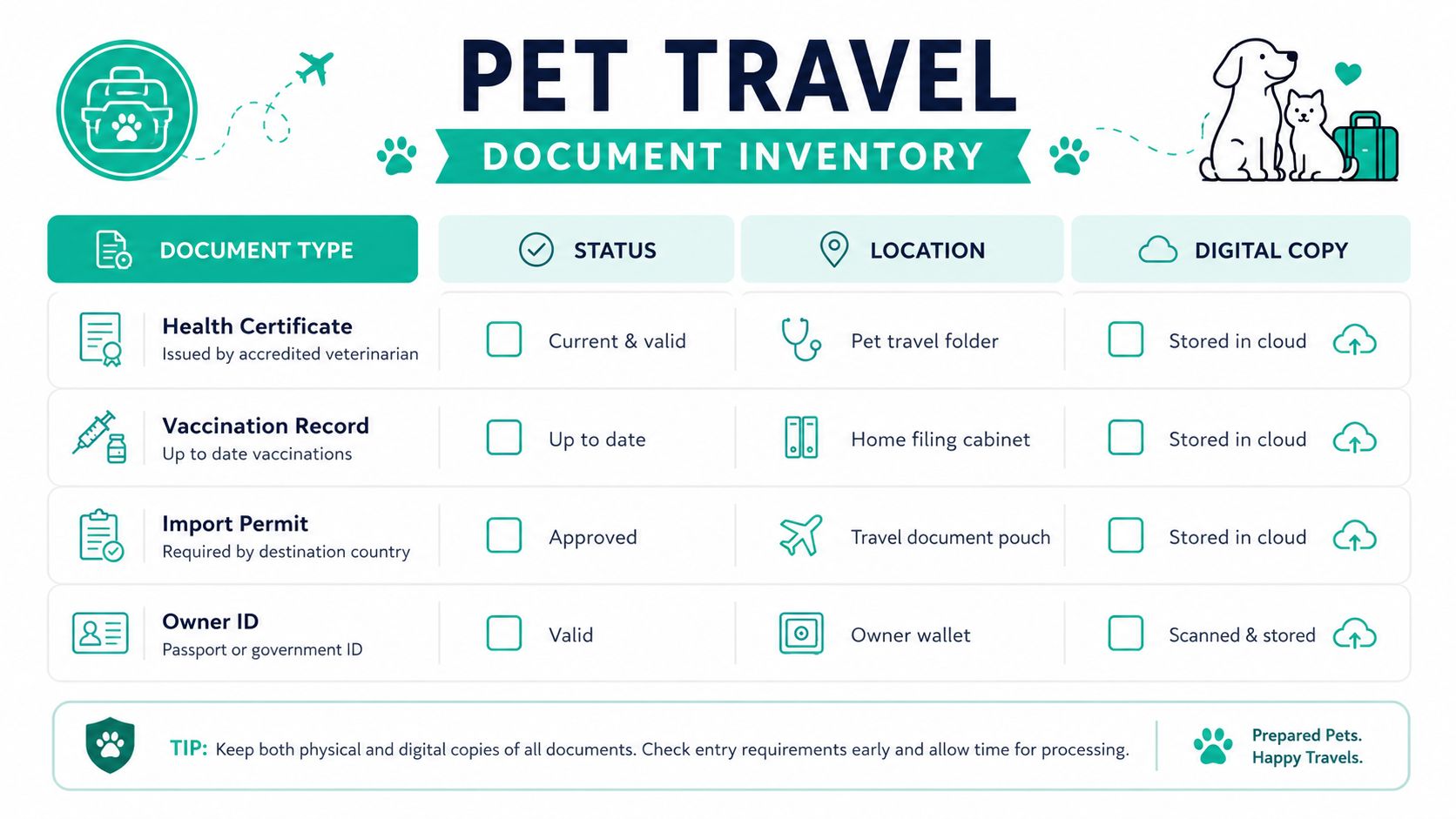
A single spreadsheet is usually enough. You don't need a complicated app unless your household handles many trips or several pets at once. The point is to create one place where you can see the whole picture, then update it every time a document changes.
Keep the list practical
Use rows for the documents you carry, not for every paper you've ever owned. For most pet trips, that means things like:
Health certificate: Mark whether it's current, signed, and where the paper original lives.
Vaccination record: Note the latest version and where the scan sits.
Import permit: Track the destination and the date it was issued.
Owner ID: Store where your passport or ID copy lives, if it's part of the travel packet.
If you run a clinic, the same structure can become a shared client dossier, just with clearer version control and a staff-facing location field. That keeps the front desk, the vet, and the travel coordinator from working off different copies.
The inventory stage pairs well with a basic records system like Passpaw's pet record-keeping overview, because both rely on the same habit, knowing what exists before you try to protect it.
Keep the list boring. Boring is good here. Boring means you can trust it when you're tired.
Once the inventory is complete, the rest of your storage plan gets much easier. You'll know what needs scanning, what needs encryption, and what can stay as a paper-only backup.
Choose the Right File Format and Naming System
A file is only useful if you can open it later without guessing. That's why the storage format and file name matter just as much as the scan itself. For long-term archiving, PDF/A is a strong choice, PNG works well for barcode-style images like microchip scans, and JPG is better kept for photos rather than records you may need to read clearly later.
Scan for clarity, then name for speed
One practical workflow is to scan at 300 DPI in black and white for clean text pages, then save sensitive files in a format that won't turn fuzzy when reopened. If you're archiving a document that may need to be read in a rush, clear text beats decorative layout every time. The smoother the scan, the less likely someone is to miss a name, date, or stamp.
The name itself should tell you the most important facts at a glance. A structure like 2026-08-15_FIP_RabiesCert_Buddy.pdf works because the date comes first, the document type comes next, and the pet's name closes it out. Dates first make sorting automatic, while spaces and special characters can create headaches across devices and file systems.
A few naming habits make the whole folder easier to search:
Use date-first names: They sort in the order you need.
Keep tags consistent: PET, HEALTH, AIRLINE, and COUNTRY help you group files fast.
Avoid vague words: “Final” and “new” don't help after the third revision.
Use one spelling style: Pick a standard and stick to it.
For a solo traveler, a flat folder often works better than a deep nest of subfolders. Families with multiple pets may prefer one top folder per pet, then a simple set of document types inside each. The right answer is the one you can explain to someone else in under a minute.
Passpaw's records guide for veterinary teams is a good reference point if you're building the same naming habit across a clinic, not just at home.
If you ever have to say, “I know it's in here somewhere,” the system is too loose.
Layer Your Storage With Encryption and Access Controls
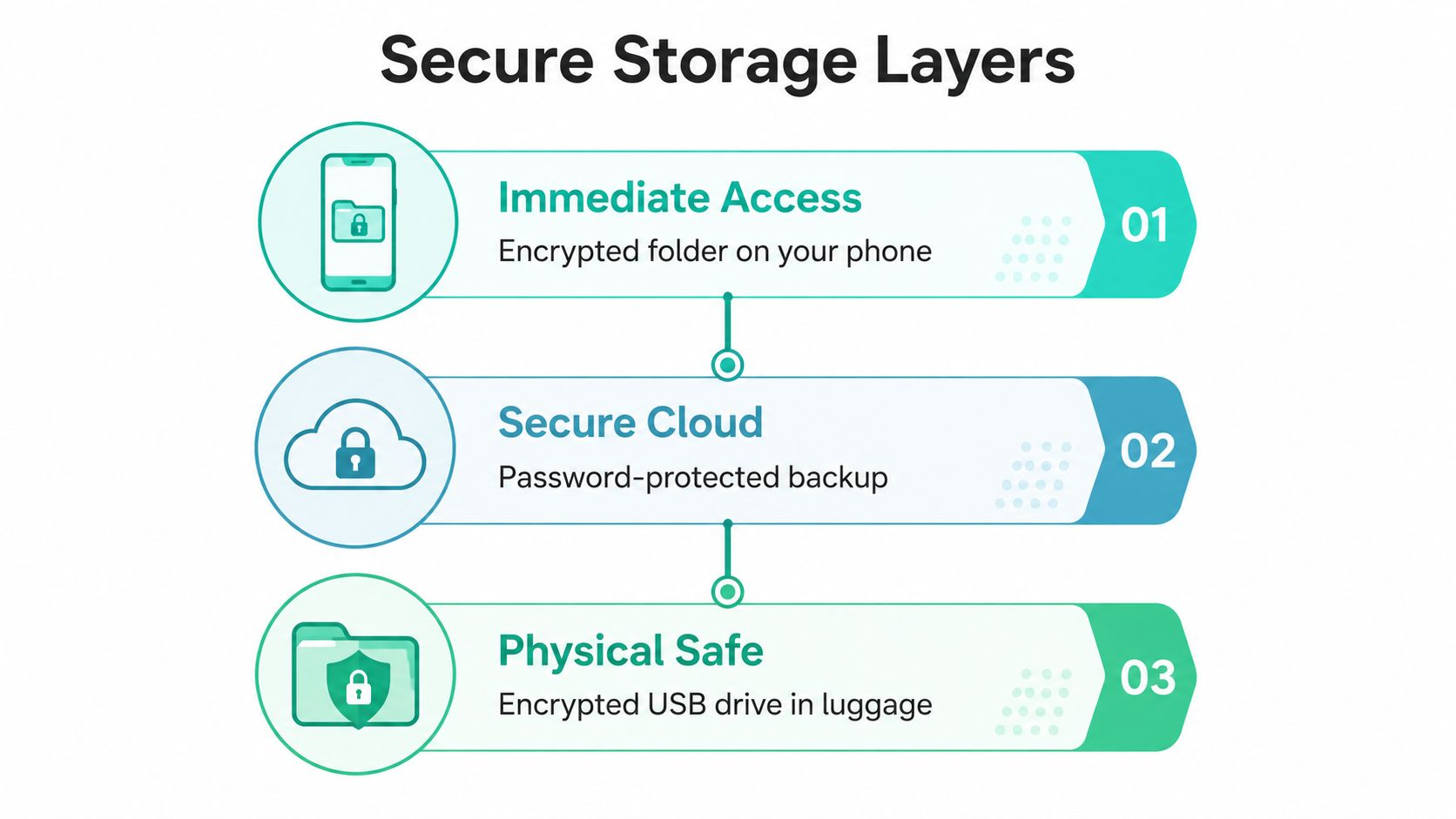
A single phone without security is a weak travel plan. It works until the battery dies, the device gets lost, or someone else can open the gallery and scroll straight into your pet's records. A better setup uses layers, so one failure doesn't take down the whole stack.
Think in three access levels
The first layer is immediate access, a phone folder or encrypted app you can reach quickly at a checkpoint. The second is secure cloud, which helps if you switch devices or need to send a copy to a travel partner. The third is a physical safe layer, such as an encrypted USB drive in luggage or a printed set tucked into a secure bag pocket.
Sensitive files deserve stronger handling than casual photos. Guidance on digital storage recommends labeling items like passport scans, vaccine records, and payment-related files as high sensitivity, then keeping them in offline-first or zero-knowledge encrypted storage with metadata removed before archiving. Tools such as Cryptomator, a local encrypted drive, or a zero-knowledge cloud service fit that job better than a shared photo album. digital travel document storage workflow
Provider-side cloud encryption can still leave a gap, because it doesn't solve every access issue if you're locked out, offline, or waiting on account recovery. That's why the master copy should stay under your control, with the cloud acting as backup rather than the only home for the file. A private vault with a password manager is usually enough for most travelers, and it doesn't require security-engineer levels of setup.
For pet owners, the safest practical habit is simple. Keep a copy you can reach on the road, a backup you can reach if the phone fails, and an offline copy you can use if the internet disappears. If you're comparing the logic to broader backup planning, a guide to IT backup in Houston can help you see why layered recovery matters in any file system, not just travel.
Cloud access is helpful. Cloud-only access is fragile.
When you choose access controls, use the least complicated setup that still protects the files. If the password is impossible to remember or the vault is impossible to open on another device, the system won't help you at the airport.
Create Backups You Can Actually Recover From
A backup only counts if you can open it when you need it. That's the part many skip, because saving a file feels like the job is done. In practice, the true test is whether you can recover the passport or visa set from a backup medium without internet access and without relying on your primary device.
A strong travel backup plan uses separate locations. One copy lives with you, one copy lives in the cloud, and one copy lives somewhere unrelated, like a trusted family member's house or another safe place away from your bag. That separation matters because if one thing goes wrong, the others are still standing.
The most reliable setup is an air-gapped master copy with two offline backups, plus a test before departure. One recommended method is to place all travel docs in a small encrypted container, copy that container file to two separate USB drives, then mount the vault with the written passphrase and open at least one document before you leave. That test proves more than storage ever will, because it checks actual access.
A travel-day failure usually looks ordinary. Maybe the laptop charger is in the wrong suitcase, maybe the phone fell into water, or maybe the cloud account wants a login code you can't reach. A tested offline copy gets you past those moments without improvising at the counter.
Keep the backup useful, not cluttered
The practical workflow is straightforward:
Save the master copy in your encrypted vault.
Copy it to two offline devices you can reach separately.
Store a cloud copy for remote access.
Open the backup on another device before the trip.
Confirm offline access to the key files.
Write down the passphrase and store it apart from the devices.
The last step sounds obvious until someone has a locked file and no usable key. That's one of the most common failure modes in real travel use, and it's usually a human problem, not a storage problem.
After the trip, clean up the extra copies. Keep a plain-text note that says why the file exists and set a deletion date so personal data doesn't sit around forever. For most leisure trips, 30 days after return is a defensible maximum retention period in one cited workflow, which keeps the archive useful without turning it into a permanent junk drawer. retention and encrypted workflow guidance
Set Up a Simple Workflow for Veterinary Practices
Clinics need a storage routine that doesn't collapse when three clients call at once. A good workflow starts with the same basic pieces every time, then keeps them in one template so the team isn't reinventing the folder structure for each pet. That's how you avoid a pile of named files that all sound like they were filed by different people on different planets.
Use one shared case template
A clean clinic flow usually looks like this: intake checklist, document upload, internal review, client confirmation, and archive. Each step should have one owner, one storage location, and one version that's treated as current. That prevents the classic folder mess of final_v2_REAL_final.pdf, which helps no one and confuses everyone.
Here's a simple version-control habit that works well:
Intake checklist: Capture what the client sent and what's still missing.
Document upload: Put the files in one shared case folder.
Internal review: Check that the right version is attached.
Client confirmation: Send the approved set back through a safe channel.
Archive: Move completed records to a closed case folder.
Where the clinic stores files and where the owner stores them should be clearly different. The clinic needs an internal system for review and handoff, while the pet owner needs a personal recovery plan for travel day. Those two jobs overlap, but they aren't the same.
A tool like Passpaw can sit inside that workflow as one option for document handling and client communication, while keeping the team focused on the same folder and version every time. If you want a deeper look at how records are handled in practice, Passpaw's record-keeping requirements overview is a helpful reference point.
The clinic's job is to keep the source file clean. The owner's job is to make sure the copy survives the trip.
If your team handles many travel cases, standardizing the storage path saves time and cuts the chance of sending the wrong version to a client. That's a quiet win, but in pet travel, quiet wins are the ones that matter.
Departure Checklist and Quick FAQ
The day before travel, check five things. Confirm every document is current, verify the backup opens offline, share access with your travel partner, pack a printed emergency set, and do one final review about 24 hours before departure. If those five steps are done, you've already handled the most common failure points.
A few questions come up often. How long should you keep the files? Keep the trip copy only as long as you still need it, then delete it on schedule. What if a document is lost overseas? Use the backup you tested before the trip, not the one you hope is in the cloud. Should every family member carry a copy? Usually yes, but keep the versions organized so nobody has to guess which one is current.
Travel document storage works best when it feels a little boring and a little overprepared. That's the sweet spot. Your pet gets the smooth trip, and you get to keep all four paws on the ground.
A CTA for Passpaw.

More articles
From regulatory changes to best practices for veterinarians and pet owners, our resources keep you ahead of the curve.