Are you a team member in a veterinary practice?
Are you a pet parent planning a trip with your furry pal?
Client Communication Software for Veterinary Practices
A client calls while your veterinarian is waiting for a laboratory result, the owner is already overseas, and the destination has just changed a document requirement. The shared inbox contains three versions of the health certificate, a forwarded airline email, and a reminder nobody has answered. Everyone is working hard, but nobody has a reliable view of what happens next.
That's where client communication software earns its place. For veterinary practices, the right platform isn't just the one with email, SMS, or chat. It's the one that connects people, documents, deadlines, and decisions in one traceable workflow, especially when an international pet-travel case starts to grow whiskers.
The Moment Your Inbox Stops Being Enough
A shared inbox works well for ordinary questions. Someone asks about a vaccine, a routine appointment, or a payment, and a team member replies. The problem begins when one pet-travel application involves an owner, a veterinarian, a laboratory, an authority, a shipper, and an airline.
Take a dog travelling from the United States to Europe. The practice needs the pet's identity details, vaccination history, laboratory results, destination requirements, signed certificates, endorsement timing, and travel date. The owner may send documents from a phone, the laboratory may issue a result separately, and an airline may request a certificate that falls inside a narrower window than the destination rule.
The USDA pet-travel process overview makes the core problem clear: every country sets its own import requirements, and the process can take from a few weeks to many months. After a veterinarian signs a health certificate, there may also be a limited endorsement window, such as 30 days, before the destination stops accepting it. A generic inbox doesn't understand those dependencies. It stores messages and waits for someone to remember them.

The real test is the messy case
A useful platform should show staff which documents are missing, which task is blocked, who owns the next action, and how close the case is to a deadline. It should also let the owner respond without creating a second trail of information across personal inboxes and text messages.
Email became workplace infrastructure because it made professional communication portable and scalable. The historical growth of business email, including the approximately 108 billion business-related emails sent worldwide each day in 2014, also created the filing and retrieval problem that modern workflows must solve. The BBC's history of email captures why a single inbox eventually becomes an inadequate operating system.
Better tools turn pet travel from a manual scramble into a repeatable service line.
That's the standard I'd use when reviewing any veterinary client communication workflow. Don't ask how many channels a vendor supports. Ask whether your team can move one complicated application from intake to completion without hunting through threads, spreadsheets, and staff memory.
The Four Jobs of Client Communication Software in a Veterinary Practice
A pet-travel case can stall because one date, document, or owner reply is missing. Good client communication software gives the team four jobs in one workflow. If it only sends messages, it is a notification tool, not a case-management system.
1. Capture structured intake
Owner and pet details should enter a form, not remain buried in an attachment. The case record should hold the travel date, destination, species, identification information, vaccination dates, and requested services.
That structure saves staff from rereading emails to find a departure date. It can also create the next tasks and reduce repeated questions during a deadline-driven application.
2. Apply deadline logic
Reminders should follow the case rather than sit on a generic calendar. A vaccination date, laboratory result, certificate appointment, endorsement window, and departure date can each trigger a different action.
The U.S. State Department guidance on pets and international travel notes that airlines typically require health certificates issued no more than 10 days before travel, while destinations can apply different timing rules. UK guidance also describes a 21-day waiting period after a first rabies vaccination and a 10-day entry window for an animal health certificate in relevant situations. Staff should not have to track those dates in notebooks or memory.
3. Exchange documents securely
Owners need one clear place to upload records, receive corrections, and see whether a document is accepted or still under review. Staff need version history, permissions, and an audit trail.
A “received” message does not show the state of the application. The case should identify the file, reviewer, required correction, and owner notification. That record keeps a deadline-sensitive application moving when several people handle it.
4. Report what happened
Managers need more than a message count after completion. They should see how many cases finished, how long document requests remained open, how often owners needed follow-up, and where applications stalled.
A 2025 survey of 1,000 North American pet parents found that 77% preferred text or online chat with their veterinary clinic, while 42% said they didn't receive essential-care reminders. The pet-owner communication research shows the practical gap: clients may prefer fast communication, but the message must connect to a task and case record.

Document your current intake, review, and follow-up process before choosing a platform. If calls remain part of intake, compare pay-as-you-go call plans separately. The phone provider handles calling; the workflow platform should attach the outcome to the pet's case.
A strong client communication management approach keeps every contact within the same application, so the team can see the full case instead of disconnected conversations.
Passpaw vs General CRMs vs Telehealth Tools
The right comparison isn't “which platform has the most features?” It's “which platform understands the work your staff must complete?” A general CRM, a telehealth tool, and Passpaw can all send messages, but they organise the case around different assumptions.
Consider a dog travelling from the United States to Portugal. The practice needs destination-specific requirements, a laboratory result, a signed certificate, owner confirmations, and reminders tied to travel. Here's how the three categories generally compare.
How three platform types compare on pet-travel needs
Criterion | Passpaw | General CRM | Telehealth tool |
|---|---|---|---|
Intake depth | Pet and trip details connected to the case | Strong contact forms, often less pet-travel-specific | Usually built around consultation intake |
Deadline logic | Designed around travel dates and document timing | Calendar and task reminders, often manually configured | Appointment-led reminders |
Document handling | Centralised requests, status updates, and case records | Attachments and storage, with workflow setup required | Often secondary to the consultation |
Multi-party visibility | Owner and veterinary team can follow one case status | Possible through pipelines and permissions | Usually centred on the care team and visit |
Reporting | Case progress and completion-focused workflow data | Broad sales or service reporting | Visit, communication, or consultation reporting |
Passpaw fits the workflow-first category. Its role is to collect trip and pet details, request documents, send deadline reminders, and keep status updates connected to the international health-certificate application. That's materially different from a CRM that begins with a contact record or a telehealth platform that begins with a video consultation.
A general CRM can still be a sensible choice. HubSpot, Zoho, and similar systems are good at contact history, broad automation, pipeline stages, and routine reminders. They become less comfortable when one case needs destination rules, multiple document versions, conditional tasks, and a visible correction loop. Staff can build those functions, but the practice should price the configuration and maintenance, not just the subscription.
Telehealth tools solve another problem. They're useful when the core service is triage, video consultation, or remote follow-up. They're not automatically good at certificate packages, laboratory attachments, authority review, or travel-date dependencies. A video call can answer a clinical question without producing a clean document workflow.
A review of secure client-provider messaging across 78 studies found that 43% reported clinical benefits and 22% reported efficiency benefits when researchers measured outcomes beyond simple adoption, as described in the secure messaging review. The point isn't that every platform produces those outcomes. The point is that usage alone is a weak success measure. Your practice should measure whether messages help complete cases.
When evaluating a CRM, ask whether its pipeline can show a rejected document, a delayed laboratory result, and an owner who has stopped responding without staff inventing a workaround. If you use a virtual assistant team, resources on GoHighLevel VA staffing may help with general CRM administration, but delegation won't fix a workflow that lacks the right case structure.
A practical customer communication management tool comparison should therefore score the category, not merely the brand. If travel documentation is occasional, a CRM may be enough. If it's a regular service line, the specialised workflow deserves more weight.
Pricing Models and What They Reward
Pricing often looks simple until your team models actual work. Client communication software usually charges by seat, message volume, active case, or a combination of these. Each model rewards a different operating style.
Per-seat pricing
With per-seat pricing, the bill follows the number of staff accounts. A practice with 25 active travel cases might pay the same platform fee whether one coordinator handles the cases or several veterinarians share the work. That can be attractive when many staff need access, but it can punish a small team that only needs occasional involvement from additional users.
Per-seat pricing rewards broad internal access. It makes sense when multiple people must review cases, answer clients, and manage documents every day. Check whether external users, temporary staff, and read-only accounts count as seats.
Per-message pricing
Per-message pricing links cost to communication volume. A practice managing 25 active cases may send appointment reminders, document requests, correction notices, and completion updates. If staff must split one clear explanation into several short messages, the platform may charge for each part.
This model rewards brevity, but brevity can make complex instructions harder to understand. Ask whether inbound replies cost extra, whether failed deliveries count, and whether SMS fees pass through separately.
Per-active-case pricing
Per-case pricing follows the work that matters. A practice with 25 active cases pays according to the applications currently in progress, rather than the number of staff or individual notifications. This can be easier to forecast when travel cases have a clear opening and closing point.
The model rewards clean case management. Closed cases should leave the active count, and archived documents should remain accessible under the platform's retention rules. Confirm what qualifies as active and whether an abandoned application continues to incur a fee.
Sinch's 2024 research found that 91% of businesses use email to reach customers, while more than 41% planned to add at least one messaging channel to their communication mix, according to Sinch's customer communications research. That makes channel cost worth modelling early, especially when your team expects to add SMS or messaging apps to email.
The sticker price is only one line. Add implementation, integrations, storage, support, message pass-through fees, and staff time. Review Passpaw's plans alongside your real case volume, then calculate what happens when a case stays open because a laboratory result is delayed.
Integrations That Remove Repeated Handoffs
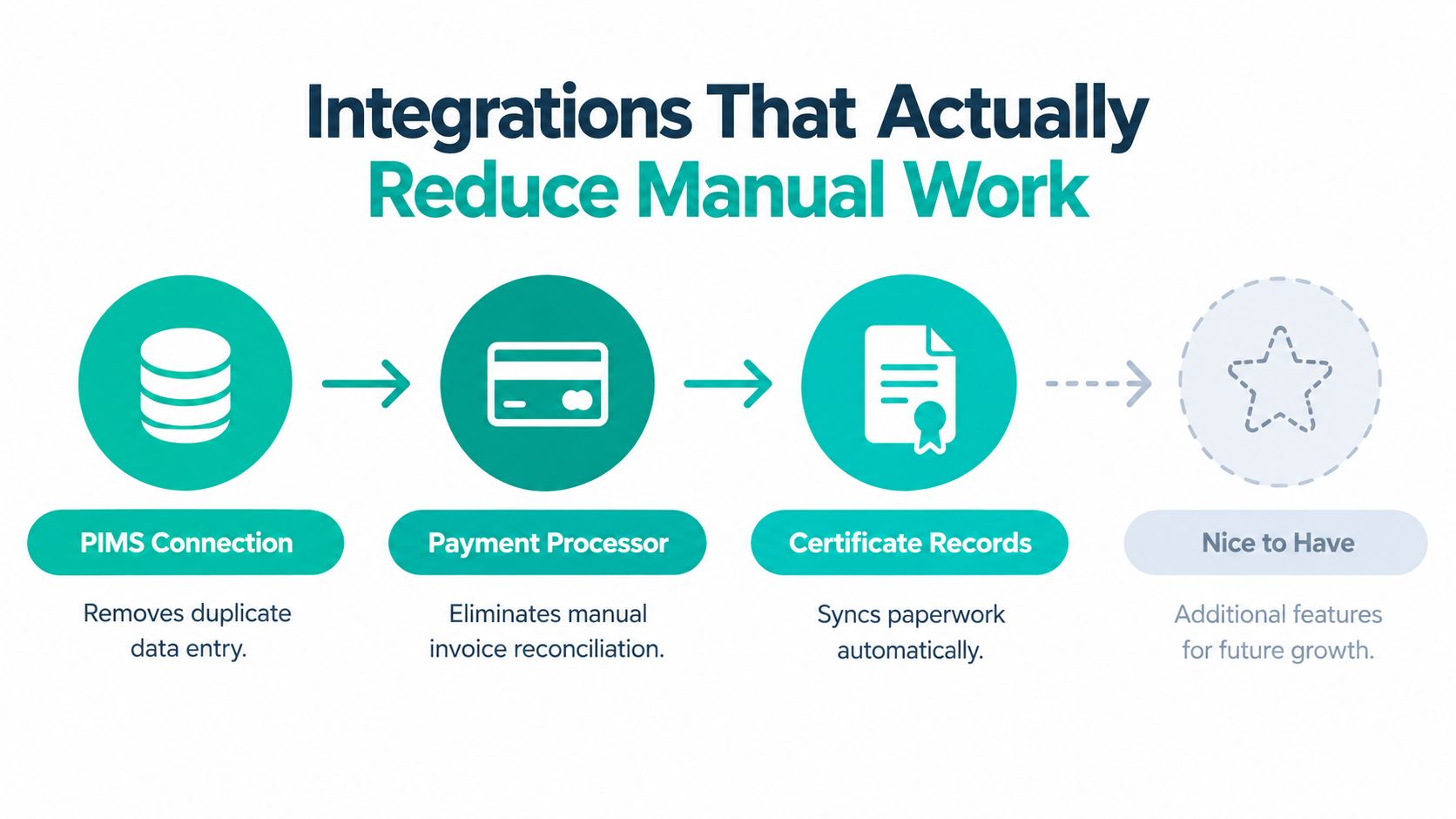
An integration earns its place when it removes a repeated handoff. For pet travel cases, that means stopping staff from copying the same owner, pet, payment, and certificate details across separate systems while a deadline approaches.
Start with the patient record
A PIMS connection should prevent duplicate entry. When a client starts an application, the system should pull approved owner and pet information into the workflow and provide a clear way to correct outdated details. Staff should not retype a microchip number from one screen into another and risk a transcription error.
Payment processing needs the same treatment. If an owner pays for a certificate service, the case should display the payment status without forcing a coordinator to reconcile a separate spreadsheet. Finance staff may still need to review transactions, but the workflow should remove avoidable invoice chasing.
Connect the documents that decide the outcome
E-signature tools can shorten approval when an owner or veterinarian must sign a form. Laboratory-result integrations should place titer results and related records directly in the case, rather than leaving staff to download, rename, and upload files by hand.
An audit-friendly export deserves equal attention. If an authority, airline, or partner asks how a case progressed, staff should be able to produce requests, uploads, corrections, approvals, messages, and event dates in one readable record. Managers can then investigate a missed deadline without relying on personal recollection.
USDA guidance says that after a veterinarian signs a health certificate, there may be a limited endorsement window, such as 30 days, before the destination stops accepting it. Document status therefore affects the next useful action, not just the appearance of the case dashboard.
Score the demo with a real case
Ask the vendor to demonstrate one complete sequence instead of accepting a generic integration tour:
Create the case: Pull owner and pet details from the practice record.
Request the missing item: Send a structured document request and record the response.
Apply the timing rule: Create a task from the travel or certificate date.
Record the outcome: Export the case history with documents and event dates.
If the demonstration skips these handoffs, the connection may save less work than its sales page suggests. Choose the integration a coordinator will use every day, not the one with the most impressive name.
Implementation in a Real Practice
A new platform fails when the practice tries to migrate every process at once. Start with the travel workflow, keep active cases visible, and give staff a small set of rules they can follow without guessing.
Week one sets the foundation
Import only the data you need for open cases and upcoming travel. Create roles for coordinators, veterinarians, and managers. Decide who can view documents, who can approve them, and who owns an unanswered client message.
By the end of the first week, every active case should have an owner, a travel date, a current status, and a list of missing information. If the dashboard can't show those fields, fix the configuration before writing templates.
Week two turns knowledge into messages
Build templates for intake confirmation, missing-document requests, correction notices, appointment reminders, and completion updates. Keep each message focused on one action. A client who needs to upload a vaccination record shouldn't receive a paragraph that also explains every possible destination rule.
Use two-way communication where a reply changes the case. Healthcare research reports SMS open rates around 98%, compared with 20% to 46% for healthcare email, and says two-way reminders outperform one-way messages by 23%, as summarised in healthcare patient-engagement guidance. These figures are directional for veterinary work, not a guarantee, but they support a sensible design choice: make it easy for the owner to confirm, ask, upload, or escalate.
Weeks three and four prove the workflow
Pilot the system with a small group of travel cases. Don't choose only easy applications. Include one case with a missing laboratory result and another with a document correction.
Track delivery rate, response rate, time to first human response, unresolved-message age, document completion, correction frequency, and staff follow-ups. Compare those results with the manual process. A vendor supporting teams that scale healthcare solutions can be useful when implementation requires wider operational planning, but your internal owner still needs to define what success means.
Train staff with short screen recordings and a one-page escalation guide. For doctors who resist new tools, show the one action they must complete, such as reviewing a flagged certificate, rather than asking them to learn every administrative feature. Keep the old inbox available for a limited transition period, but route new travel cases through the new workflow from a clear start date.
Matching the Tool to Your Caseload
There isn't one correct platform for every veterinary practice. The right choice depends on how often you manage international travel, how much paperwork each case creates, and whether deadlines or conversations cause the most staff effort.
Choose a specialised workflow when documents drive the service
Passpaw fits practices that regularly handle international health certificates and need travel details, document requests, reminders, and application updates connected in one case. It's especially relevant when staff spend more time chasing missing information and checking dates than answering ordinary client questions.
A general CRM is a better fit when most communication involves appointment reminders, recalls, billing updates, and broad client follow-up. HubSpot or another CRM can provide strong contact history and automation without adding specialist travel logic your practice rarely uses.
Telehealth software makes more sense when virtual consultations, triage, and remote clinical conversations are the main service. It may be the wrong centre of gravity when the difficult work happens after the consultation, inside a document package that must satisfy destination and airline timing.
The communication channel matters, but comprehension matters more. A 2025 study of 68 veterinary participants reported a 0.86 correlation between meaningful client interaction and perceived patient-care outcomes, as reported in the veterinary communication study. That doesn't prove that any particular platform will create the same result. It does reinforce the operational lesson: messages should help owners understand and complete the next step.
Choose the platform that follows the case, not the platform that merely sends the message.
If travel documentation is a regular revenue service, test a workflow-first platform against one real application. If travel is rare, configure your existing CRM carefully and avoid buying complexity you won't use. If virtual care is your priority, evaluate telehealth tools on consultation quality rather than certificate handling.
Passpaw provides a connected way to collect pet and trip details, request documents, send deadline reminders, and keep international health-certificate applications organised. Visit Passpaw to see whether its workflow fits the cases your practice handles.

More articles
From regulatory changes to best practices for veterinarians and pet owners, our resources keep you ahead of the curve.