Are you a team member in a veterinary practice?
Are you a pet parent planning a trip with your furry pal?
Veterinary Client Communication Software: A Practical Guide
The phones start before the coffee does. A client wants to move a vaccine appointment, another is waiting for discharge instructions, and a technician is trying to confirm tomorrow's surgeries while a missed-appointment alert joins the growing pile on the screen. By lunch, the team has answered some messages twice, lost others in personal text threads, and promised callbacks that still sit on someone's sticky note.
That's the problem veterinary client communication software is built around. It isn't only a texting tool. Done well, it connects reminders, conversations, forms, follow-ups, and reporting to the work your team already does, so communication becomes a managed workflow rather than another bowl to keep spinning.
A Busy Monday at the Front Desk
At 8:07 on a busy Monday, the front desk phone rings while two clients wait with leashes in hand. A notification announces a missed appointment in the corner of the monitor. One receptionist answers the call, another searches for a lab result, and a technician moves between the treatment area and the desk to confirm which patients are booked for surgery tomorrow.
The messages don't stop. A client asks whether a dog needs to fast before a procedure. Someone replies from a shared mobile phone, but the rest of the team can't see the conversation. A cat owner calls back about a reminder sent last week, and nobody's sure whether the appointment was confirmed or merely acknowledged. The day has developed a small communication hairball.
That scene feels ordinary because the work is fragmented. Phone calls live in one place, emails in another, staff texts somewhere else, and appointment notes inside the practice management system. The team may be working hard, but effort doesn't guarantee that every client receives the right message at the right time.
Practical rule: If a client question requires someone to remember which channel was used, where the answer was stored, and who owns the callback, the workflow is already carrying unnecessary risk.
A practice can improve its starting point by making onboarding details consistent from the first interaction. Guidance on client onboarding best practices is useful here because communication quality often depends on collecting the right contact preferences, pet details, and consent before the appointment exists.
Veterinary client communication software brings those loose pieces into a more deliberate process. The important question isn't whether it can send a text. It's whether it helps the receptionist, technician, veterinarian, and client know what happens next.

What Veterinary Client Communication Software Is
A Monday morning can expose the difference between sending messages and managing communication. A client replies to a reminder, another asks about a prescription, and a third needs to reschedule. Veterinary client communication software gives those conversations a shared workflow, so each request has an owner, a recorded history, and a defined next step.
The software works like a front desk assistant that never clocks out, combined with a shared inbox and automated reminder engine. It sits beside, or connects with, the practice management system. Routine messages can go out automatically, while staff handle the replies that require judgment, empathy, or clinical review.
The category now covers integrated, two-way communication rather than one-way notifications alone. The American Veterinary Medical Association describes two-way client communication through text or email as technology practices can use today, linking responsible telehealth adoption with continuity of care, client compliance, and practice efficiency. The AVMA also reported that integrated communications software was more common among companion-animal-exclusive practices than among companion-animal-predominant, mixed-animal, or equine practices, based on its 2023 Veterinary Practice Owners Survey.
The main feature groups make more sense when tied to a staff member's daily work:
Two-way SMS and email: A CSR can answer a scheduling question, send discharge instructions, or route a clinical question without moving between personal phones and separate inboxes.
Appointment reminders and confirmations: The system sends a message, records the response, and may offer confirmation or rescheduling. Staff can see appointment status instead of relying on memory.
Recall and vaccine reminders: The practice can contact clients about preventive care, dental work, laboratory rechecks, and other due services. Responses can feed a follow-up queue for the recall coordinator.
Digital intake forms: Owners provide contact, history, and consent information before arrival. Receptionists review missing fields instead of entering every answer at the counter.
Post-visit follow-ups: A technician can send home-care instructions or check whether recovery is progressing as expected. Some platforms also request feedback after the visit.
Telehealth and two-way video or chat: A veterinarian can assess an appropriate follow-up interaction remotely, with the conversation connected to the patient record.
Client portals and self-service: Owners may request appointments, update details, ask routine questions, or view selected information without calling for every small task.
Review requests: The practice can invite feedback after an appointment, giving satisfied clients a clear path to respond and staff a way to spot concerns.
Basic analytics: Managers can review delivery, responses, appointment outcomes, recall activity, and communication volume. Reporting quality depends on integration depth and consistent tagging.
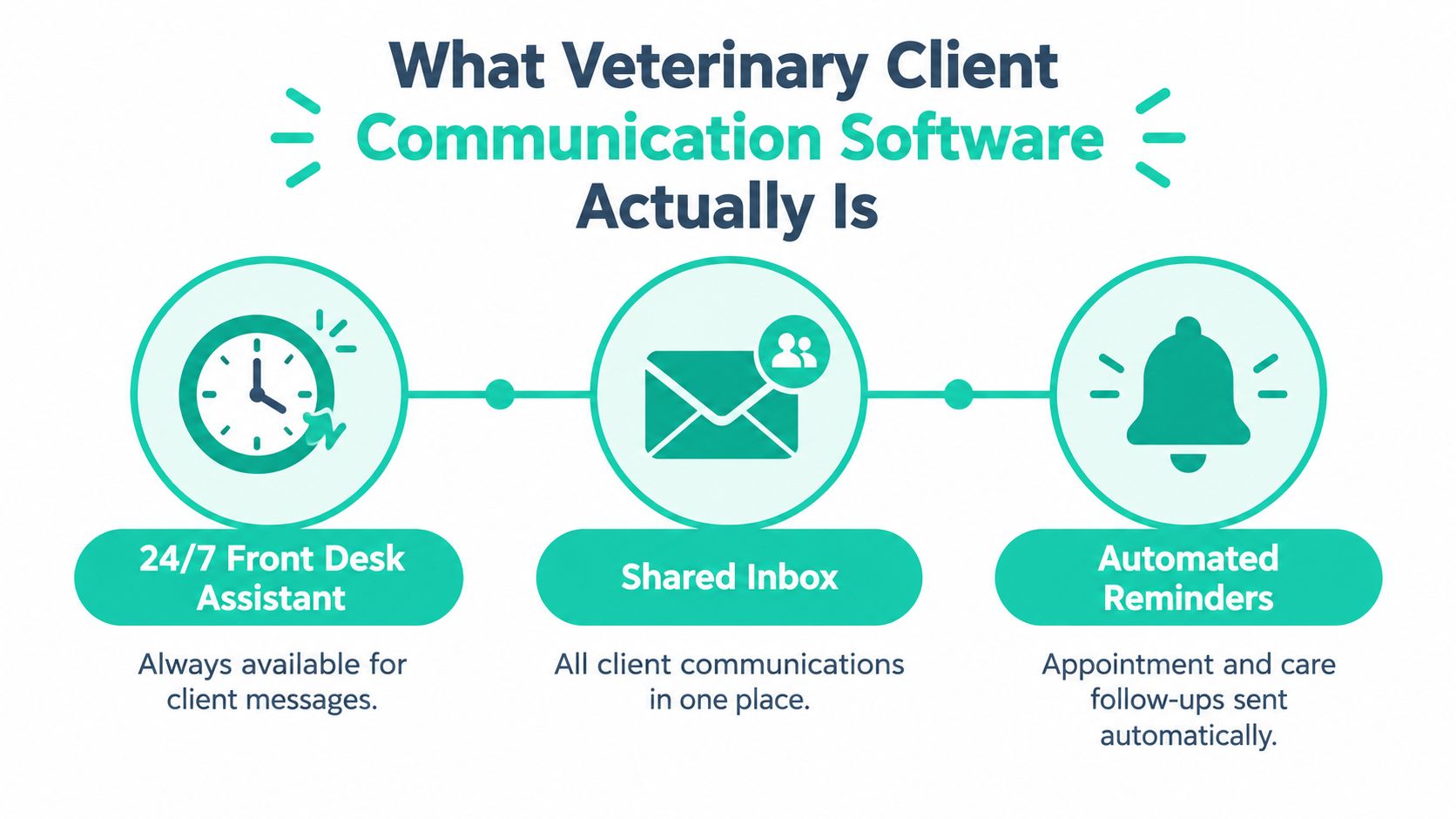
A shared inbox can borrow ideas from broader SaaS customer support solutions, including assignment, escalation, response history, and visibility. Veterinary teams must adapt those practices to patient care, but the operating rule remains useful: every conversation needs a clear owner and visible next action.
For a practical comparison, review these customer communication management tools. The strongest fit is not the platform with the longest feature list. It is the one that removes a specific manual step, connects cleanly with the clinic's systems, shows who is responsible, and leaves a record the practice can measure later.
Benefits You Can Measure, Not Just Feel
A smoother front desk is valuable, but “the day felt easier” isn't enough to judge a software purchase. A practice should connect each communication workflow to a number it can review regularly, such as missed appointments, recall responses, phone volume, rebooking, or follow-up completion.
Computer-generated recall systems show why message design matters. A peer-reviewed veterinary practice-management study found that 40% of clients who received recall notices returned to the clinic, while vaccination recalls received responses about three times less often than other recall types, including dental, laboratory, recheck, and neuter reminders. The findings are summarized with the study details in this veterinary client retention automation comparison.
That doesn't mean every practice should expect the same result. It does mean a vaccine reminder shouldn't automatically use the same cadence, wording, or follow-up logic as a dental recall. The software should help the team see which message types perform differently.
Benefit | Metric to Track | Typical Impact |
|---|---|---|
Fewer missed appointments | No-show and late-cancellation rate | Fewer empty slots and less last-minute rework |
Stronger recall activity | Recall response, booking, and rebooking rate | More visible follow-up opportunities |
Better preventive-care compliance | Completed recommended tests or services | Clearer view of whether owners acted |
Less phone work | Calls, callbacks, and front-desk minutes per appointment | More time for clients who need a human conversation |
Faster feedback collection | Survey delivery and completed responses | Earlier visibility into satisfaction concerns |
Better retention | Repeat visits and overdue-client reactivation | More consistent ongoing care |
Automated reminders can support concrete care workflows. In one clinic case study, automated reminders and pre-appointment instructions increased fecal sample compliance to 63% and preventive-care bloodwork inclusion to 43%, while also reducing no-shows and last-minute cancellations, according to the IDEXX animal care clinic case study. The source connects the gains with repeated reminder timing and format, not with automation alone.
The same principle applies to follow-up. A post-visit survey may reveal a problem before a frustrated owner leaves a public review. A reschedule link may turn an unanswered reminder into a new appointment. A portal may save a call, but the practice should record that saved interaction rather than assuming it happened.
A veterinary software platform can provide the wider system around these workflows, but reporting still needs deliberate setup. Choose a baseline, name an owner for each metric, and review the results often enough to adjust the process.
Common Use Cases in Real Veterinary Practices
A small animal clinic with two doctors has a vaccine-due appointment on the calendar. Three days before the visit, the software sends the owner a text with the pet's name, the procedure, and a reschedule button. The owner confirms in about 90 seconds, and the receptionist avoids making 15 confirmation calls.
Before the change, the team worked down a call list and recorded answers manually. Afterward, the receptionist only handles exceptions, such as an owner who needs a different appointment type or a pet whose medical history needs review. The value isn't the text by itself. It's the removal of a repetitive call-and-record loop.
A clear call ownership model matters whenever messages and calls share the same front desk. Teams reviewing choosing call queue software can apply the same thinking to veterinary communication: define who receives an unanswered request, how urgent items are flagged, and when a conversation moves from a CSR to a technician or veterinarian.
A follow-up that fits the patient
After a cat's urinary procedure, the doctor sends a message at 6 p.m. asking about litter box activity and comfort. The owner replies with a short video. The veterinarian reviews the information, adjusts the pain-management plan where appropriate, and captures the recheck interaction without asking the client to travel back to the clinic for that specific exchange.
This workflow isn't suitable for every concern, and it doesn't replace an in-person assessment when the patient needs one. Its strength is in structured follow-up, where the clinician already knows the case and the owner can provide useful observations from home.
A late question with a clear handoff
At 10 p.m., a worried new puppy owner sends a message about mild stomach upset. The CSR replies with approved at-home care steps and flags the conversation for a morning callback. The owner receives an answer instead of repeatedly calling, while the clinic keeps the case in a visible queue for the next day.
The same system can manage discharge updates, lab-result notices, refill requests, and client-submitted photos. Those smaller touchpoints often prevent the front desk from becoming a relay station between owners and the medical team.
The universal use cases are appointment confirmations, reminders, intake, and documented two-way messaging. Specialty and emergency hospitals may place more weight on updates, triage routing, and photo or video exchange. Equine practices may need different scheduling and field-service workflows. Telehealth, portals, and review prompts can be useful, but they're optional layers rather than requirements for every practice.
Examples such as these are easier to design when the team maps the client communication examples to actual staff roles, escalation rules, and patient needs.
Integration, Security, and the Stack Around Your Software
A communication product should be judged by what happens around it, not only by its message editor. Start with the connection to the practice information management system, or PIMS.
A standalone tool might sync the appointment book once a day. An embedded platform may read the appointment schedule, patient history, and recall list in real time. The first arrangement can be faster to adopt, but stale information may send a reminder after an appointment has moved. The second can reduce double entry, but a broken connection can affect more of the daily workflow.
Dimension | Standalone Tool | Embedded Platform |
|---|---|---|
Data freshness | May depend on scheduled syncing | Usually reflects connected PIMS data more closely |
Staff entry | More copying between systems | Less duplicate entry when the connection works |
Appointment changes | Can create outdated messages | Better positioned to reflect live changes |
Charges and services | May require manual reconciliation | Can connect communication to visits or services more directly |
Failure impact | Often limited to the communication tool | A wider outage may disrupt connected workflows |
Implementation | Potentially simpler | Usually requires deeper vendor and PIMS coordination |
Ask vendors how they handle health information and whether their safeguards fit your practice's obligations. Confirm that texting consent is recorded in a way that supports your chosen compliance process, including TCPA-related consent management where applicable. Ask about encryption in transit and at rest, role-based access for relief doctors, audit logs, and independent assurance such as SOC 2 or an equivalent review.
Security isn't a checkbox to inspect only during procurement. Find out how access is removed when a staff member leaves, how messages are exported, and who can view attachments or clinical discussions. A receptionist may need scheduling access but not every medical detail. A relief veterinarian may need patient context for a shift without retaining broad administrative permissions.
Look beyond messages
Useful connections may include payment links, pharmacy refill requests, and Google or Apple Business profiles. Each one can reduce a handoff, but each also creates another place where permissions, data mapping, and failure recovery matter.
Teams comparing integration patterns can use a general SCORM xAPI LTI guide for broader questions about data flow, ownership, and system boundaries, even though those standards come from learning technology rather than veterinary care.
Tighter integration usually reduces staff load. It also raises the stakes on vendor stability, so review the company's roadmap, support process, incident history, and uptime record as carefully as its feature list.
Why Buying the Tool Is the Easy Part
Adoption has spread, but purchase alone doesn't create a reliable workflow. One 2026 overview reported that 75% of general practices use digital client communication tools, while 59.9% use integrated client-communication software and fewer than one in three offer online scheduling or telehealth, according to Otto's veterinary communication software guide. The gap suggests that many teams have started using digital tools without connecting every part of the client journey.
The first failure mode is message overload. A clinic turns on every reminder, survey, promotion, refill alert, and follow-up sequence at once. Clients may stop paying attention, and staff may stop distinguishing urgent conversations from routine notifications.
The second is a people problem, not a software problem. A CSR who hasn't been coached on tone, timing, routing, and escalation may treat the inbox like an answering machine. A doctor may receive questions that a trained technician could resolve, while a clinical concern may sit with a team member who doesn't know when to escalate it.
The third is weak measurement. Without a baseline for no-shows, recall conversion, front-desk minutes per appointment, and unanswered messages, nobody can tell whether the system is reducing work or merely moving it to another screen.
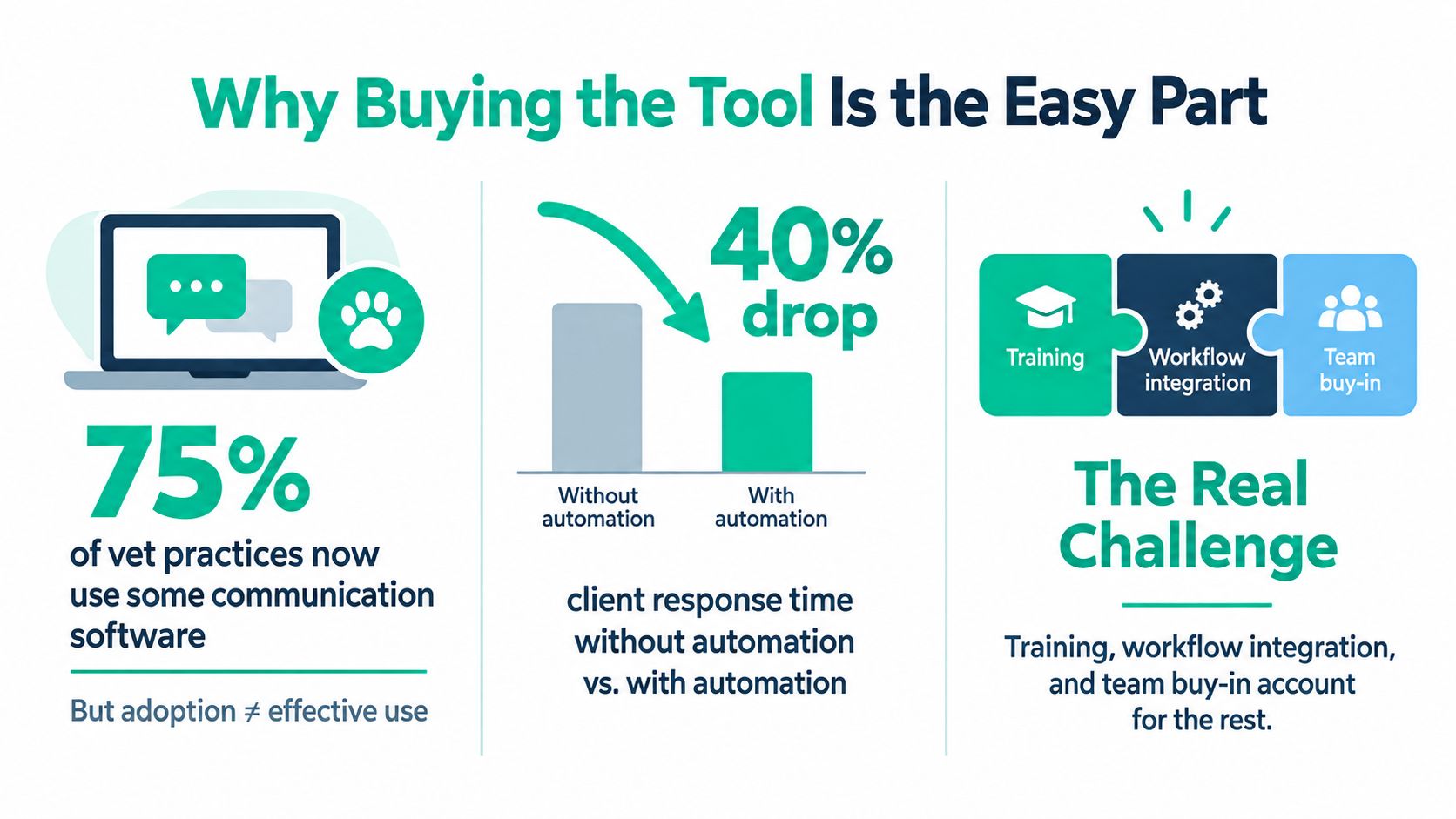
The useful question isn't “Did we switch it on?” It's “Which staff action changed, and what result followed?”
Create a rollout plan with a small number of message types first. Write response templates in the clinic's voice, define which questions need a veterinarian, and assign someone to monitor the shared inbox during each shift. Then review the workflow quarterly instead of treating onboarding as a one-time event.
The measurement gap can be especially serious for growth. A 2026 survey summary reported that 78% of veterinary professionals couldn't say what a new client costs them, while 58% of new-client interactions arrived by phone and 23% through online booking, as described in this veterinary client communication software comparison. If the practice can't connect communication events to lead source, conversion, or new-client cost, convenience may be mistaken for return on investment.
Choosing and Rolling Out the Right Solution
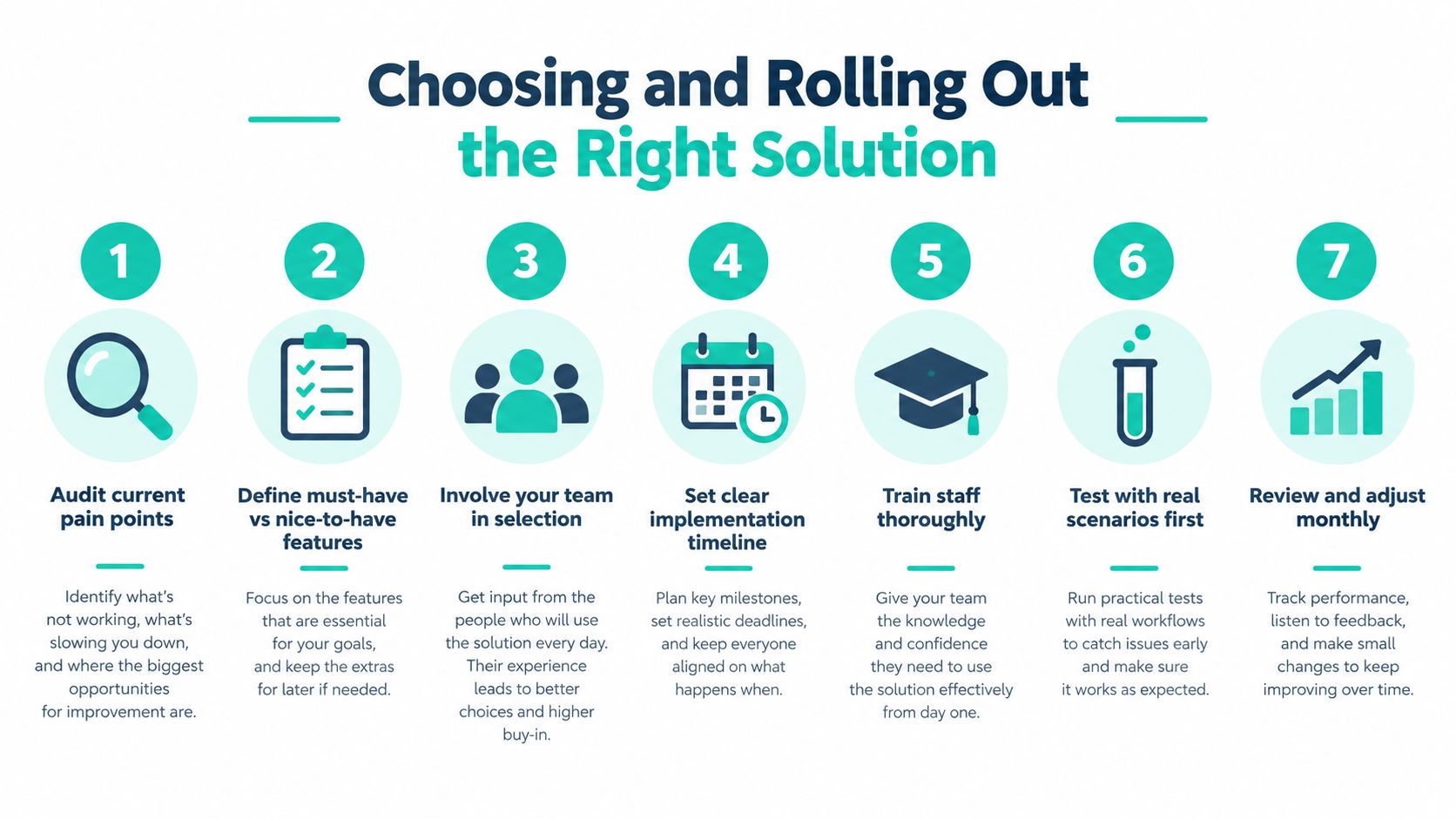
Treat the purchase as a short operational project. A seven-step sequence keeps the team focused on workflow rather than shiny features.
Audit current pain points. Pull a sample of missed calls, late cancellations, overdue recalls, unanswered messages, and duplicate entries. Ask the people doing the work where a client request gets stuck.
Separate must-haves from nice-to-haves. Two-way texting, live appointment syncing, consent records, and clear ownership may be essential. A branded app or advanced review automation may wait.
Shortlist two or three vendors. Include the PIMS connection, pricing model, support coverage, export options, and implementation help in the first pass.
Run a scripted demo. Ask each vendor to show a reschedule, a recall reply, a photo attachment, a clinical escalation, and a staff handoff. Don't accept a tour that only shows the easy path.
Negotiate the exit as carefully as the entry. Confirm data ownership, export format, contract renewal terms, termination rights, and what happens to message history if the relationship ends.
Pilot with one doctor and one receptionist for two weeks. Use real scenarios, but keep the scope controlled. Record where the process saves time and where it creates extra work.
Expand with feedback loops. Add teams and message types gradually. Review results monthly, revise templates, and retire workflows that clients or staff consistently ignore.
Before signing, verify TCPA-compliant texting consent procedures, confirm the PIMS can connect through the required HL7 or API route, and ask who supports the integration when either system changes. Budget staff training time separately from the software subscription. A tool that looks affordable can become expensive in attention if nobody has time to learn it.
Practice situation | Practical deployment style |
|---|---|
Small team with one clear communication problem | Standalone add-on with a narrow pilot |
Growing practice needing shared records and automated care workflows | Integrated suite connected closely to the PIMS |
Multi-location or cloud-first operation needing flexible access | Cloud-native platform with strong permissions and reporting |
At 30 days, check delivery, response, inbox ownership, and staff adoption. At 60 days, review no-shows, recalls, rebooking, and front-desk effort. At 90 days, connect those results to retention, lead source, conversion, and cost where the data is available.
For practices handling international pet travel, communication also has to follow the calendar. CDC pet travel guidance says a certificate dated within 10 days of departure is needed for pet travel, while USDA guidance notes that after an accredited veterinarian signs the certificate, there may be only about 30 days to obtain USDA endorsement and travel before a destination stops accepting it. The U.S. State Department adds that most countries require a federally accredited veterinarian and USDA endorsement, and some airlines accept certificates no older than 10 days even when the destination allows more time, according to its pets and international travel guidance.
Passpaw supports this type of workflow by collecting travel details, requesting documents, sending deadline reminders, and keeping the practice and pet owner updated on an international health certificate application. Visit Passpaw to see how the platform can fit alongside your broader client communication process.

More articles
From regulatory changes to best practices for veterinarians and pet owners, our resources keep you ahead of the curve.