Are you a team member in a veterinary practice?
Are you a pet parent planning a trip with your furry pal?
Application Tracking System Software: A 2026 Guide
A client emails at 8:10 a.m. about flying a dog overseas. At 8:25, a technician is checking a second pet's rabies records, while a veterinarian is trying to remember whether a third destination needs a lab result before a certificate can move forward. The details sit in inboxes, spreadsheets, practice-management notes, and paper folders. One missed date can turn a straightforward travel appointment into a frantic scramble.
That's why veterinary practices should look at application tracking system software differently. The useful question isn't, “Can this tool track applicants?” It's, “Can this tool show every pet travel case, every missing document, every deadline, and every person responsible for the next step?”
The original applicant tracking system, or ATS, was built for hiring. ATS software collects, organizes, and filters applications, often scanning resumes for keywords, skills, job titles, and education before a recruiter reviews them, as explained by Jobscan's ATS overview. The same basic workflow can help a veterinary clinic, but only if the software understands that a health certificate isn't a resume and a destination rule isn't a job description.
Workflow need | Generic HR ATS | Generic project tracker | Pet travel platform |
|---|---|---|---|
Capture pet, owner, and destination details | Adaptable, but requires custom fields | Manual setup | Built around pet travel intake |
Track health certificates and supporting documents | Possible with workarounds | Possible with attachments | Designed for document workflows |
Apply destination-specific rules | Usually limited | Manual research | Central feature |
Monitor lab and vaccination dates | Custom fields or reminders | Manual updates | Structured tracking and alerts |
Manage clinic roles and approvals | Often strong | Basic | Aligned with veterinary review steps |
Report on blocked cases | May need configuration | Usually manual | Built for operational visibility |
What Application Tracking System Software Means for Vet Travel
Three international pet travel certificates in one morning can look manageable until each case brings a different destination, lab schedule, and certificate window. One owner is relocating with a dog, another is traveling with a cat, and a third client has already booked a flight before asking what paperwork is needed. A shared inbox shows messages. A spreadsheet shows rows. Neither gives the team a reliable view of what must happen next.
Application tracking system software creates a visible case pipeline. Each pet travel application has a record, an owner, a status, supporting documents, and a next action. Instead of searching through email for the latest attachment, a technician can open the case and see whether the team is waiting for a vaccine record, a rabies titre result, a client response, or a veterinarian's signature.
The term ATS comes from recruitment, where software parses submitted resumes into raw text and compares information with requirements attached to a role. Some systems can assign a match score or reject applications below a threshold, according to ATS Craft's explanation of keyword processing. That logic doesn't transfer neatly to pet travel. A keyword match can't decide whether a microchip was recorded before a rabies vaccination or whether a treatment date fits a destination's required window.
The same pipeline, with better veterinary logic
Take a client asking about flying a dog to the EU. The intake record should capture the owner's contact details, the dog's microchip information, the planned travel date, the destination, and the available vaccination history. From there, the workflow can trigger a checklist for the rabies titre, tapeworm treatment, certificate preparation, and any supporting documents.
The value comes from the sequence:
Capture the request: Create one case from the client's inquiry.
Check required information: Identify missing pet, owner, destination, or travel-date details.
Assign the next task: Route the case to a technician, veterinarian, or administrative team member.
Track time-sensitive work: Flag lab processing, treatment timing, and the certificate window.
Store the outcome: Keep the final document and related records with the case.
Practical rule: If a staff member has to ask, “Where are we with that pet's certificate?” the workflow needs a clearer status view.
This approach supports the broader role of an ATS, which can include job posting, communication, scheduling, feedback, background checks, and electronic offer letters, as described by SAP's applicant tracking system guide. In a clinic, those functions become intake, client messages, appointment coordination, document review, lab follow-up, and certificate issuance.
For practices handling international paperwork, Passpaw's pet travel workflow offers a useful example of how an application can move through a structured process rather than live across disconnected files.

Core Features That Matter in a Vet Travel Workflow
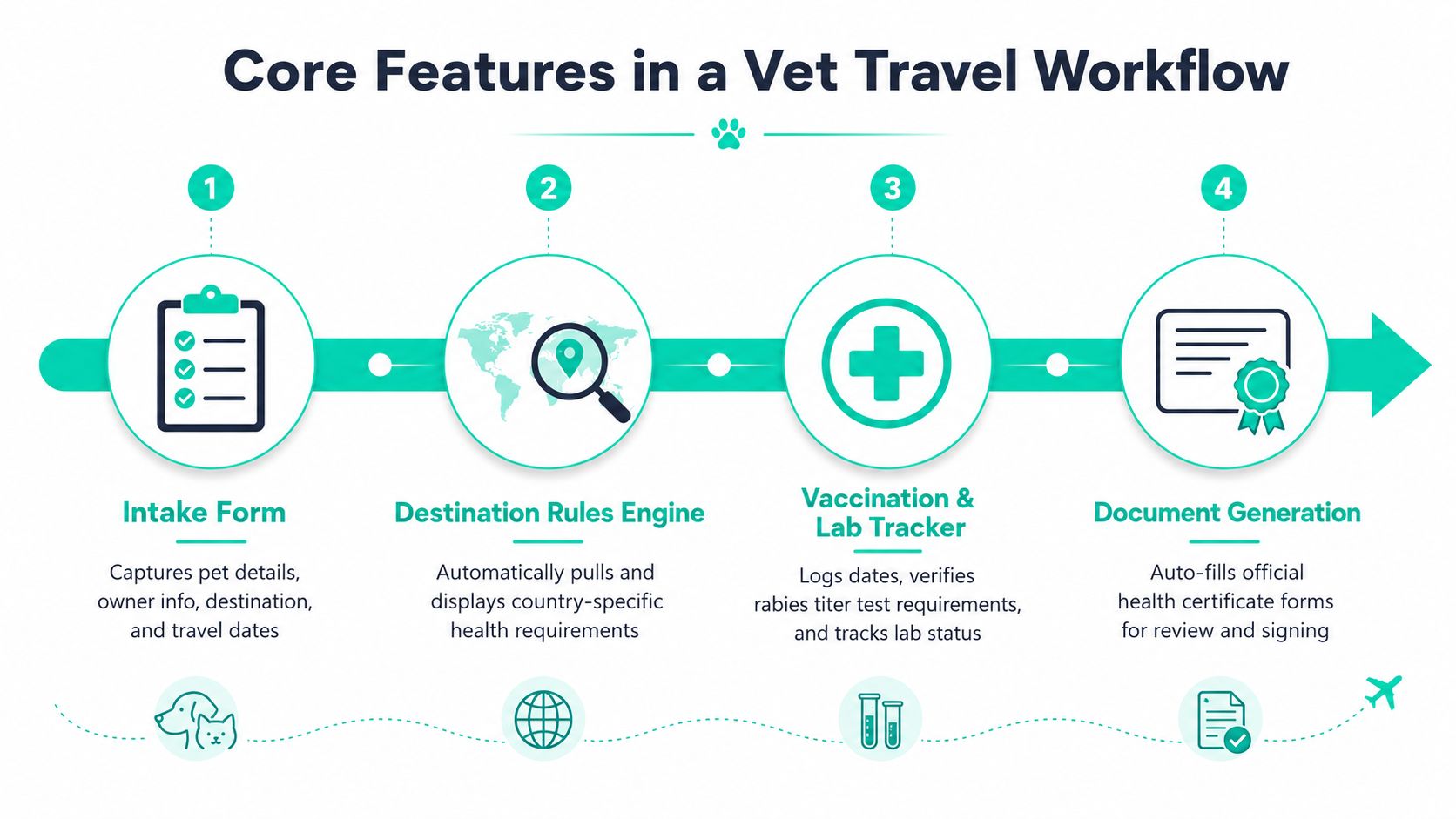
A clinic doesn't need every feature found in a large recruitment suite. It needs the features that prevent missing information, unclear ownership, and late document work. The strongest application tracking system software for pet travel should make routine cases easier while giving staff a clear way to handle unusual ones.
Intake should collect the right facts once
Start with a structured intake form. It should collect the pet's name and species, owner contact information, destination country, travel dates, microchip details, vaccination history, and the documents already available.
Every later step depends on the first record. If the destination is stored only in an email subject line, or the travel date appears in a technician's handwritten note, the team can't reliably prioritize cases. A clean intake also gives the client a single place to provide information instead of forcing staff to retype it into several systems.
Validation should check more than empty fields
Required-field checks are useful, but they're the beginning. A practical workflow should flag missing documents, expiring records, rabies titre timing, and dates that need review. It should also show why a case is blocked, rather than marking it “incomplete.”
The system doesn't replace veterinary judgment or destination research. It gives the team a structured way to spot issues before certificate drafting. That distinction matters when a country's requirements differ from another destination's requirements, or when a rule changes after the client first makes contact.
Status tracking should match the work
A clear pipeline might include:
Received: The clinic has the travel request.
Awaiting exam: The pet needs an appointment or clinical review.
Lab pending: A sample or result is outstanding.
Certificate drafting: The record is ready for document preparation.
Ready for USDA endorsement: The clinic has completed its review and is preparing the next submission step.
Issued: The approved certificate is stored and ready for the client.
The labels should reflect actual staff actions. “In progress” tells nobody enough. “Lab pending” tells the technician what to check and helps the practice identify cases that are sitting still.
Reporting should expose bottlenecks
Useful reports show turnaround times, blocked cases, overdue tasks, upcoming travel dates, and revenue per travel certificate. They should help a manager answer practical questions, such as which cases are waiting on clients, which are waiting on labs, and how many certificates are ready for review.
Independent literature identifies application source effectiveness, screening-to-interview conversion, offer acceptance, and time-to-hire as examples of ATS analytics. In a veterinary workflow, those ideas translate into source of inquiry, intake-to-exam conversion, certificate completion, and time from application to issuance. Resume screening ranked as the most valued ATS capability in one respondent-based feature ranking at 36%, followed by candidate tracking at 20% and interview coordination at 16%, according to this peer-reviewed ATS feature analysis. For pet travel, the lesson is simple. Strong intake, structured status tracking, and reporting matter more than a polished job-posting screen.
Integrations should remove duplicate entry
Look for connections with the practice-management system, laboratory portals, document storage, calendars, and microchip registries. Integration quality is part of workflow management, not an IT side issue. Practices assessing broader coordination needs may also find IT workflow management from CloudOrbis useful as a reference point for thinking about system handoffs and ownership.
A platform such as Passpaw's pet travel features shows the type of workflow-specific functionality a clinic should test, including application progress, task handling, and document work.
Comparing Generic ATS Tools to Pet Travel Platforms
The wrong tool usually doesn't fail on day one. It fails when the clinic handles a destination with unusual rules, a delayed lab result, or a client who changes travel dates. The software still shows a green status, but staff members are doing the work in email and spreadsheets.
Three approaches appear most often.
Workflow Step | Generic HR ATS | Generic Project Tracker | Purpose-Built Pet Travel Platform |
|---|---|---|---|
Initial intake | Strong forms, but fields are designed for people and roles | Flexible, often manual | Captures pet, owner, destination, and travel details |
Document collection | Attachments and candidate profiles work reasonably well | Easy to attach files, weak organization | Groups health certificates and supporting records by case |
Destination rules | Usually requires custom fields or external references | Manual lookup | Uses destination-focused workflows and rule handling |
Microchip and vaccination review | Needs adaptation | Depends on staff notes | Structured around pet travel records |
Lab tracking | Reminders may be possible | Manual date updates | Tracks result status and follow-up tasks |
Approval stages | Mature role and status controls | Basic assignment tools | Supports technician and veterinarian handoffs |
Client updates | Often strong email automation | Usually manual | Tied to case progress |
Reporting | Broad, but may need configuration | Simple counts and filters | Focuses on blocked cases, deadlines, and certificate flow |
Scaling complexity | Handles volume, not necessarily travel nuance | Becomes harder to maintain | Built for repeated destination workflows |
Generic HR ATS tools
A hiring ATS is good at stages, permissions, communication, and document intake. It can often support a custom workflow for applications, and some systems are highly configurable. The problem is meaning. “Screening complete” doesn't tell a veterinary team whether the rabies titre is acceptable, whether a microchip record needs review, or whether a certificate window is closing.
Recruitment systems also tend to favor keyword and profile matching. That makes sense for resumes, but pet travel depends on dates, document relationships, destination rules, and professional review. A clinic can adapt an HR ATS, but it should budget time for custom fields, manual checks, and careful testing.
Generic project trackers
Spreadsheets, shared boards, and general project tools are easy to start with. A small practice can create columns for received, lab pending, drafting, and issued, then assign tasks to staff members. They're flexible and familiar.
They don't validate the information. They don't know whether a destination requires a specific treatment window. They won't reliably connect a lab result to the pet's travel date unless someone updates the record. The clinic gets a visual board, but the team remains responsible for the rules and the data quality.
Purpose-built pet travel platforms
A pet travel platform starts with the actual workflow. It can organize destination requirements, health documents, lab steps, client communication, and endorsement-related tasks in one case. That reduces the number of manual bridges staff members must build between systems.
It isn't automatically the right choice for every practice. A clinic with occasional travel cases may prefer a simpler tracker, especially if staff already know how to research requirements manually. A high-volume practice with many destinations needs more than a generic pipeline. It needs a system that understands why one case is blocked and another is ready to move.
A Realistic Pet Travel Case From Intake to Certificate
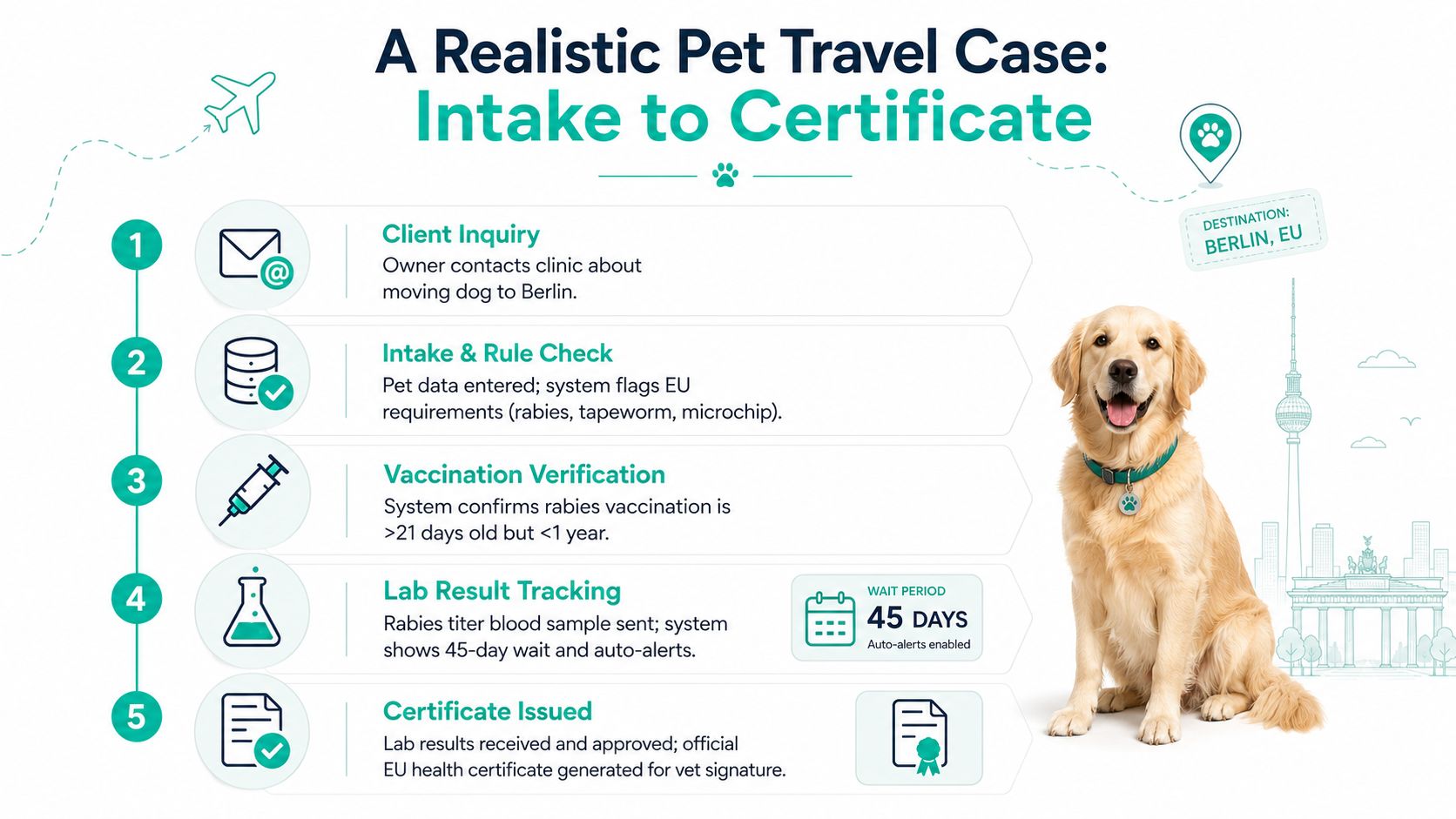
A client emails the clinic about moving a dog to Berlin. The owner includes the planned travel date, but the message doesn't contain a complete vaccination history or a clear microchip record. The team should not begin by opening a spreadsheet row called “Berlin dog.” It should create a complete application that can guide the next conversation.
The case begins with structured intake
An intake form captures the owner's contact details, the dog's identifying information, microchip data, destination, and travel date. The system stores the email and uploaded records with the case, so the technician doesn't have to search through the shared inbox later.
The destination selection then starts a rule check. The workflow flags the need to review rabies vaccination, rabies titre requirements, microchip information, tapeworm treatment, and the timing of the health certificate. The team can see which facts are confirmed and which still need evidence.
The clinic verifies health records
At the appointment, the technician checks the vaccination record and enters the relevant dates. The workflow indicates that the rabies vaccination is more than 21 days old but less than one year old, matching the case timeline shown in the process example. The veterinarian reviews the record instead of relying on an informal note that says “rabies okay.”
If a rabies titre blood sample is needed, the case moves to rabies titre pending. The lab task records when the sample was sent and keeps the result attached to the correct pet. The workflow example uses a 45-day wait, with an alert to help the team follow up rather than depend on memory.
The best status is an instruction. “Lab result tracking” tells the next staff member what to look for and what action may follow.
Endorsement and certificate preparation
Once the result arrives, the technician uploads it, marks the lab task complete, and moves the case to certificate drafting. The veterinarian reviews the generated document, confirms the information, and signs it when ready. The case then moves to endorsement submitted, followed by certificate issued when the final document is available.
The system should preserve the intake details, uploaded records, status history, notes, and final certificate in one case file. That gives the clinic a usable record of what happened without requiring staff to reconstruct the timeline from email threads.
Automation earns its keep. It doesn't make the destination decision for the veterinarian. It reduces repeated spreadsheet updates, makes ownership visible, and brings missing work to the surface before the client's departure date becomes an emergency.
Where Most Tracking Tools Fall Short in Daily Use
Vendor demos usually show a clean pipeline, quick filters, and a confident click from “received” to “complete.” Daily clinic work is messier. The tool must handle a missing record, a changed travel date, a lab portal that doesn't connect, and a veterinarian who needs to approve a document while a technician updates the case.
A dashboard can hide the real blockage
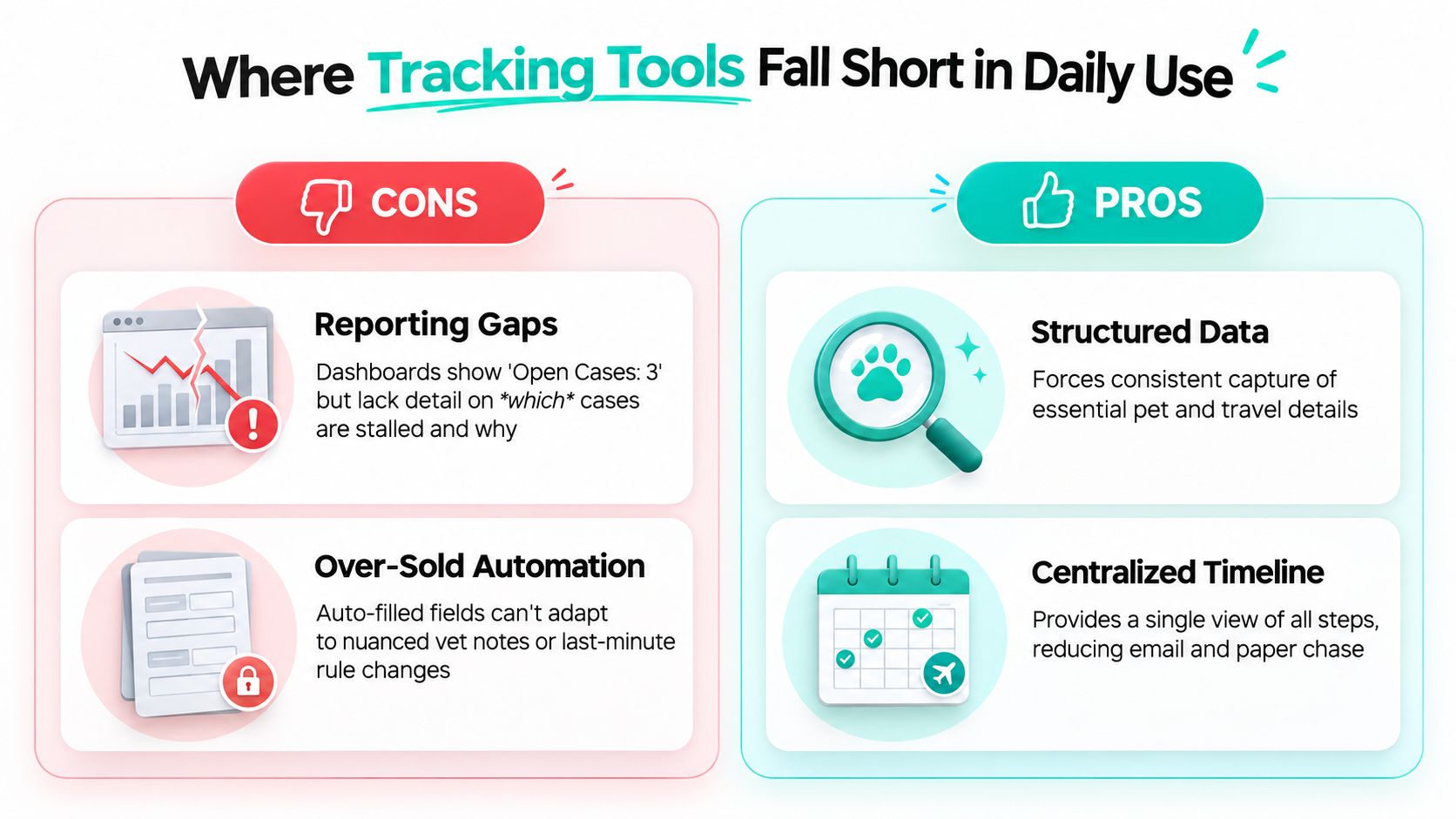
An open-case count isn't enough. A dashboard may show three open applications without showing that one is waiting for the client's microchip record, another is waiting for a lab result, and the third is ready for veterinarian review. Staff then spend time opening cases one by one or asking for updates in chat.
Ask vendors to demonstrate a blocked-case report. The report should identify the case, the missing action, the owner, the due date, and the next person responsible. If the system can't do that without exports or custom development, the dashboard may be decoration rather than management.
Integrations often stop at a promise
“Integrates with your PIMS” can mean several different things. It may mean a live connection, a one-way export, an import file, or an integration that requires staff to copy information between screens. Test the exact handoff for pet identity, owner contact details, appointment information, documents, and status updates.
Hidden integration work creates its own queue. A team that manually exports a file from the practice-management system and uploads it into the tracker hasn't removed duplicate entry. It has moved the task.
Rule engines can be too shallow
Destination requirements can vary by country and by the details of the pet's record. A rule engine that handles only a basic checklist may fail when staff need to review tapeworm treatment timing, unusual entry conditions, or breed-specific questions. Auto-filled fields also don't replace clinical notes or a human review of conflicting records.
A document validation guide for veterinary clinics can help teams frame the evaluation around missing information, date checks, and document quality rather than generic automation claims.
Permissions can create a bottleneck
Technicians need to update case notes and upload lab results. Veterinarians may need to review or approve final documents. Administrative staff may need to send client updates without changing clinical content. If the permission model is too rigid, the veterinarian becomes the only person who can keep the case moving. If it's too loose, the clinic may struggle to see who changed important information.
The right tool supports collaboration without blurring responsibility. Ask to test each role during the demo, not just the administrator account.
Picking the Right Application Tracking System Software
Choose the system that fits the clinic's case volume, destination mix, staff capacity, and existing technology. Don't buy a broad feature list and hope your team can bend it into a pet travel workflow.
A useful starting point is to group practices by monthly case volume.
Practice Profile | Monthly Pet Travel Cases | Recommended Software Type | Why It Fits | Watch Out For |
|---|---|---|---|---|
Small clinic with occasional international cases | Under 10 | Generic project tracker | Low setup burden and enough visibility for a small queue | Manual rule research, weak validation, and inconsistent updates |
Growing clinic with repeat travel work | 10 to 50 | General HR ATS adapted for documents | Strong workflow stages, permissions, communication, and reporting options | Custom fields, destination logic, and integration work |
High-volume clinic or pet travel service | 50+ | Purpose-built pet travel platform | Better fit for repeated destination workflows, document tracking, and deadline management | Vendor support, rule coverage, data migration, and pricing structure |
Under 10 cases per month
A shared project tracker can work if one person owns the process and the clinic accepts manual destination checks. Use fixed statuses, required fields, clear naming, and a consistent document folder. Don't pretend a board validates health records. It only makes the work easier to see.
This model suits a small practice that handles a limited destination mix and doesn't need complex reporting. It becomes risky when cases arrive in bursts or several people update the same board without a shared process.
Between 10 and 50 cases per month
A general ATS can be a reasonable middle path. Its strengths usually include intake, assignments, communication, permissions, and pipeline reporting. The clinic should test whether it can represent a pet, an owner, a destination, multiple documents, lab work, and date relationships without forcing staff into awkward workarounds.
Prioritize these criteria:
Destination rule coverage: Can the system display the requirements relevant to the selected destination?
Validation quality: Does it identify missing or conflicting information?
Integration depth: Does data move between the PIMS, labs, calendars, and document storage?
Reporting clarity: Can managers identify blocked cases without opening every record?
Per-case cost: Does pricing remain sensible as travel work grows?
A veterinary software comparison such as this practice-focused evaluation can help teams organize questions around workflow fit instead of brand familiarity.
More than 50 cases per month
High-volume clinics need purpose-built workflow support. At this level, manual rule lookup, repeated data entry, and spreadsheet maintenance can consume the time the software was supposed to protect. The system should prioritize cases by travel date, show outstanding tasks, support client updates, and preserve a clear history of document changes.
Ask for a live demonstration using difficult cases, not a perfect sample. Change the travel date. Upload an incomplete record. Add a delayed lab result. Give a technician and veterinarian different permissions. The right system should remain understandable when the case goes off script.
Your Next Steps and Evaluation Checklist
Start with the work your team repeats. Write down how a case enters the clinic, who reviews the pet's information, how the destination requirements are checked, where lab results are stored, who drafts the certificate, who approves it, and how the client receives updates. That map will expose the gaps more clearly than a vendor's feature page.
Then shortlist tools by case volume, destination mix, and current systems. A low-volume clinic may need a structured tracker. A growing practice may benefit from an adapted ATS. A busy pet travel service likely needs purpose-built workflows and stronger rule handling.
Run a workflow-specific evaluation
Ask each vendor to use a real scenario, such as a dog traveling to the EU with incomplete records and a pending rabies titre. Watch what happens when the travel date changes or the lab result is late. A polished demo with perfect data tells you very little.
Use this checklist during the review:
Intake capture: Does the form collect pet, owner, destination, travel date, microchip, and vaccination details?
Document storage: Can staff find every supporting record and the final certificate in one case?
Status visibility: Are stages specific enough to show the next action?
Deadline alerts: Can the team identify upcoming travel dates, certificate windows, and follow-ups?
Destination updates: How does the vendor update destination requirements, and how are changes shown to staff?
Audit trail: Can the clinic see status changes, notes, uploads, and approvals?
Reporting: Can a manager identify stalled cases, workload, turnaround, and certificate revenue?
Integrations: Does the system connect with the PIMS, laboratory portals, calendars, storage, and microchip records?
User permissions: Can technicians update cases while veterinarians review final documents?
Support responsiveness: Who answers workflow questions during setup and daily use?
Pricing transparency: Are implementation, integrations, users, storage, and per-case charges clearly explained?
Pilot the shortlisted system with one destination before expanding. Measure practical usability by asking staff to locate an open case, explain why it's blocked, send a client update, and produce a status report. If those tasks take too many clicks or require a separate spreadsheet, the tool won't reduce daily friction.
Application tracking system software should become the clinic's working view of pet travel, not another dashboard someone has to babysit. Select the system that makes ownership, dates, documents, and next actions obvious.
Passpaw provides a cloud-based workflow for creating pet travel applications, tracking case status, managing tasks and deadlines, and keeping clients informed as documents progress. Visit Passpaw to see whether its pet travel workflow fits your clinic's daily certificate process.

More articles
From regulatory changes to best practices for veterinarians and pet owners, our resources keep you ahead of the curve.